
pnbbookneacpggbngfmhfggennhigonh
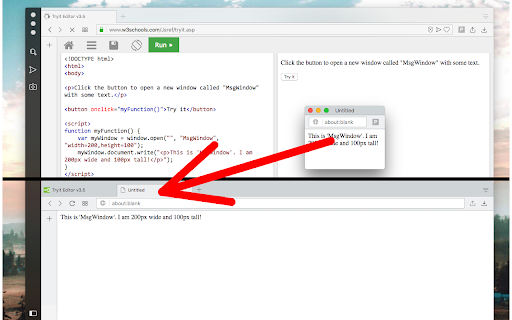
Do not allow popup windows. Open all links in the current window This extension prevents web pages from opening pop-up windows of any kind. When the extension is enabled, all newly opened windows will get directed to the active window (in the currently active window before this window gets opened). You can toggle the extension on and off from the toolbar button to enable the single-window mode or disable it. When the extension is enabled, all windows are forced to stay in the same active window. So if a website issues a popup window, instead the extension moves the newly created popup window into the active window and then focuses on this newly created window (same as dragging a tab from one window to another window). When the extension is disabled, popup opening is permitted. Notes: Even if the extension is enabled, the user can still open new windows using Ctrl + N or Command + N shortcuts. Also from the 3-dot -> New Window menu. This extension does not intercept incognito (private) windows. This extension does not intercept extension windows (extensions are still permitted to open. their popup windows). Version Log: 0.1.3: The new tab will get focused. Now you can use command-line tools to open in a new window and get your tab focused 0.2.0 Moves to manifest v3

Link Controller
The icon shows in which tab links will open, click it for options to toggle it for the current tab or for all tabs.

Link Control
Manage whether links are opened in the same tab or a new tab Link Control gives you the power to decide how links open in your browser, helping you to ensure a consistent and uncluttered browsing experience. Always Open Links in the Same Tab: Prevent websites like eBay and Etsy from opening new tabs with every product click. Enable this option to keep your browsing streamlined in a single tab. Always Open Links in a New Tab: If you prefer to open each link in a new tab, this feature is perfect for you. It’s ideal for research, comparison shopping, or simply keeping your main tab uncluttered. Customisable Behaviour for Specific Websites: Conveniently configure how links open on individual websites according to your preferences, giving you complete control. ***PLEASE NOTE*** The extension cannot change the behaviour of links for every website as there are many methods that sites can use which prevent the functionality. Please report any sites where Link Control is not working using the Contact Us button in the extension - we will investigate and attempt to fix.

Pop-up as Tab
Forces Chrome to open new tabs instead of pop-up windows and/or links in the same tab by default instead of new or background tab.… Forces Chrome to open new tabs instead of pop-up windows and/or links in the same tab by default instead of new or background tab.

One Tab Only
This extension makes sure there will be only one tab open for the specified/configured domain URL. If change happens on any tab URL, the extension will check if the domain of new URL is matching with the defined and configured domain URL pattern.In case if there is a match all the tabs will be checked for configured domain URL, and if any tab found with the same domain the new URL will be opened in the already existing tab and the tab sourcing the URL will be closed. You can configure the domain URL from the extension options link on the extension details page. The extension is also sending notification if a match happen what can be switched off on the options screen.
