
pmoldfbmipffdecleeffgfcoahobhkpp
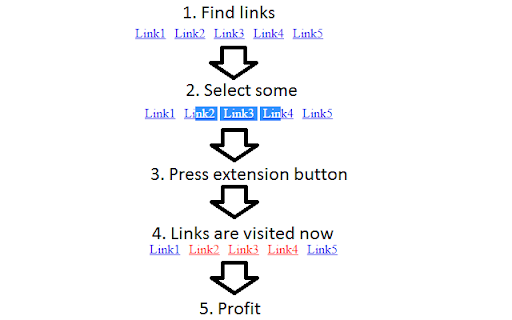
Marks selected links as visited. If nothing is selected - marks all links on page as visited. 2025-03-06 Starting from Chrome version 133.0.6943.142 links added to history by extension are not styled as visited by Chrome. Temporary solution is to disable chrome://flags/#partition-visited-link-database and chrome://flags/#partition-visited-link-database-with-self-links flags. 2025-03-21 Starting from Chrome version about 136.0.7079.0 Google returned possibility to style visited links, but only for links leading to the same site where extension was used. 2025-04-30 Chrome 136 final version arrived. Partition flags are still available. If flags are enabled, extension works like from 2025-03-21. If flags are disabled, extension behaves like before 2025-03-06, but this will probably not last forever and flags will be removed soon(they still exist in 138 version). Extension also has some context menus for link and selection. And it can even unmark links via context menu of extension icon. Please note that extension does not colorize links, it just puts them in browser history. If visited and unvisited links on some site look the same, then you also need some other extension to distinguish them.

Have I visited this page before?
Searching for a Chrome extension that shows if page has been visited before? Want a Chrome extension that shows you when you last… Searching for a Chrome extension that shows if page has been visited before? Want a Chrome extension that shows you when you last visited a page? Looking for a Chrome extension that lets you know if you've already visited webpage you're on? Many people online have been requesting a Chrome Extension that simply lets them know if they have visited a certain webpage url before. This tiny free extension does just that. Please pin the extension by clicking on Chrome's jigsaw piece icon so you can always see if you have visited a webpage before.

Seen Before: Track your visited job webpages with ease
Seen Before tells if you have visited a webpage (e.g. job, housing advertisements) before, with first and last visit time and count. Remember every webpage you visit! Seen Before is a powerful Chrome extension that helps you keep track of your browsing history with ease. See instantly if you've encountered a webpage before with a clear visual badge displayed directly on the page. Have you ever wondered if you had already seen an advertisement before and applied? Maybe you do not even apply into the opportunity thinking of duplicate application! Seen Before extension is here to solve this challenge for you. It tells you about every webpage you visited, so that you can continue applications without any worries! Visited Page Tracker: Seen Before automatically tracks every webpage you visit, letting you know instantly if it's a new encounter or a familiar one. It will show "SEEN" tag with red color on already visited pages. New Page Badge: Green "NEW" badges highlight webpages you've never visited before, making them easy to identify at a glance. Visit Count: Seen Before extension also keeps the visit count of pages for you. Simply hover mouse cursor over the extension icon and it will tell the number of times this url has been visited. Reload Friendly: Reloading a webpage won't reset the "NEW" badge. Seen Before tracks within the tab, ensuring you know it's a first-time visit even after refreshing. Multi-Tab Detection: Visited a webpage in another tab? Seen Before keeps track! See a red "SEEN" badge to indicate you've encountered this webpage before, even across different tabs. Hover History: Detailed visit history at your fingertips! Simply hover over the Seen Before extension icon to see the first and last time you visited any webpage. Stop the confusion! Seen Before is the ultimate Chrome extension for managing your browsing history. Download today and take control!

Markers
Add mark as seen buttons to your favorite websites. ⚠️ This extension includes paid plans. Once you install the Markers extension for Google Chrome on your desktop, a new mark as seen button will be added to the items listed below: ✓ Videos on Youtube (www.youtube.com) ✓ Videos on TED (www.ted.com) ✓ Tweets on Twitter (www.twitter.com) ✓ Products on Product Hunt (www.producthunt.com) Every time you mark an item as seen, we'll change its visual appearance so that you can easily spot items you've already seen when you visit the sites the next round. Your marked links are automatically synced and backed up on cloud. You have full control over your data. Useful Links: ✓ See our pricing and subscribe at https://www.markers.app/ ✓ Review our privacy policy at https://www.markers.app/privacy @ Contact us with any questions at support@markers.app

Promnesia
Recall which pages you already visited, why and in which context Promnesia is a browser extension (Chrome/Firefox/Firefox mobile) which provides a sidebar which complements browser history with some enhanced features. TLDR: it lets you explore your browsing history in context: where you encountered it, in chat, on Twitter, on Reddit, or just in one of the text files on your computer. This is unlike most modern browsers, where you can only see when you visited the link. It allows you to answer different questions about the current web page: - have I been here before? When? - why have I bookmarked it? - how did I get on it? Which page has led to it? - who sent me this link? Can I just jump to the message? - which links on this page have I already explored? - which posts from this blog page have I already read? *NOTE*: to get the most benefits from the extension, you also need to set up a supplementary service. You can find the instructions here: https://github.com/karlicoss/promnesia#setup
