
pmmaemmobdmccnfepmkckendmealjapo


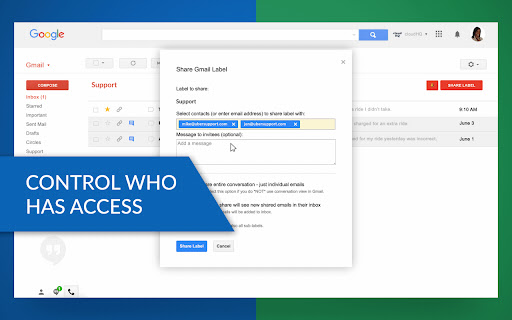

Email and label sharing plus real-time team collaboration and chat without ever leaving Gmail™ Share Gmail™ labels (and emails) as you would share folders in Google Drive™. This extension allows you to use your Gmail™ as a collaboration tool, without ever having to leave your email screen. Its an amazingly simple way to way to share labels with projects / cases, assign tasks, and track status of hiring process, support and sales queries. This is ideal for: - Customer service and support - Sales teams - Legal teams - Hiring / Recruitment - Anyone who wants to share an entire Gmail label with someone else Here's how to use this extension: 1) Install the extension and create a cloudHQ account. 2) Choose the label you want to share. 3) Send an invitation. For best practices and real-world examples of how law and real estate firms use our product, please refer to these support notes: General best practices: https://support.cloudhq.net/best-practices-for-cloudhq-label-and-email-sharing/ Organizing workflow in law firms: https://support.cloudhq.net/organizing-workflow-in-law-firms-with-gmail-label-and-email-sharing/ Organizing workflow in real estate firms: https://support.cloudhq.net/organizing-workflow-in-real-estate-firms-with-cloudhq-label-and-email-sharing/ cloudHQ. Helping your productivity, 1 click at a time. cloudHQ website: https://www.cloudhq.net/share App website: https://www.gmail-label-sharing.com/ Pricing: https://www.gmail-label-sharing.com/pricing Support page: https://support.cloudhq.net/category/browser-extensions/gmail-label-and-email-sharing/ Blog: https://blog.cloudhq.net Gmail, Google Shared Drive, Google Drive, and Google Workspace are trademarks of Google LLC. Use of these trademarks is subject to Google Permissions.

Notes for Gmail™ by cloudHQ
Add annotations on your emails to remember something, or to coach how to craft a good email. If emails were letters, Notes for Gmail™ by cloudHQ would be sticky post-it notes. Highlight a section of an email that you received, and make a note about it. Keep it for yourself or email it to someone else. The notes are embedded directly within your email message and stored on Google Gmail™ servers, allowing you to view them on your mobile phone as well. No more having to respond to someone by saying "see edits below in red", or wishing that you could write a note on an email. Now, you can just use Notes for Gmail™ by cloudHQ and never lose a thought. It is also useful to add information to your email message, such as the project ID or customer ID, so you can easily search for that email. cloudHQ. Helping your productivity, 1 click at a time. cloudHQ Website: https://www.cloudhq.net App Website: https://www.gmail-notes.com/ Pricing: https://www.gmail-notes.com/pricing Support page: https://support.cloudhq.net/category/browser-extensions/gmail-notes/ Blog: https://blog.cloudhq.net

Snooze Email by cloudHQ
Snooze of an email will temporarily remove them from your inbox - it will come back to the top of your inbox at the time you set it. Sometimes you're just not ready to read and respond to an email. With this snooze email extension, you can just tell us when you want to see that email reappear at the top of your inbox. Key features: - add notes to your snooze - snooze only if nobody replies - mobile text message reminders (paid feature) - auto-snooze on send (paid feature) cloudHQ. Helping your productivity, 1 click at a time. Website: https://www.snooze-email.com/ cloudHQ website: https://www.cloudhq.net Pricing: https://www.snooze-email.com/pricing Support page: https://support.cloudhq.net/category/browser-extensions/gmail_snooze_email Blog: https://blog.cloudhq.net Gmail, Google Calendar, and Google Workspace are trademarks of Google LLC. Use of these trademarks is subject to Google Permissions.

Rename Email Subject by cloudHQ
Rename email subjects for Gmail. This extension lets you rename the subject lines of your emails directly in Gmail, helping you stay organized and productive. How It Works: 1. Select the email you want to rename. 2. Click on the "Rename" button icon. 3. Enter a new subject line that better fits your needs. Why Use This Extension? 1. Organize Your Inbox: Rename unclear or irrelevant subject lines to make emails easier to find later. 2. Keep Conversations Focused: Break up long email threads by renaming them with specific topics. 3. Personal Productivity: Add meaningful labels to emails that reflect your thoughts or ideas when you first received them. Additional Benefits: 4. The original sender won’t know you’ve changed the subject line (unless you reply with the new subject). 5. Perfect for professionals managing client communications, projects, or personal workflows. Simple and intuitive—rename emails with just a few clicks! Stay organized and take control of your Gmail inbox with Rename Email Subject by cloudHQ. cloudHQ. Helping your productivity, 1 click at a time. App website: https://www.rename-email.com/ cloudHQ website: https://www.cloudhq.net Pricing: https://www.rename-email.com/pricing Support page: https://support.cloudhq.net/category/browser-extensions/gmail_rename_email Blog: https://blog.cloudhq.net Gmail, Google Calendar, and Google Workspace are trademarks of Google LLC. Use of these trademarks is subject to Google Permissions.

Get My Receipts by cloudHQ
Extract digital receipts and invoices from your email Managing digital receipts and invoices should not be a headache. Yet inboxes are full of them, and too often they get lost or forgotten when it is time to prepare tax returns, claim deductions, or file expense reports. Get My Receipts by cloudHQ is the simplest way to automatically collect, organize, and export receipts and invoices directly from Gmail™. With 99.2% accuracy, powered by artificial intelligence and machine learning, this app scans your inbox and generates a clean, well-structured spreadsheet. How it works: 1. Open Gmail™ and click on Get My Receipts. 2. The app instantly finds receipts and invoices across your inbox. 3. A spreadsheet is created for you with two tabs: one for receipts and one for invoices. The spreadsheet is stored for you in your Google Drive account to edit and share as you see fit. Each entry is organized into useful columns: ✅ Date ✅ Amount ✅ Taxes ✅ Merchant ✅ Subject line ✅ Email text ✅ PDF copy of the receipt Perfect for: - Tax planning and capturing every deduction - Audit-ready expense reporting - Small business owners, freelancers, and contractors - Anyone who wants receipts and invoices organized in seconds Stop wasting time searching your inbox when you need receipts most. With Get My Receipts, you will always have an accurate, audit-ready record of your expenses. cloudHQ. Helping your productivity, 1 click at a time. cloudHQ website: https://www.cloudhq.net/ App website: https://www.get-my-receipts.com/ Pricing: https://www.get-my-receipts.com/pricing Support page: https://support.cloudhq.net/category/browser-extensions/get-my-receipts/ Blog: https://blog.cloudhq.net
