
pmcnjmhibdjolfjcgbpmdfjlnofdabig
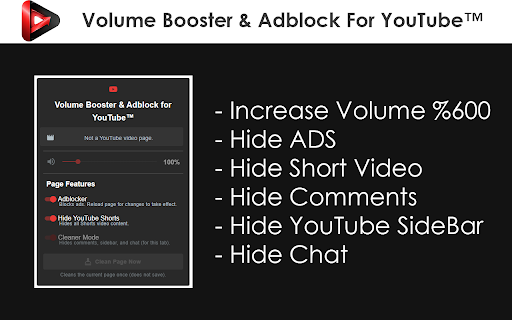

Boost sound to 600%, block all ads, and hide Shorts. A simple, powerful toolkit to improve your YouTube experience. Supercharge your viewing with All-in-One for YouTube, the ultimate all-in-one toolkit to take full control of your experience! Our extension lets you boost volume up to 600%, block ALL ads, completely hide Shorts, and declutter your interface with a single click. Why is All-in-One for YouTube™ the only enhancer you'll ever need? 🚀 600% Volume Booster & Audio Enhancer Tired of quiet videos? Our volume booster feature lets you safely increase sound far beyond the default limit. Get loud, clear audio and perfect sound control on any video. 🚫 Total Ad Blocker for YouTube™ Enjoy a completely uninterrupted, ad-free experience! The powerful ad blocker built into Volume Booster & Adblock for YouTube™ stops all types of annoying ads. No more pre-rolls, mid-rolls, or banner ads. Just pure content. 🙈 Hide Shorts & Declutter Your Feed Reclaim your focus with our Shorts blocker. You can completely disable Shorts on the homepage, in your subscription feed, and in navigation. If you want to stop seeing Shorts, this is the tool for you. ✨ Focus Mode & YouTube Cleaner Declutter your view instantly. Our cleaner mode allows you to hide comments, the related videos sidebar, and live chat to create a distraction-free environment. Use the "Clean Page Now" button for a one-click cleanup on any video. How to Use All-in-One for YouTube™ 1. Pin the extension to your toolbar for easy access. 2. Click the icon on any YouTube™ page to open the control panel. 3. Increase Volume: Use the slider to boost sound in real-time. 4. Stop Ads & Hide Shorts: Use the global toggles for the ad blocker and Shorts hider. These settings apply across all of YouTube. (Adblocker may require a page reload). 5. Cleaner Mode: This feature is tab-specific. Use the switch to hide distractions on your current tab. Lightweight, Secure, and User-Friendly Volume Booster & Adblock for YouTube™ is built for performance. It's easy on your system and respects your privacy (we do not track any of your activity). With a fully translated interface for all major languages, it provides a seamless experience for everyone. Disclaimer: YouTube™ is a trademark of Google LLC. This extension is an independent project and is not affiliated with or endorsed by Google LLC. Install Volume Booster & Adblock for YouTube™ now and create the perfect, personalized viewing experience

Pie Adblock - A Powerful Free Ad Blocker
Pie Adblock blocks ads & pop-ups, plus YouTube & Twitch video ads. You can customize your ad experience with Pie! Pie is a completely free ad blocker that blocks pre-roll ads on YouTube, mid-roll ads on Twitch, pop-ups, banners, and more. Reclaim your online experience and watch ads disappear in real-time! 🔒 Privacy + Security — Your data is only used to power Pie features—never sold or monetized. We prioritize trust and transparency. Read our full privacy commitment at www.pie.org/privacy 🛑 Advanced Features — Enjoy all advanced adblocker features at no cost to you: robust ad-blocking methods, enhanced popup suppression, plus more. 🎉 Visual Mode — See the power of our ad blocking technology in action as ads are zapped away. 🥧 Growing The Pie Together — Pie isn’t just an ad blocker; it’s an experiment to see what happens when people have more control of their internet experience. Add Pie with just a couple clicks and start blocking ads immediately. Terms apply and may be viewed at www.pie.org/terms ➤ Changelogs: [March 2025] We’ve introduced a new feature that detects when multiple ad blockers or related extensions are installed, as using several at once can negatively impact effective ad blocking. Users now have the option to easily disable conflicting extensions directly within Pie Adblock. This helps ensure optimal ad blocking efficiency, reduces ad block detection, and creates a smoother browsing experience. Read more in pie.org/privacy [February 2025] Released new ways to support your favorite creators on YouTube and Twitch. Our new video overlay shows you when Pie's YouTube & Twitch ad blocker is actively working to block ads and gives you more control over your ad experience. [January 2025] Added support for new Fair Ads sites [October 2024] Twitch stats: ads blocked, time saved, and more! [September 2024] Improvements to Manifest V3 (MV3) ad-blocking and filters [August 2024] First fully featured version. Block distractions like ads, video ads like pre-rolls and mid-rolls, floating videos, pop-ups, cookie banners, and more. Need a replacement for uBlock Origin? Pie is an efficient, fully MV3 compatible ad blocker that will block ads on YouTube, Twitch, and more! Ready to get started? Click “Add to Chrome” at the top of this page and start blocking ads in just a couple of clicks!

Adblocker for Youtube™
Block all Youtube Ads! Augment your YouTube experience with Fullscreen Theater Mode, Video Screenshot, Volume Booster and many more This software helps to removes all ads: pre-roll video ads, text & banner ads. Save time by stopping those useless advertisements. This adblocker automatically blocks all ads on YouTube ™, including pre-roll video ads, text & banner ads. Save your time by stopping those useless advertisements. In gist, by installing this extension all YouTube ads will be hidden. Made a tutorial page. Sometimes, the first video preview ad is not blocked properly and a black screen is shown on the video while the ad audio plays. The temporary solution for this is to refresh the video page by pressing Control + R and the video will play right away. The ad would be skipped once the page is refreshed. If you wish to hide the toolbar at the bottom of Youtube when you are watching videos, please click on this extension icon at the top right corner of the Google Chrome browser. there is an option called "Disable toolbar" which can be ticked on/off. Reverted back to a previous version which helps to press "skip ad" when that button is clickable. Youtube has recently made some changes, so now our extension helps save you time by pressing the skip ad button for you. We'll review the situation and see if there is a better solution in the future. Fixed a bug where the screen would turn black and the ad sound would continue playing for pre-load ads. Fixed a bug where your Youtube Watch History was not saved. Allow Users to turn the toolbar at the bottom of Youtube on/off. Fixed the ad blocking technology so it blocks all types of video ads including pre-roll. Fixed a bug where our extension was interfering with Youtube native dark mode. 1) Fixed the auto blocking of Ads settings. Now if you choose "Block All" under options/settings, the video and image ads for Youtube are blocked automatically. Side note: the toolbar for all the other useful features will fade away if you do NOT mouse over the toolbar in full screen/theatre mode etc. 1) Fixed Bugs - Toolbar kept appearing even when User used full screen mode for their video Fixed Black Screen from appearing when we block a pre-roll ad Added in Tutorial Page so users know how to begin using this extension Allow users to turn on/off the software toolbar at the bottom of the page. 2) Added in toolbar at the bottom of Youtube videos. There are 7 buttons available now. Shield Icon - Press this button whenever you want to skip a pre-roll ad manually Theater Mode - Watch your favorite videos in Theatre mode Screenshot - Take a screenshot of an exact moment. Volume Boost - Increase Volume of the Youtube Video up to 600% Picture Mode - Allow the Youtube video to become floating videos Loop Video - Loop your favorite music videos to play over and over again. You can specify the exact moments you want the Youtube video to loop over and over. Options - Change your ad-block configurations. You can block ads manually/block ads automatically. ★★★ Features ★ No configuration. No messy lists to manage ★ Block all pre-roll YouTube™ video ads on all sites ★ Blocks banner/text ads throughout YouTube™ ★ Ultra fast plus very lightweight, will not slow you down ★ 100% Free & always updated ★★★ YouTube Ad blocking benefits ★ Improve browser speed ★ Improve page load speed ★ Decrease memory / CPU usage ★ Decrease bandwidth After installing, please reload all YouTube tabs for the extension to take effect. ✓ Note Youtube™ & the YouTube logo are trademarks of Google Inc. Use of these trademarks is subject to Google Permissions. This extension is not created nor endorsed by Google inc.

Sound Boost Pro - Audio Volume Amplifier
Boost audio up to 600% on any tab. One-click volume amplifier for YouTube, Spotify & all sites. Per-site memory, VU meter included. Sound Boost Pro amplifies your browser audio up to 600% so you can make any video, music, or audio louder in seconds. Works on every website including YouTube, Spotify, Netflix, and more. Whether you need to increase volume on a quiet video, make YouTube louder, or boost audio on any tab, this sound booster extension gives you full control. Use the smooth slider or quick preset buttons to set your perfect volume level. Key features: - Amplify audio from 100% to 600% on any website - Per-site volume memory that remembers your settings - Quick preset buttons for instant 1x, 2x, 3x, 4x, and 6x boost - Real-time VU meter showing audio intensity - One-click toggle to enable or disable boosting - Lightweight and fast with zero impact on browsing speed - Works offline with no account required Sound Boost Pro uses advanced Web Audio API processing to increase video volume, enhance audio quality, and make sound louder across all your tabs. Perfect as a super volume booster for quiet laptops, low-volume videos, or anytime you need maximum audio power. Tab volume control made simple. Install now and never struggle with quiet audio again. SOUND BOOST PRO — PUSH YOUR BROWSER AUDIO PAST ITS LIMITS Some content is just too quiet. A softly narrated tutorial. A podcast recorded in a bedroom. A livestream with a low-gain microphone. Sound Boost Pro was built for exactly those moments — it amplifies any browser tab's audio output up to 6× (600%) using a precision gain stage, giving you clean, powerful sound without touching your OS volume. PLATFORM COVERAGE - YouTube (standard and Music) - Spotify Web Player - Twitch — live streams and VODs - Podcast and audiobook players - Any page with HTML5 audio or video - iframes and embedded media widgets SITE-LEVEL MEMORY - Flip "Remember for this site" and your boost level sticks to that domain - Next visit loads your saved setting automatically - Settings are written to local storage only — they never touch a server CLEAN ARCHITECTURE, NO CRUFT - Zero third-party scripts bundled - No CDN calls, no telemetry endpoints, no beacon requests - Extension footprint: under 50KB - Page load performance: unaffected — the extension only activates on demand

Enhance YouTube & Remove Shorts - ProdYouTivity
Enhance YouTube, remove distractions and shorts. Fight procrastination and maximize YouTube potential. Enhance YouTube & Remove Shorts - ProdYouTivity is your ultimate tool to improve your YouTube™ experience. You'll never be able to use YouTube™ without this extension again! - Deactivate YouTube™ shorts, home feed, thumbnail, inefficient menu categories, comments, related videos, end-wall videos, and autoplay and anything you want. - Integrated Distractions Button for instant access to productive mode. - Fully customizable settings to create a personalized YouTube environment. - Distraction counter to track your productivity progress. - Adjust Volume, Brightness, Quality and Speed of your videos. - Reactivate scroll in fullscreen - Install the ProdYouTivity extension. - Open the extension. - Click on the "Remove distraction Button" on YouTube to activate the productive mode or directly choose what you'd like to hide on youtube from the extension. - Customize your settings to choose what you want to hide on your screen. - Monitor your distraction counter to see how many distractions you've avoided. - Adjust Volume, Brightness and Speed of your videos from the extension popup or directly from your screen with our shortcuts. Hide YouTube distractions: - Unhook, stop distraction - Remove shorts - Deactivate comments - Hide home page - Remove sidebar - Hide thumbnail - Deactivate notification - Hide suggestion - Reactivate scroll in fullscreen Improve YouTube - YouTube Enhancer & Video Tweaks: - Increase volume: Boost YouTube Volume beyond default limits - Adjust video brightness and dim screen - Adjust video quality: Set and lock YouTube video playback quality - Speed up video: Accelerate or slow down video playback speed - Quick Rewind/Fast Forward buttons - Copy and save video transcript (coming soon) Productivity Tracker & Digital Health: - Time Saved Analytics Dashboard - Daily Motivation Quotes for Mindful Viewing - Focus Mode & Minimalist Layout for YouTube ✨ Why ProdYouTivity? - Ideal for students, remote workers, entrepreneurs, and mindful viewers - Helps reduce screen time and procrastination - Compatible with other YouTube extensions and themes - Lightweight, fast, and privacy-friendly
