
plleipkcjhgekajbapdbdcdmafomjmnd
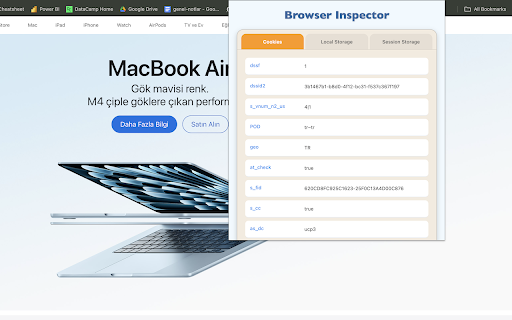


View cookies, session storage, and local storage for the current website Ever wondered what cookies, local storage, and session storage data a website is using? Browser Inspector makes it easy to inspect and analyze this data in real time, directly from your Chrome browser. Key Features: ✅ View Cookies – Instantly see all cookies set by the current website, including their values, expiration dates, and attributes. ✅ Inspect Local Storage & Session Storage – Easily access and analyze stored data for debugging, optimization, and compliance checks. ✅ No Data Collection – The extension runs locally, ensuring your privacy and security. ✅ Designed for Digital Analysts & Developers – Ideal for digital analysts, marketers, and developers who need to audit website storage mechanisms for tracking, personalization, and performance. ✅ One-Click Access – Simply open the extension to view all storage data in a clean, structured format. 📊 Whether you're a digital analyst optimizing marketing campaigns, a developer debugging storage usage, or just a privacy-conscious user, Browser Inspector is the perfect tool for you!

AdClean Pro
🚫 AdClean – Block Ads with One Click AdClean is a simple and easy-to-use Chrome extension that helps you block ads on websites. With just one click, you can hide annoying ads like banners, popups, and auto-playing videos. When ads are gone, websites load faster ⚡, pages look cleaner ✨, and it's easier to focus on what matters 🧠. 🔧 What AdClean Does ✅ Blocks ads on any website ✅ Lets you turn ad blocking on or off with one click ✅ Shows how many ads were blocked on the page 🔢 ✅ Works right away — no setup needed 🚀 ✅ Doesn’t slow down your browser 🛡️ 💡 Why Use AdClean? AdClean helps you: 🚀 Browse faster 😌 Avoid annoying distractions 📉 Use less data 🧼 Keep pages clean and simple 👉 How It Works Just click the AdClean icon in your browser to turn ad blocking on or off. You’ll see a small number 🔢 showing how many ads were blocked. That’s it — clean and simple. ✅ No popups ✅ No complicated menus ✅ Just a better way to browse the web 🌐

Cookie Remover
Removes cookies for the current site Instructions: Click the cookie icon at the top right to remove cookies for the current site. A confirmation will then appear displaying how many cookies were removed. You should then refresh the page to see possible changes. Also clears localStorage and sessionStorage for the current site.

Aware - Screen Time Tracker & Site Blocker
See where your browser time actually goes. Block distracting sites, run focus sessions, and build better habits - free to start. Aware is a screen time tracker and site blocker for Chrome. It runs silently in the background and gives you an honest picture of where your time goes - no setup, no accounts, no timers to start. ──────────────────────── FREE — forever ──────────────────────── • Automatic time tracking on every site • Hourly bar chart (24h) and weekly view (Mon–Sun) • 200+ sites auto-categorized (Social, AI, Entertainment, Education...) • Last 7 days in day view, current + previous week in week view • Top 5 most-used sites per day or week • Daily goal with streak counter • 1 focus session per day (30 min) • Hourly nudge when you've been on a site for 1h • 5 notification sounds or mute • Badge counter, dark mode, idle detection • 100% local — no accounts, no cloud sync ──────────────────────── PRO — from $9.99 ──────────────────────── • Site blocking — set daily time limits per site; get blocked automatically when you hit them • 1-minute warning before any limit is reached • Nuclear focus mode — start a session you literally cannot stop early • Unlimited focus sessions with custom durations (25, 45, 60, 90 min) • Goal alerts at 80% and 100% of your daily limit • Unlimited history — go back as far as your data goes • Weekly summary every Monday morning • Full site list with detailed breakdowns • Export JSON backup Start with a free 7-day Pro trial — no payment required. ──────────────────────── HOW IT WORKS ──────────────────────── Install → browse normally → click the icon for today's breakdown. That's it. Aware counts time only when Chrome is focused. It pauses when you're idle or on another app. Per-hour bars show exactly when you were most active. ──────────────────────── PRIVACY ──────────────────────── All data stays on your device. Aware records only domain names and seconds elapsed — never page content, passwords, or screenshots. No email, no sign-up, no ads. The only data sent externally is an anonymous device ID used solely to prevent trial abuse. Delete everything in one click under Settings → Clear data. ──────────────────────── PERFECT FOR ──────────────────────── Remote workers who want to understand their browsing patterns Students balancing study and distraction Anyone who's ever wondered where the last 2 hours went

Cache Clear
Quickly delete browser cache, clear cookies, and history. Optimize browsing performance with Cache clear. 🚀 Introducing: Your Ultimate Browser Cleanup Companion. 😩 Are you tired of your browser slowing down due to accumulated clutter? 📝 Do you worry about your online activities being tracked or your personal data being stored without your consent? 🛡️ Say goodbye to these concerns with Cache clear chrome – the definitive Google Chrome extension designed to streamline your browsing experience and safeguard your privacy. ⚡ What is cache clear? It is a comprehensive browser tool meticulously crafted to declutter your digital footprint effortlessly. 💥 With just a few clicks, you can: 1️⃣ Delete cache 2️⃣ Delete search history 3️⃣ Clean cookies 4️⃣ Delete downloads 5️⃣ Clear storage 6️⃣ Clear passwords chrome And much more, all within the familiar confines of your Chrome browser. 🔑 Key Features: ☑ Cache clear: Instantly eliminate cache buildup that can bog down your browser's performance. ☑ Clear search history: Safeguard your privacy by delete web history in a flash. ☑ Manage cookies: Take control of your online identity by easily clearing cookies that track your browsing habits. ☑ Delete browsing history: Bid farewell to your clear browsing history chrome with a single click, ensuring your online activities remain confidential. ☑ Secure password management: Effortlessly delete stored passwords to enhance security and protect sensitive information. ☑ Customizable Settings: Tailor cache cleaner to suit your preferences with customizable settings for clear website cache, cookie cleaner, clean chrome browser history, and more. 🎉 How to Use: 1. Install the Extension: Visit the Chrome Web Store and add our app to your browser. 2. Click on the Cache Clear icon in your Chrome toolbar to access the extension's settings. 3. Select the data you want to clean, such as cache, cookies, and browsing history, clear browsing data. 4. Hit the "Clear" button, sit back, and watch as cache cleaner swiftly tidies up your browser. Why Choose? ⏱️ Efficiency: our extension streamlines the process of clearing cache, delete all history, and cookies, saving you time and hassle. 🛡️ Privacy Protection: Rest easy knowing that your online activities are kept confidential with clear cache and cookies thorough data deletion capabilities. 🚀 Enhanced Performance: By regularly clearing cache and other clutter, clear cache helps optimize your browser's performance for a smoother experience. 🌀 User-Friendly Interface: With its intuitive design, clean cache is accessible to users of all experience levels, making browser maintenance a breeze. 💪 Comprehensive Cookie Control: ■ Cookies are essential for many online tasks, but they can also clutter your browser and compromise your privacy. ■ Our tool empowers you to manage your cookies effectively, giving you the control to delete unwanted cookies and maintain your online privacy. ⚡ Streamlined History Cleanup: 🔸 Your browsing history can reveal a lot about your online activities. 🔸 With this tool, you can clear history with ease, ensuring that your online footprint remains private and secure. 📌 FAQs: ❓ How to clear cache in Chrome? 💡 Simply install our extension from the Chrome Web Store, access the extension's settings, and choose the cache clearing option. Click "Clear," and delete browser cache. ❓ How to clear cookies? 💡 Access the extension, and choose the clearing cookies option. Click delete cookies. ❓ How to delete search history? 💡 Access the extension, and choose the delete history option. ❓ Is this extension compatible with other browsers? 💡 Currently, our app is designed specifically for Google Chrome. ❓ Will using this app on chrome affect my saved passwords? 💡 No, our app gives you the option to delete stored passwords for added security, but it won't interfere with your ability to save new ones. ❓ How often should I use browser cleaner? 💡 It's recommended to use this app regularly to keep your browser running smoothly and your online activities private. Download Today: 💫 With our tool, you'll never have to worry about slow browsing speeds or cluttered browser histories again. 💻 Don't let unnecessary cache files and cookies slow you down. 🛠️ Take control of your browsing experience and safeguard your privacy with clear browser cache. 🌟 Say goodbye to cluttered caches, unwanted cookies, and prying eyes – download Cache clear from the Chrome Web Store today and experience a browser cleaner, more secure browsing experience.
