
plldnnbdlbgbiknjebohmlggcbicghlj
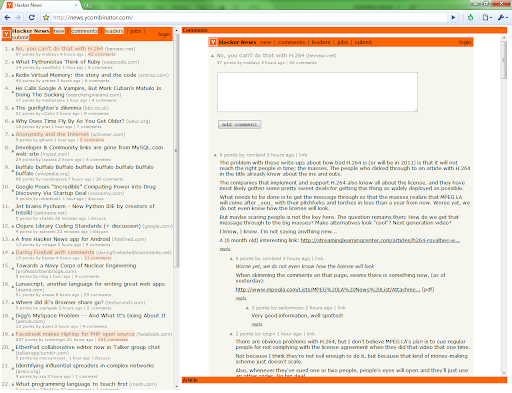
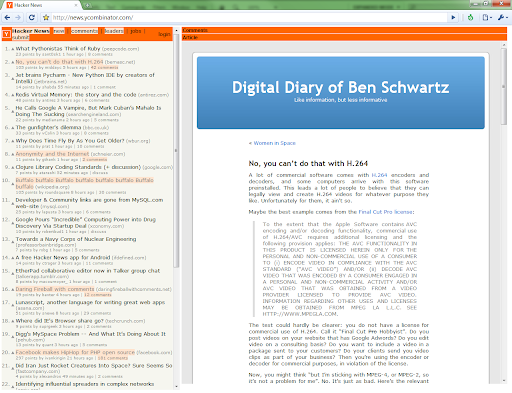
Provides users with the ability to browse Hacker News articles and comments without leaving the page. Hacker News OnePage is an extension for news.ycombinator.com. It allows you to view the news articles in a left column, while viewing the article or comments on the right. You never have to leave Hacker News to view any of the comments or articles. OnePage also highlights the articles and comments that you click on, allowing you to easily see what you have read. 04/04/2025 - Updated manifest from v2 to v3 and removed legacy jQuery dependancy. Added extension code to github: https://github.com/tdupree/hacker_news_onepage 03/13/2013 - Updated to work with https://news.ycombinator.com 08/30/2012 - I have update the extension with a fix which allows the comments page to be loaded into the side by side view again. I will get the extension source code up on Github soon. Enjoy - Tim 08/07/2012 - HN has added "X-FRAME-OPTIONS: Deny" headers to their pages. This prevents the comments pages from loading into the side by side view. I will work on a fix for this over the following week. I will also get the project up on github.com. Cheers - Tim

Devo
GitHub Trending, Hacker News and Product Hunt, on every new tab! Devo is a new tab extension that displays GitHub Trending, Hacker News, and many different platforms' front pages on every new tab, with no-login required. You can change the placement of the cards, display whatever platform you'd like to in different order. Devo uses state-of-the-art web technologies to bring the content to your new tab. It does not use any of your personal information: it just fetches the publicly available information of these platforms, and it contains links that directly refers to the platform itself. Devo uses specially-built crawlers for each these platforms, and it styles the data in the way of the original platform. The data is cached for 5 minutes, so that you don't have to wait for the data to be updated on every new tab, but you are also exposed to up-to-date data. The data displayed belongs to the respective platform, and Devo is just an organizer to allow you to reach these platforms quickly. Devo is a free and open source project, developed publicly on GitHub. If you would like to submit issues, add some new functionality or fix bugs you are very welcome.

Omni - Meta Search Engine
Omni allows you to search anything in one click Delivered with actual useful search engines :D - Google - Wikipedia - Collins dictionary - Youtube - The Conjugator - Le Conjugueur - El Conjugador - WordReference - Forvo

Awesome Button Bar
Button bar, combining downloads, bookmarks, extensions, history, view source, print, and more from a single button. Awesome! Extensions, history, downloads, bookmarks, view source, options, new window, and print are all here. Recently added buttons are duplicate tab, second home, and refresh all tabs. Showing each button on the bar is optional so you don’t have to have them all if you don’t want them all. Also, each button can be configured to open either in the current window or in a new window. Note: print to a new window now works too!

All in one web searcher
Search anything on the internet easily by typing into ONE unified search box All in one web searcher allows to search any website easily by typing in one search box. All in one web searcher is a simple yet powerful extension to search multiple sites with ZERO click. Add sites to search, customize the order and search anywhere quickly. USING THE EXTENSION ---------------------------------- - Click the extension icon, simply hover over the search tabs and type the search term. - Press enter to search the keyword in the selected search engine. - Press "tab" or "alt" keys to cycle through tabs if needed. - Add custom search engine sites as you need. - Simple and quick way to search any page without a click ! FEATURES --------------- - Simple and fast UI for quick searches - Add multiple search sites easily and customize the order. - Add sub search sites like "Images" search, "Map" search etc. for easy search. - Keyboard shortcuts to cycle through the tabs. - Custom/Automatic icons for the tabs can be used. - No unwanted background process and memory. Light and fast extension. - Available in two themes - Text free extension and hence multilingual DEFAULT SEARCH ENGINES --------------------------------------- All popular search engines like Google, Bing, Wikipedia, DuckDuckGo are available out of the box. You can customize and add any search engine you want to this list with "sub search" engines like searching images, books, news etc. as needed. PRIVACY -------------- All in one web searcher extension does NOT collect any kind of information. The last used search keyword is saved locally. For any concerns, please contact me at aakashweb.com NOTE -------- After installing, please go to options page and change the "Tab selection method" to hover or click according as per your preference. Set a keyboard shortcut for opening the popup under "Manage extensions" page for even quicker search. CHANGE LOG ------------------- 5.0: - New: Move to manifest version 3.0 - New: Modernized search form styles. - Included new search engines as default. - Fix: Remove unused and old search engines from the default list. - Fix: Minor code refactoring - Fix: Last search term was not saved when button was clicked 4.1: - New option to open the results in new/same tab. - Minor enhancements to design and options page. - Updated jQuery and jQuery UI to the latest versions. - Fix issue where 'alt' key not cycling through tabs. - Replace deprecated events. 4.0: - Removed tabs permission. - Reorganized the assets used by the extension. - Updated default search URLs to HTTPS - Minor changes to the options page. 3.1: - Added feature to export and import search engine customization settings 3.0: - New simple Icon. - Reorder tabs easily. - Libraries updated to newest version. - Small interface changes. 2.0: - Core code re-written from bottom. - New Icon. - Instant popup load - Customize the default order of the list.
