
plebhjfgbokgojhikeoibipikgkclihp
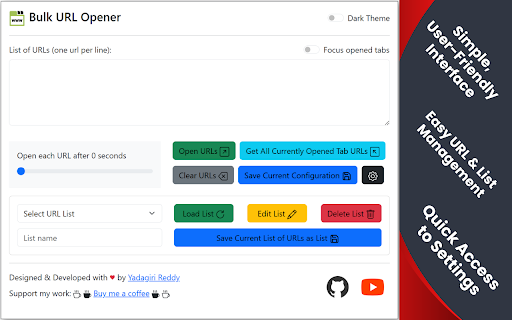


Bulk URL Opener is a powerful Chrome extension designed to revolutionize how you manage and access multiple web pages. With a single click, you can effortlessly open a list of URLs in new tabs, significantly boosting your productivity and saving you valuable time. Key Features: - Open multiple URLs in new tabs with a single click. - Capture URLs from currently open tabs. - Save, load, edit, update, and delete URL lists. - Set a custom delay between URL openings. - Focus on newly opened tabs or open in the background. - Stop the URL opening process at any time. - Enable a comfortable dark theme. - Save your preferred extension configuration. - Customize URL opening delay and tab focus options. - Experience a smoother and faster URL opening process. - Protect your data and ensure a safe browsing experience. - Ensure that only valid URLs are processed and opened. - Organize URLs into categories for efficient management. Usage Instructions: 1. Enter URLs: Input your list of URLs into the text area, ensuring each URL is on a new line. Alternatively, use the "Get All Currently Opened Tab URLs" button to populate the text area with your current tabs. 2. Customize Settings (Optional): -- Set a delay between URL openings. -- Enable or disable the "Focus opened tabs" option. -- Enable or disable the dark theme. 3. Open URLs: Click the "Open URLs" button to initiate the bulk opening process. 4. Stop URLs: If needed, click the "Stop URLs" button to halt the process. 5. Manage URL Lists: Use the provided buttons to save, load, edit, update, or delete your URL lists. 6. Save configuration: Use the save configuration button to save your settings, including the dark mode setting. Key Enhancements Over Previous Versions: This updated version of Bulk URL Opener introduces significant improvements, focusing on enhanced user control, performance, security, and customization. - Stop URL Opening: Gain complete control over the URL opening process. You can now halt the opening of URLs at any time, preventing unnecessary tabs from cluttering your browser. - Dark Theme Support: Embrace a comfortable browsing experience with the newly added dark theme. Reduce eye strain and enjoy a visually appealing interface, especially during extended use or in low-light environments. - Performance Optimization: Experience a smoother and faster URL opening process. We've implemented numerous performance enhancements to minimize delays and ensure efficient tab management. - Security Improvements: Your browsing security is paramount. We've reinforced the extension's security measures to protect your data and ensure a safe browsing experience. - Robust URL Validation: The extension now employs a more reliable and efficient URL validation method, ensuring that only valid URLs are processed and opened. Bulk URL Opener is an indispensable tool for anyone who needs to manage and access multiple web pages efficiently. Whether you're a researcher, a developer, or simply a power user, this extension will streamline your browsing experience and save you valuable time.

Bulk URL Opener Extension
Bulk URL Opener Extension just lets you open multiple URLs at once (in new tabs or windows). Usage: Enter each URL in new line (you can paste the list or import urls from file) and click the "Open All" button. The app will the open all the pages in separate tabs or windows (depending on your settings). Some of the options: * Load URLs from file; Export links to file * Extract urls from text (the tool will try to find valid links in whatever text you provide) * Open in tabs, windows or group by host (to group your links in separate windows for each domain) * You can set delay (in seconds) between opening pages * Open part of the current list The difference between this extension and other similar extensions is that if an URL doesn't include scheme, it will default to HTTPS. In other words, you may skip the protocol part for "http(s)://" sites and enter only the meaningful part. For example -- if you type "domain.com" it will be automatically translated to "http://domain.com". All similar extensions that I tested required fully qualified URL which wasn't very convenient for me and that's actually the main reason I made this tool.

MultiURLs - open multiple urls at once
MultiURLs is a A simple and easy to use extension which allows the user to open a list of URL's in one click with ability to impersonate as human behaviour such that the site owners dont block you. -Ability to further customise delay so that sites don't detect you are a bot (this may happen if you try to open multiple links of same site) - Delay customisation also prevents your browser from freezing in case of dealing with lots of links at once.

Multiple URL Opener
Open multiple URLs in new tabs. Best bulker URL opener chrome extension Chrome extension to open multiple urls with single click. A useful and easy to use extension which allows to open a list of links in single a click. - Opens multiple URLs in one click - Ability to preserve input links - Load URLs in random or reverse order - Open the link when tab is selected This extension collects no user data. "Read your browsing history": This permission allows the extension to create tabs. It also allows the extension to get the URL's and preserve the input for the next time.

Bulk URL Opener
The Bulk URL Opener is a web extension that makes your online life a bit easier. It's perfect for anyone who needs to open a bunch of links at the same time. Here are the features: 1. Open URLs: Pop in a bunch of links, and voilà – they all open together. Super handy for when you've got a list of sites to check out. 2. History: The extension keeps a history of previously opened URLs. This is super helpful if you want to reopen those links later without having to remember or find them again. 3. Settings: • Lazy Load: Only loads a URL when you focus on its tab, keeping things smooth and your computer happy. • Random Order: Randomizes the order of opening your links, great for when you need a random sequence. • Appearance: Choose between a light or dark theme for the extension, or set it to 'auto' to match your system's theme. This makes the extension more comfortable to use and fits your personal style. As an open-source project, all contributions to improve and enhance this extension are welcome. In short, the Bulk URL Opener is a simple, user-friendly extension that's all about making your browsing a bit more convenient and a little less cluttered.
