
pldjepllalaolkleolojmjlpkbpekbfl
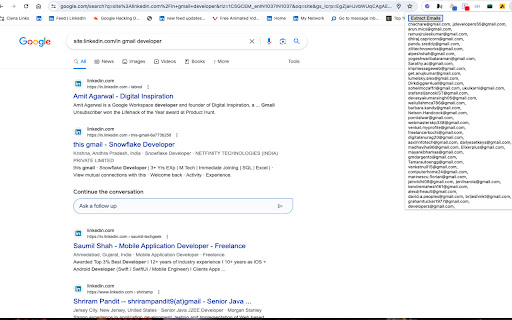
Unlock the power to effortlessly extract email addresses from any web page with the Email Extractor By-SS Chrome extension. Developed by Saurabh Srivastava, a technical talent sourcing professional, this tool is perfect for marketers, researchers, and anyone looking to streamline their contact gathering process. Designed with intuitive features, it enhances your productivity and simplifies the task of collecting valuable contact information. LinkedIn Integration: Specifically tailored to work with LinkedIn profiles, the extension intelligently retrieves email addresses from LinkedIn's profile. This ensures you capture all available contact details effortlessly. Seamless Email Extraction: Extract email addresses from the current web page with a single click. The extension scans the entire page content, identifying and compiling valid email addresses quickly and efficiently. Advanced Filtering and Deduplication: Automatically filters out duplicate email addresses and presents a clean, streamlined list for easy viewing and export. This feature saves time and ensures data accuracy. CSV Export Capability: Easily save extracted email addresses in CSV format directly from the extension interface. This allows for seamless integration into your CRM, email marketing tools, or contact management systems. User-Friendly Interface: Designed for ease of use, the extension's intuitive interface makes email extraction a straightforward process. Simply click to extract, view results instantly, and export with minimal effort. Privacy and Security: Operates securely within your browser, ensuring that your data and browsing activities remain private. No data is stored externally, offering peace of mind regarding data confidentiality. Simply install the Email Extractor By-SS extension from the Chrome Web Store, and it integrates seamlessly into your browser toolbar. Whenever you need to gather email addresses from a webpage, click on the extension icon and let it do the work. Exporting your findings to CSV is just as easy, making it an essential tool for anyone who needs to compile email lists efficiently. Ideal for: Digital Marketers: Quickly build targeted email lists for outreach campaigns. Recruiters: Gather contact details from candidate profiles and resumes effortlessly. Researchers: Collect contact information for academic or professional purposes with ease. Sales Professionals: Generate leads and enrich customer databases effortlessly. Enhance your productivity and streamline your email address extraction process today with the Email Extractor By-SS Chrome extension. Download now and experience the convenience of powerful email gathering tools right at your fingertips.

Instant Data Scraper
Instant Data Scraper extracts data from web pages and exports it as Excel or CSV files Instant Data Scraper is an automated data extraction tool for any website. It uses AI to predict which data is most relevant on a HTML page and allows saving it to Excel or CSV file (XLS, XLSX, CSV). This tool does not require website specific scripts, instead it uses heuristic AI analysis of HTML structure to detect data for extraction. If the prediction is not satisfactory, it lets the user customize the selections for greater accuracy. This type of scraping technology is much more convenient, because it does not require large user created libraries of scraping scripts, which often become filled with outdated and redundant versions. This means that our scraping method works just as well with small and lesser known websites, as it does with global giants like Amazon. Also, our users do not need to have any coding, json or xml skills! Instant Data Scraper FEATURES: * Detecting data for extraction with AI. * Detecting when dynamic data has loaded. * Delay and maximum wait time customization for desired crawling speed * Support for pagination on websites. * Automatic navigation to next page via buttons or links. * Support for infinite scrolling. * Extracted data preview with copy and paste support. * Data export to Excel spreadsheet or CSV file. * Extracted data column renaming and filtering. This extension is completely FREE. Instant Data Scraper works well in unison with SEO tools, CRM recruiter systems, sales leads management tools or email marketing campaigns. Web scraping and data downloading is made easy with our tool. Furthermore, you have data security and privacy as the scraped data does not leave your browser. Instant Data Scraper USE CASES: * Lead generation for companies and freelancers. * Growth hackers looking for easy ways to collect data. * Recruiters looking for job candidates. * Crawl results from search engines. * Get product pricing data from e-commerce websites. * Amazon sellers, distributors and review analysts. * Get email and addresses and phone numbers from directories. * Get contact info from professional association websites. * Scrape reviews and ratings. * Analyze posts for likes, comments, connection and contacts. * Extract emails and ID from social media profiles. Developer promise: This extension does not contain any malware or spyware beyond standard Google Analytics.

Email Extractor
Extract email addresses from web pages you visit Email Extractor finds and copies to clipboard valid email addresses from web pages a user visits. Right-click on the extension icon to open an options window. You can select an execution mode and the resulting list options. * In the "once" mode (default), when a user clicks the extension icon, the Extractor collects all emails from the active tab and copies them to the clipboard. * In the 'background' mode, when a user clicks the extension icon, the Extractor starts collecting emails from web sites a user visits. When a user clicks the extension icon again, all collected emails are copied to the clipboard, and the collection process stops. Hovering over the extension icon shows a tooltip with a current mode. An indicator shows a number of emails collected: in black while the Extractor is collecting data, red when the collection is done.

Extract Emails
Just active the extension and start visiting the websites that you want to get emails / leads from them Features: * Extract emails from visited pages * Auto Email search * Export to Excel emails as XLSX format with proper data types It's Completely FREE there is no LIMIT, what are you waiting for? try it NOW

Turbo Email Extractor
Tubro Email Extractor is a powerful email extraction extension for Chrome. Tubro Email Extractor automatically searches valid emails from the web page, you can copy paste particular emails you need or export all of them to a CSV file. Tubro Email Extractor extension find email addresses on pages you visit. Auto mode automates search for emails on urls. Tubro Email Extractor easily extracts email addresses from pages as you visit them and auto saves them all. This chrome app finds email addresses scraping and searching source code and no matter what you see on the front. Features: * Extract emails from visited pages * Auto save all pages emails * Export collected emails to CSV file and copy to clipboard
