
pkonnmkgoekhcpbkoklnhakhlekgjdgj
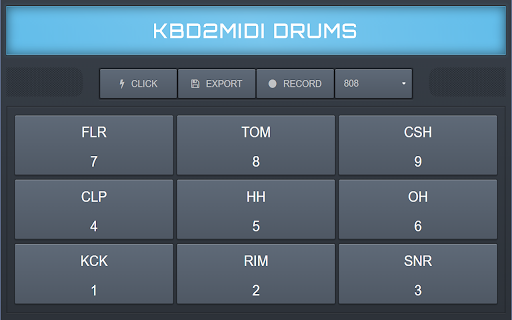
A keyboard controlled Drum Machine that can export your session to a MIDI file and record through your microphone Features: -Save session to a MIDI file at 120BPM. -Record session audio. -Audio file playback. -120BPM click. -Keyboard and mouse control. -Fully flexible.

YouTube DJ effects / EQ / Volume Booster / Bass Booster
This extension brings DJ tools such Equalizer, Volume Booster, Sound Effects, to YouTube but also any other website! Designed by audio engineers, this extension is powered by the technology of the popular YouDJ DJ software. You will hear the difference with other audio extensions... ;) Here is the audio tools you will get : - volume booster / bass booster on any website! - 8 audio DJ effects (echo, reverb, flanger...) - 3 bands equalizer with a -60dB cut - the popular hipass/lowpass DJ filter - volume limiter (to avoid distortion) - sound launchpad (are you readyyy...) - scratch and backspin effects - and finally a cool fire effect ;) PS : Chrome asks for the permission to "read" all your websites because the extension is capturing the audio from any website to process it. All audio extensions (equalizers, volume boosters...) will ask the same permission. No worries :)

Vinylizr for YouTube™
Add a cool vinyl touch to your favorite music! 🎷 🎵 🎺 This extension will add a cool background of vinyl sound to YouTube™ videos, making good music even better! 🎸🎵 🥁 IMPORTANT: Please reload Chrome after installing the extension to activate it! You can easily activate or deactivate the vinyl sound with a button that will appear under the title of the video. The samples are accurately selected from real vinyl records, to let you immerse yourself in a pleasant vintage atmosphere. 🎛️ You can choose between 3 degrees of vinyl wear, ranging from an almost intact to a highly damaged record. Each wear level includes multiple vinyl sounds. A new sound will be selected randomly for every video that starts playing. On longer videos, the vinyl sample will be changed from time to time to maintain variety. ▶️ If you don’t find the vinyl sample that is currently playing to be well matched with the video that is being reproduced, just click the Skip button, and another random vinyl sound will start playing. 🎚️ Important note on volume: what you set with Vinylizr’s volume fader is the loudness of the vinyl sound. At 100% volume, the vinyl is playing at its full loudness, while at 0% it will be muted. Once you have found a good mix between vinyl volume and video volume, you can freely change the volume of the YouTube™ video, and the vinyl volume will follow around, maintaining the ratio you set before. 🔊 Just like with old vinyl records, a bit of djing work is required! 🎧 I hope you will like this extension, it was made from a music lover for other music lovers. ❤️🎹🎶 Have fun!

Audio editor & music editor AudioStudio
AudioStudio to create and edit audio and music online AudioStudio is an audio editor to create or modify any music or audio file. It is an integration of the "Beautiful Audio Editor" with the the RedcoolMedia platform. IMPORTANT> This extension scans and collects the webpages you browse in the Internet. These webpages are uploaded to our servers in order to know if they contain audio files that can be edited using our extension integrated with our online app. The new features of that this integration provides are: - Any MP3 or WAV URL link can be imported in AudioStudio with a simple click. - The MP3 and WAV create that the audio editor have created can be shared using the cloud platform hosted by RedcoolMedia. Additionally, AudioStudio inherits all the "Beautiful Audio Editor" features. It contains features to import, export, duplicate, split, trim, modify the speed, increase the volume, merge, etc, audio files. In order to implement this functionality, this web app includes multiple buttons that provides the following functionality: - Reset button resets the play pointer to the beginning and stops play. - Play/pause button plays or pauses audio at the current time. - Move button switches into move mode, in which you can move sections within - and across tracks by dragging them. - Duplicate button switches into duplicate mode, in which you can click sections to duplicate them. - Split button switches into split-section mode, in which you can split sections by pressing on them and then releasing upon finalizing the split location. - Remove button switches into remove mode, in which you can click sections to remove them. - Time Signature button makes the grid display in 4/4 time signature - 4 beats per 2 seconds. - Undo button undos the previous action if it exists. - Redo button redoes the previously undone action if it exists. - Share WAV button shares or downloads the project as a WAV file. - Share MP3 button shares or downloads the project as an MP3 file. MP3 exporting is slower than WAV exporting, but compresses audio, so MP3 files may be much smaller than their WAV counterparts. - Render button renders the whole project into a separate track. - Recording button. Start recording on a mono channel through your default microphone by clicking on this button. Moreover, AudioStudio includes audio modification using effects. You can apply effects to tracks and the master output. Effects range from simple ones such as gain, pan, and dynamic compression to varieties of frequency filters. It also includes Zoom in or out with the zoom slider in the footer. Higher numbers correspond to more detailed zooms.

Piano Tiles Music Game
Get ready to play the piano with 2 different modes. Start full musical fun with tens of keys. How To Play Played with Mouse. Finally, you can enjoy these game for free (and more requests will be added)! Piano Tiles Music Game extension does not contain any hidden ads. Help and Contact Contact with us at info@gamebol.com and share your thoughts and problems.
