
dfmpaemifkgbnlgcccccnfjjkeiikeie
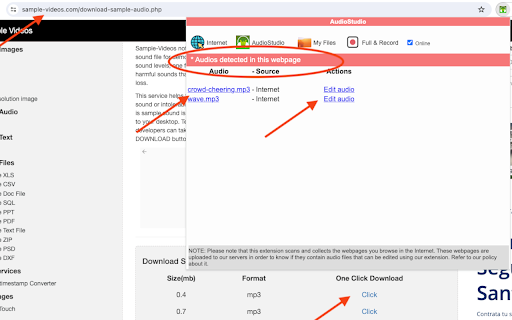

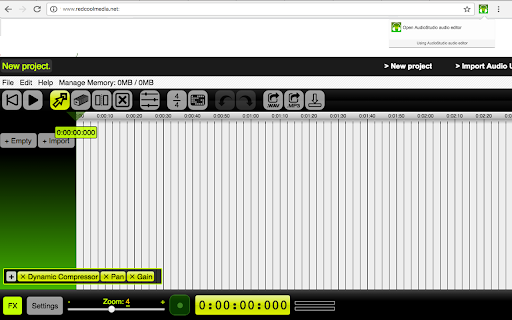

AudioStudio to create and edit audio and music online AudioStudio is an audio editor to create or modify any music or audio file. It is an integration of the "Beautiful Audio Editor" with the the RedcoolMedia platform. IMPORTANT> This extension scans and collects the webpages you browse in the Internet. These webpages are uploaded to our servers in order to know if they contain audio files that can be edited using our extension integrated with our online app. The new features of that this integration provides are: - Any MP3 or WAV URL link can be imported in AudioStudio with a simple click. - The MP3 and WAV create that the audio editor have created can be shared using the cloud platform hosted by RedcoolMedia. Additionally, AudioStudio inherits all the "Beautiful Audio Editor" features. It contains features to import, export, duplicate, split, trim, modify the speed, increase the volume, merge, etc, audio files. In order to implement this functionality, this web app includes multiple buttons that provides the following functionality: - Reset button resets the play pointer to the beginning and stops play. - Play/pause button plays or pauses audio at the current time. - Move button switches into move mode, in which you can move sections within - and across tracks by dragging them. - Duplicate button switches into duplicate mode, in which you can click sections to duplicate them. - Split button switches into split-section mode, in which you can split sections by pressing on them and then releasing upon finalizing the split location. - Remove button switches into remove mode, in which you can click sections to remove them. - Time Signature button makes the grid display in 4/4 time signature - 4 beats per 2 seconds. - Undo button undos the previous action if it exists. - Redo button redoes the previously undone action if it exists. - Share WAV button shares or downloads the project as a WAV file. - Share MP3 button shares or downloads the project as an MP3 file. MP3 exporting is slower than WAV exporting, but compresses audio, so MP3 files may be much smaller than their WAV counterparts. - Render button renders the whole project into a separate track. - Recording button. Start recording on a mono channel through your default microphone by clicking on this button. Moreover, AudioStudio includes audio modification using effects. You can apply effects to tracks and the master output. Effects range from simple ones such as gain, pan, and dynamic compression to varieties of frequency filters. It also includes Zoom in or out with the zoom slider in the footer. Higher numbers correspond to more detailed zooms.

Movie maker MovieStudio video editor
Movie maker online to create, edit and record videos, and adding videos, audios, images and texts MovieStudio is an extension to make movies, record videos, edit videos, modify them using another videos you can import. MovieStudio also allows to add audios, images, and texts into your movies and videos. Moreover, it scans and collects the webpages you browse in the Internet. These webpages are uploaded to our servers in order to know if they contain MP4 files that can be edited using our extension integrated with our online app. Its main features are: * Record any video and import them in your project: - MovieStudio provides a button that capture videos from your camera. The video recorded are imported in your Gallery along with other objects that can be used to make your movie. - After importing your recorded video in your Gallery, drag your video from the Media Gallery to the timeline. Drag it to Layer 0 or any other layer. - Refer to the following section in order to know what to do with any of your video. * Add and modify MP4 or WEBM videos included in your project: - You can import videos from the Internet by pasting in the link, or uploading a local video. Once you have found a MP4 or WEBM video you like, copy the link by right-clicking on the Video link and selecting Copy Link Address from the context menu. Then paste the link into your VideoStudio project and click on Get Media. - Drag your video from the Media Gallery to the timeline. Drag it to Layer 0 or any other layer. Once you have dragged your video to the timeline, you will enter in an editor from which you can extend the video time or shorten it, you can turn the video portion of your clip off; and you can do the same thing with the audio, as well as turn the volume down. - You assemble your project in layers. Layers with lower numbers appear above layers with a higher number. So layer one appears on top of layer two. * Add any MP3 audio file in your project taking into account that adding MP3 audio files is similar to adding video files: - Once the MP3 audio files are imported you can drag your audio from the Media Gallery to the timeline from which an editor is open. - The audio editor allows to extend the audio time or shorten it, and select only a portion of your audio if you would like. * Include texts into your movie. In the Events tab there is an option to add some text to your video. MovieStudio provides an editor for this text integration. It allows to change the time when your text starts and ends, move it around on the canvas, and change the way it transitions on and off the page. It also allows to change the font and color. * Include images into your movie or video. In the Events tab there is an option to add some images to your video. The formats supported are PNG, JPG and GIF. MovieStudio provides an editor for this images integration. It allows to change the time when your image appears in your video. * Create your MP4 movie or video file. In the Project tab there is a button to create a MP4 file with your composition of videos, audios, images and texts. This MP4 creation uses the open source software FFMPEG. MovieStudio is an enhancement of our VideoStudio but with more capacity and features. It is also based on Mozilla Popcorn Maker. Popcorn Maker could handle sound or video that could come from a number of places like videos from YouTube, Vimeo, or SoundCloud. VideoStudio has removed any feature related to YouTube, Vimeo, or SoundCloud in order to be compliance with YouTube, Vimeo and SoundCloud service terms.

AudioCloud audio editor to record, cut, paste, trim parts of audios
Trimming, cutting, pasting or applying audio effects like compression, reverb, delay and distortion fx AudioCloud Audio Editor is an extension that allows users to easily edit and manipulate audio files. With a user-friendly interface and a wide range of features, AudioCloud Audio Editor makes it simple and convenient to create professional-quality audio recordings. AudioCloud lets you record, or use your existing audio tracks, and modify them by trimming, cutting, pasting or applying a plethora of effects, from compression and paragraphic equalizers to reverb, delay and distortion fx. AudioCloud also supports more than 20 hotkeys combinations and a dynamic responsive interface to ensure ease of use and that your producivity remains high. Some of the key features of AudioCloud Audio Editor include: • Cutting/Pasting/Trimming parts of the audio. • Loading Audio, navigating the waveform, zoom and pan Visualization of frequency levels. • Multi-track editing: Easily edit multiple audio tracks simultaneously, making it simple to create complex audio compositions. • Peak and distortion signaling. • Inverting and Reversing Audio. • Exporting to mp3. • Modifying volume levels Fade In/Out. • Pitch Shift. • Noise removal: Remove unwanted background noise from your audio recordings, resulting in cleaner, crisper sound quality. • Audio effects: Add a variety of effects to your audio files, including reverb, echo, and distortion, to enhance the overall sound. • Equalizer: Adjust the equalizer settings to fine-tune the bass, treble, and other audio frequencies for a customized sound. • Audio conversion: Convert audio files to different formats, including MP3, WAV, and AIFF, for compatibility with a wide range of devices. Overall, AudioCloud Audio Editor is a versatile and user-friendly tool that provides all the features you need to create high-quality audio recordings. Whether you're a musician, podcaster, or sound engineer, AudioCloud Audio Editor is the perfect solution for all your audio editing needs.

Calligra online - office, graphics & email
Suite applications for word processing, spreadsheets, presentation and graphics with email client This extension allows to create and edit any office file using the Calligra online app integrated, which is a suite of applications for word processing, spreadsheets, presentation and graphics. This extension allows to handle the OpenDocument formats and it can also import other formats, including Microsoft Office formats. This Calligra suite office includes the following office components: * Words, which is a word processor application with desktop publishing features. It makes it easy to create rich documents with images, tables, and more. Open and save ODF, and open Microsoft Office Word files .doc and .docx files. * Sheets, which is a fully-featured spreadsheet application. It is a calculation and spreadsheet tool with a comprehensive formula list, default templates, and use shapes for notes or create flowcharts and mindmaps. Open and save ODS, and open Microsoft Office Excel files .xls and .xlsx files. * Stage, which is a powerful and easy to use presentation application. It provides tools to make creating slides using images, videos, animation and other special effects easy. It is extensible through a plugin system. Open and save ODP, and open Microsoft Office Powerpoint files .ppt and .pptx files. * Krita, which is a creative sketching and painting application based on Calligra technology. It is valid for creating concept art, comics, textures for rendering and matte paintings. Krita supports many colourspaces like RGB and CMYK at 8 and 16 bits integer channels, as well as 16 and 32 bits floating point channels. Please refer to the video in order to know how to use the extension. IMPORTANT: This extension scans the URLs browsed in order to detect Calligra compliant files. The Calligra compliant files detected appear in a list located in the extension popup that are retrieved from our servers. The scanning is performed from our servers so your URL are reported to our system. No personal data is collected. This scan can be disabled with a checkbox that appears in the extension popup. If you disable this scanning, this functionality is not available so then the extension functionality is very limited.

Web browser with anonymous access
Anonymous web browsing inside an extension This is an extension that allows to run a web browser as a Chrome web extension. This is run with a different IP address so your connection is anonymised. - It implements many web standards. - It implements "Safe Browsing," a proprietary protocol from Google used to exchange data related with phishing and malware protection. - It allows to save your bookmarks, account passwords for various websites, browsing history across devices. - You can control some aspects of the reading mode looks. You can change the font, change the width of the content, font size, line height etc. You can also select light, dark and sepia themes. - It includes an ad blocker – a secret weapon against annoying ads. IMPORTANT: This extension scans the URLs browsed in order to detect HTML links. The HTML links detected appear in a list located in the extension popup that are retrieved from our servers. The scanning is performed from our servers so your URL are reported to our system. No personal data is collected. This scan can be disabled with a checkbox that appears in the extension popup. If you disable this scanning, this functionality is not available so then the extension functionality is very limited.
