
pkldkmpncfhhlmiajnlpfkbhgnalnngf
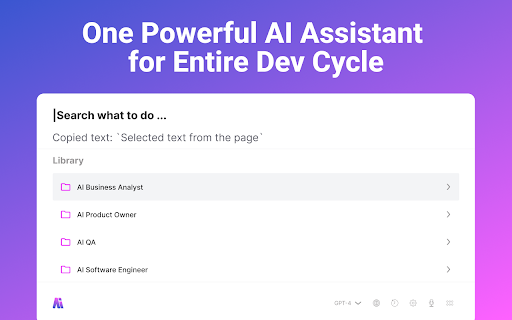


PO/BA/QA AI assistant in your browser AI assistant for Product Owners, Business Analysts, QA, and Software Engineers for efficiency and productivity One Powerful AI Assistant for the Entire Dev Cycle: Specs, Stories, Acceptance Criteria, Code Review, and Tests Cases. Create PRD Volokha AI: A Product Owner's Secret Weapon for Outstanding Product Requirement Documentation. Specialized in generating compelling problem statements, clear objectives, and actionable success metrics. Volokha AI for Product Owners Create a User Story with Acceptance Criteria Effortlessly draft stories, tasks or sub-tasks in a fraction of the time. Create professional User Stories with Acceptance Criteria's' with just one click. Create test cases for test automation software Enhance your test cases writing, create positive and negative scenario's and use it with your testing automation software. Review the code and get suggestions for improvements Volokha AI simplifies the process of working with the any code of programming language, making easy to review PR before they merged, summarise issues and suggest improvements. Features: - Use ChatGPT on Jira, Confluence and version control systems. - Library of everyday, IT battle-tested prompts - Convert business product requirements into technical requirements - Made by IT Product Manager for IT People - Works in any language 🪵 Changelog v1.0.1 - Copy any of response message - Re-try CTA for the last answer from dialog - Submit using hotkey - Focus pointer place to the end when text selected - Submit using hotkey with multiple chat messages - Clear chat history when new userQuestion submitted - Long text Entry dynamically change textarea entry point - Esc to start over and second escape to close app - Handle Enter during ArrowDown/Up navigation - Navigation through Categories and Search results using arrowUp, arrowBottom - Avoid handling enter from search input because it's impact arrow navigation

AI Cypress Tests generator
Records user session and generates cypress tests with support of Open AI Introducing the ultimate tool for web developers and testers! Our Chrome extension uses the power of OpenAI to automatically generate Cypress test cases when you interact with your website. With our extension, you can easily create comprehensive test cases by simply clicking on different elements on your website. Say goodbye to tedious manual testing and hello to faster, more efficient testing. Our extension is perfect for teams who want to save time and improve the quality of their web applications. Whether you're a developer, tester, or QA engineer, our tool will help you catch bugs and ensure your website is running smoothly. Features: • Easy to use: Simply click on elements to generate test cases. • Out of box: It suggests out of the box test scenarios to test your website. • Comprehensive: Generates Cypress test cases to cover multiple scenarios. • Efficient: Saves time and improves the quality of your web applications. • Powerful: Uses OpenAI to automate the testing process. Try our extension today and see how it can transform your web development and testing process! How to Generate Your OpenAI API Key • If you already have an API Key, you can use it for this extension. If not, follow these steps to generate new api key: • Go to the OpenAI website https://platform.openai.com/ and Sign up for an OpenAI account. • Once you have signed up and logged in, Go to https://platform.openai.com/account/api-keys • Click on the "Create API key" button. • After you have created your API key, it will be displayed on the page. Copy it to your clipboard. • Paste the new API key in the space provided in extension and start using the extension. ***Important: “Our extension allows users to send data to OpenAI for natural language processing and analysis. We take user privacy and security seriously and have designed our extension to protect user data as much as possible. However, it is important for users to understand that they are responsible for the data they choose to send through the extension. We strongly recommend that users review and understand OpenAI's data privacy and security policies before using our extension to send data”. Usage • Navigate to test website • Open the extension and enter Open AI API key • Click Record button to start recording • Click on any elements on the website that you want to test • Choose suitable value from the action dropdown on top of each selected element • Click Stop to stop recording • Click Get Scenarios button to generate test scenarios • Click Get Test cases button to generate cypress test cases code Contributing Thank you for your interest in contributing to AI Cypress Tests Generator, We welcome contributions to this project! Check us out on GitHub: Link to GitHub - https://github.com/syscolabs/ai-cypress-tests-generator

GlowBox for Smartsheet
Highlight your active Smartsheet cell with customizable borders, glow, and presets for better visibility. - Major improvement to cell-tracking — CTRL + F results now highlight the correct cell. - Fixed scroll and resize alignment on Smartsheet’s virtualized grids. - Updated Glow toast with smoother animation and click-to-open settings. - Cleaner “border-only” visuals with consistent glow and padding. ✨ Thanks to Sarah L. for the helpful feedback and feature suggestion! ____________________________________________________________________________ GlowBox for Smartsheet Make your active Smartsheet cell impossible to miss. GlowBox adds a clean, customizable highlight around the cell you’re working in, so you never lose track of your selection — even in large, complex sheets. - Quick Presets – One-click color styles (Blue, Yellow, Red, Glow, Random). - Custom Borders – Adjust border color and thickness to your liking. - Glow & Padding – Add subtle glow or padding around the cell for clarity. - Live Updates – Changes apply instantly as you adjust options. - Active Toggle – Quickly enable or disable GlowBox without reloading. - Wide Compatibility – Works seamlessly across Smartsheet views. Smartsheet is powerful — but when you’re scanning thousands of rows, it’s easy to lose sight of the active cell. GlowBox solves that problem by visually anchoring your focus with customizable effects, making your workflow faster, cleaner, and less error-prone. - Built exclusively for Smartsheet.com. - Lightweight, efficient, and quota-safe (no background spam). - Settings are saved automatically and synced across devices. - Share your thoughts: Feedback Form

TestCraft
Introducing TestCraft, a free and open-source browser extension with the power OpenAI LLMs, designed to be a companion to your software testing. AI-Powered Test Idea Generation: Leverage the power of OpenAI to generate comprehensive test ideas based on webpage elements. Automated Test Creation: Generate ready-to-run test scripts for popular automation frameworks, Playwright, Selenium, and Cypress, in your preferred programming language: JavaScript, TypeScript, Python, C#, and Java. TestCraft eases your test creation process and saves time. Accessibility Checks: Empower your web applications to be inclusive for all users. TestCraft identifies accessibility issues and provides actionable insights to improve. Test Idea to Automated Tests: Seamlessly convert your AI-generated test ideas into automated test scripts. Additionally, you can edit the test ideas to improve them before generating automation tests. Unlock the full potential of your testing process with TestCraft. Download it now and experience the future of software testing!

QA Test Case Helper
A professional tool for QA engineers that highlights testable elements and suggests comprehensive test cases QA Test Case Helper is a professional tool for testers and QA engineers that automatically analyzes web pages and assists in creating comprehensive test cases. Complete UI Redesign: A modern, sleek interface with improved layout and Inter typography. Dark Mode Support: Added a native dark theme for comfortable late-night testing (toggles automatically or manually). New Filtering System: Easily filter discovered elements by type (Buttons, Inputs, Links, Forms, Selects) to focus on what matters. Expanded Test Case Library: Added comprehensive test suites for: Checkboxes & Radio buttons Textareas (multi-line input) Type-specific inputs (Email, Password, Number) Advanced QA Checks: New test suggestions for boundary values, XSS safety, and ARIA accessibility roles. Markdown Export: One-click button to copy all results in formatted Markdown for your Jira/Bug reports. Performance Stats: Real-time counter of interactive elements found on the page. Improvements & Fixes: Page Analysis: Updated the detection engine to better find custom interactive elements and ARIA components. Bug Fix: Resolved an issue where the extension would sometimes stop responding on complex dynamic pages. Bug Fix: Fixed a disappearing icon issue during the generation process. Security: Switched to modern navigator.clipboard API for secure data copying. Optimization: Significant reduction in background script memory usage. Key Features: • Interactive highlighting of testable elements on hover • Automatic test case recommendations for each element type • Support for various elements: buttons, forms, input fields, links • Convenient tooltips with detailed testing suggestions Perfect for: ✓ QA Engineers ✓ Software Testers ✓ Developers writing tests ✓ Teams practicing TDD/BDD The extension helps ensure important test scenarios aren't missed and improves the quality of test documentation. Common Test Scenarios Covered: • Form validation and submission • Button states and interactions • Input field constraints • Link functionality • Select/dropdown behavior • Error handling Developed by a professional QA engineer for the QA community. For support or feature requests: Website: https://serhii-tkachenko.com Email: me@serhii-tkachenko.com
