
dadjhmgdejocfnabomkeengamkaeppdm


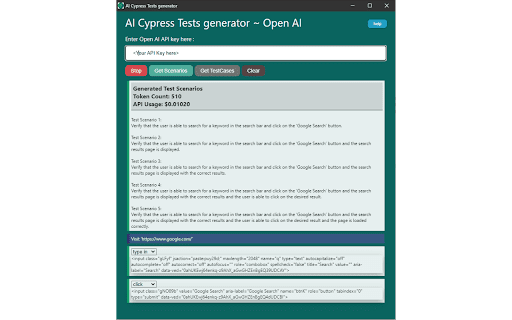
Records user session and generates cypress tests with support of Open AI Introducing the ultimate tool for web developers and testers! Our Chrome extension uses the power of OpenAI to automatically generate Cypress test cases when you interact with your website. With our extension, you can easily create comprehensive test cases by simply clicking on different elements on your website. Say goodbye to tedious manual testing and hello to faster, more efficient testing. Our extension is perfect for teams who want to save time and improve the quality of their web applications. Whether you're a developer, tester, or QA engineer, our tool will help you catch bugs and ensure your website is running smoothly. Features: • Easy to use: Simply click on elements to generate test cases. • Out of box: It suggests out of the box test scenarios to test your website. • Comprehensive: Generates Cypress test cases to cover multiple scenarios. • Efficient: Saves time and improves the quality of your web applications. • Powerful: Uses OpenAI to automate the testing process. Try our extension today and see how it can transform your web development and testing process! How to Generate Your OpenAI API Key • If you already have an API Key, you can use it for this extension. If not, follow these steps to generate new api key: • Go to the OpenAI website https://platform.openai.com/ and Sign up for an OpenAI account. • Once you have signed up and logged in, Go to https://platform.openai.com/account/api-keys • Click on the "Create API key" button. • After you have created your API key, it will be displayed on the page. Copy it to your clipboard. • Paste the new API key in the space provided in extension and start using the extension. ***Important: “Our extension allows users to send data to OpenAI for natural language processing and analysis. We take user privacy and security seriously and have designed our extension to protect user data as much as possible. However, it is important for users to understand that they are responsible for the data they choose to send through the extension. We strongly recommend that users review and understand OpenAI's data privacy and security policies before using our extension to send data”. Usage • Navigate to test website • Open the extension and enter Open AI API key • Click Record button to start recording • Click on any elements on the website that you want to test • Choose suitable value from the action dropdown on top of each selected element • Click Stop to stop recording • Click Get Scenarios button to generate test scenarios • Click Get Test cases button to generate cypress test cases code Contributing Thank you for your interest in contributing to AI Cypress Tests Generator, We welcome contributions to this project! Check us out on GitHub: Link to GitHub - https://github.com/syscolabs/ai-cypress-tests-generator

Testim Editor
The simplest and most advanced testing automation tool, using Adaptive Learning and Computer Vision image validation. Testim is the leading AI-based functional and end-to-end UI testing automation solution. Testim Automate uses AI to give you the speed and stability of codeless end-to-end tests, with the flexibility of code. Customers like Microsoft, Salesforce, Wix, and JFrog run millions of tests on Testim each month. Learn more at www.testim.io Quickly record, configure, and customize functional UI tests. Record user journeys that are added to the Testim visual editor as discrete, configurable steps. Create reusable groups, configure validations, add loops, or insert custom JavaScript. Reduce maintenance with AI-based Smart Locators Each element is uniquely identified by analyzing the entire DOM and assigning a score. When element attributes change, the AI-based Smart Locators learn and continue to identify the element and test its functionality. Run parallel, cross-browser tests on our test cloud or Selenium-compatible grids. Integrate with your CI or dev tools to trigger test runs on pull requests or other dev milestones. Quickly identify the root cause of failures with screenshots, console logs, and network info. Capture video or annotate screenshots to send meaningful bug reports. The Testim Chrome extension only used for the purpose of creating and playing-back web application UI tests in Testim. No additional information is captured when not actively using the Testim application.

Dakka
Dakka is a development tool which provides a simple and fast solution to generate end-to-end tests by recording events fired on the page. Generated events can be exported or copied to clipboard for further modification and execution. Dakka currently supports frameworks such as - Playwright, Cypress, Puppeteer. Dakka provides a visual outline of the events fired on the page so the user can see all actions happening on the page - click, keypress, input, navigation etc. It is possible to manually delete events that the user doesn’t want to include in the exported test script. One of the differences between writing tests manually and using Dakka is that Dakka dramatically reduces the time spent on selectors and assertions. Dakka identifies and suggests a list of best possible element selectors for the recorded tests. Assertion blocks in Dakka are the validation steps that determine whether the specified step of the test case succeeded or not. helping the user to drag and drop the assertion block to any phase of the test, locate elements and add assertion value. This gives the ability to assert if an element is present on the page, page contains some text or title, current page url equals to particular value. Dakka is framework agnostic meaning tests can be generated and later exported to one of the suggested formats.

E2E Test Helper
A helpful tool for locating UI elements for Cypress, Playwright, Selenium. Will create a Page Objects for by Generative AI. The **E2E Test Helper Extension** is designed to simplify and enhance your end-to-end testing workflow by leveraging AI to generate page objects. This extension integrates seamlessly with popular testing frameworks like Cypress and Playwright, enabling you to create robust, reusable page objects quickly and efficiently. - Element Scanning: Automatically scan your web pages to identify elements based on a predefined attribute. This feature helps you quickly locate elements that will be used to generate page objects. - Customizable Prompts: Define and manage both system and user prompts to tailor the AI's behavior to your specific testing needs. Customize the responses to ensure they align perfectly with your testing requirements. - Support for Shadow DOM: Enable the inclusion of elements within Shadow DOM, allowing you to work with modern web components effortlessly. - Flexible AI Integration: Choose from various AI instances, including OpenAI, LLaMA, and Azure AI. Configure the AI model, API endpoint, and other settings to match your development environment. - Efficient Page Object Generation: Generate page objects with meaningful names and detailed prompts. The extension sends the HTML elements and your instructions to the AI, which returns a complete page object ready for use in your tests. - Easy Export Options: Save the generated page objects as files or copy the code directly to your clipboard. This makes it easy to integrate the generated code into your existing codebase. 1. Scan Elements: Begin by scanning the web page to identify elements with the specified attribute. 2. Define Page Object: Provide a meaningful name for the page object and select or define prompts to guide the AI in generating the page object. 3. Generate and Save: Send the request to the AI and wait for the response. Once the page object is generated, you can save it as a file or copy the code. 1. Install the Extension: Add the E2E Test Helper Extension to your Chrome browser from the Chrome Web Store. 2. Configure Settings: Navigate to the Settings tab to configure your preferences, including the E2E attribute, AI instance type, API endpoint, and model name. 3. Manage Prompts: Go to the Prompt Manager tab to define and manage system and user prompts. 4. Start Scanning: Use the Scan button to identify elements on your web page and generate page objects with the help of AI. - Save Time: Automate the tedious process of writing page objects, freeing up your time to focus on writing tests. - Consistency: Ensure consistent and reusable page objects across your test suite. - Customization: Tailor the AI-generated page objects to fit your specific testing framework and coding standards. - Advanced Features: Take advantage of advanced features like Shadow DOM support and flexible AI integration to handle complex web applications. Support and Feedback We are committed to providing the best possible experience with the E2E Test Helper Extension. If you have any questions, need support, or want to provide feedback, please submit a support request. Thank you for using the E2E Test Helper Extension! Happy testing!

TestCraft
Introducing TestCraft, a free and open-source browser extension with the power OpenAI LLMs, designed to be a companion to your software testing. AI-Powered Test Idea Generation: Leverage the power of OpenAI to generate comprehensive test ideas based on webpage elements. Automated Test Creation: Generate ready-to-run test scripts for popular automation frameworks, Playwright, Selenium, and Cypress, in your preferred programming language: JavaScript, TypeScript, Python, C#, and Java. TestCraft eases your test creation process and saves time. Accessibility Checks: Empower your web applications to be inclusive for all users. TestCraft identifies accessibility issues and provides actionable insights to improve. Test Idea to Automated Tests: Seamlessly convert your AI-generated test ideas into automated test scripts. Additionally, you can edit the test ideas to improve them before generating automation tests. Unlock the full potential of your testing process with TestCraft. Download it now and experience the future of software testing!
