
pkiligjbdajidpjlikchpofgfjhgecdp
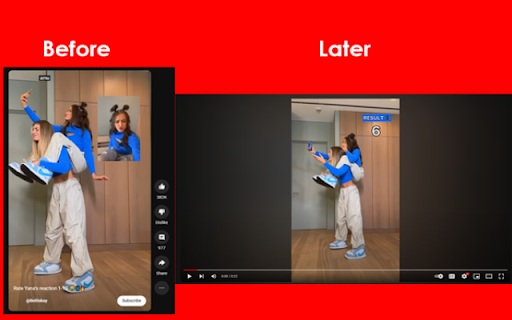
YouTube Shorts ON OFF Removes all Shorts from YouTube The YouTube shorts video should be played just like any other video. Playing YouTube Shorts videos on a standard Video is possible using an extension. YouTube Shorts ON OFF YouTube Shorts to Standard Videos YouTube Shorts ON OFF is now enabled by default

Disable YouTube Shorts
Use Disable YouTube Shorts extension to deep focus and stay unhooked. Distraction free tool will help you to hide Youtube shorts! 🔇 Are you overwhelmed by the constant bombardment of distracting youtube shorts? Regain control of your browsing experience with the Disable YouTube Shorts Chrome extension! Installing the Disable YouTube Shorts tool is quick and effortless. Simply add it to your Chrome browser and customize your settings to align with your preferences. With user-friendly controls and seamless integration, you'll be enjoying a distraction free and disable youtube shorts hide experience in no time. 🔧 Installation and Usage: 1. Click the Add to Chrome button to install the Disable Youtube Shorts extension. 2. Customize your settings to tailor the tool to your preferences. 3. Enjoy distraction-free browsing as shorts and other distractions are seamlessly hidden from your feed. 4. Need to adjust your settings? Simply access the extension options within your Chrome settings. It's time to bid farewell to the incessant stream of distractions cluttering your feed. With the disable youtube shorts tool, you can take charge and tailor your YouTube experience to suit your preferences. Whether you're studying, working, or simply unwinding, this extension empowers you to enjoy videos on your own terms. 1️⃣ Disable Shorts: Say goodbye to the omnipresence of shorts in your YouTube feed. With the disable youtube shorts extension, you have the power to eliminate shorts and create a deep focus environment. 2️⃣ Hide Distractions: In addition to disabling shorts, this extension allows you to hide comments and other distractions, ensuring a seamless and focused viewing experience. 3️⃣ Focus Mode: Activate focus mode and immerse yourself in quality content without interruptions from shorts or other distractions. Stay in the zone and maximize your productivity with this invaluable feature. 4️⃣ YouTube Deep Focus: Delve deeper into platform content without the constant barrage vying for your attention. Enhance your ability to concentrate and engage with long-form content, disable and free from distractions. 5️⃣ Disconnect from youtube: Seamlessly detach from youtube shorts noise and reconnect with your tasks, projects, or leisure activities without interruptions. Regain control of your online experience and make the most of your time. 6️⃣ Unhook YouTube: Break free from the cycle of mindless scrolling and regain control of your browsing habits with the disable youtube shorts tool. Say goodbye to aimless browsing and hello to intentional use of your time. 7️⃣ Distraction-Free YouTube: Enjoy a clutter-free experience by disabling and blocking shorts and other distractions. Stay focused on your goals and immerse yourself in the content that matters most to you. 8️⃣ Focus and Productivity: Boost your productivity by eliminating distractions and maintaining focus while browsing. Whether you're seeking educational content or entertainment, stay on track with your objectives. 9️⃣ Tailored Settings: Customize the disable youtube shorts software to suit your preferences and browsing habits. Whether you want to completely remove shorts or selectively hide them based on specific criteria, the choice is yours. Take control and personalize your experience. 📌 Is the disable youtube shorts extension free? Yes, the basic version of the program is free to use, with optional premium features available for advanced users. 📌 How does it differ from other ad-blocking or content-filtering tools? Unlike generic ad blockers, this extension is specifically designed to Hide YouTube Shorts, providing a tailored solution for users seeking a distraction-free and focusing experience. 📌 Can I customize the unhooked youtube extension to hide other types of content? While the primary focus is on remove shorts for youtube, future updates may include additional customization options based on user feedback to detach and disconnect from youtube even more. Got questions or feedback? We'd love to hear from you! Reach out to us at builtbycores@gmail.com and join the movement toward a more focused YouTube experience. Ready to take control of your experience? Install the Disable YouTube Shorts extension now and hide youtube shorts and unlock a world of distraction free life! 🎉

YouTube Shorts & Playables Remover
Removes Shorts and Playables from YouTube homepage, search results, and sidebar. Free. Easy-to-use. Toggle switch for quick disabling of all Shorts from Youtube recommendations. Installation: press the 'Add to Chrome' button. How to use: It will activate automatically upon installation. To re-enable shorts, or remove the extension, click on the Extensions (on top right corner) > Manage Extensions. There are other similar extensions on the store; this extension is minimalistic and comes with no other features, which makes it a safer choice from potential security concerns. **v1.1 Update (19/07/2025):** ✅ Also removes: - YouTube **Playables** shelf from the homepage - Shorts tab and sections from **search results** Q: How do I install the extension? A: You can install the extension directly from the Chrome Web Store by clicking on the "Add to Chrome" button. Once installed, it will automatically run on any YouTube page you visit, removing Shorts sections as you browse. Q: Is the extension free? A: Yes, the extension is completely free to use. Q: Will the extension block all types of video suggestions? A: No, the extension only targets YouTube Shorts. All other video suggestions, including long-form videos and recommended content, will still appear as usual on your homepage and sidebar. Q: Does it work on mobile? A: Short answer: No. Long answer: Unfortunately, iOS is a highly controlled environment, and it doesn’t allow third-party apps to modify or alter the functionality of other apps. Android is more flexible than iOS, but it still doesn’t officially allow third-party apps to modify or change the behavior of other apps like YouTube. To make modifications at the app level, users would need root access, which, again, isn't recommended for the average user. If you are still interested, look into a mobile browser with an ad/content blocker or alternative clients like NewPipe (for Android). Q: Does this extension collect my personal data? A: Absolutely not! This extension does not track or collect any of your personal data. It only modifies the appearance of YouTube pages on your browser to hide Shorts content. Q: Will this extension work with other browsers like Firefox or Edge? A: The extension is primarily designed for Google Chrome. However, it may work with Chromium-based browsers like Microsoft Edge and others. To install it in other browsers, you would need to follow their specific instructions for adding Chrome extensions. Q: Can I re-enable YouTube Shorts after installing the extension? A: Yes, if you decide that you want to see YouTube Shorts again, you can easily disable or remove the extension from your browser by going to the Extensions page (chrome://extensions/) and turning it off or uninstalling it.

YouTube Shorts to Standard Videos
Click the extension icon to convert YouTube Shorts URLs to standard YouTube video URLs. Watch YouTube Shorts videos as standard/normal YouTube videos. Click the toolbar button or press the keyboard command Alt + v, while watching any Short. Visit our homepage for detailed usage guide and more information. Extension by BrowserNative. Not created by or affiliated with YouTube/Google.

remove shorts for youtube
Block all of the youtube shorts from homepage and play with Desktop UI as normal video One of your productivity extensions if you are a marketer, creator or youtuber. This extension is designed to hide shorts and enable them with the desktop view if they are required to play. Simply add the remove shorts for yt extension to your browser and no other settings are required. remove shorts for yt lets you play YouTube Shorts videos in normal mode like regular videos. It converts short videos with an aspect ratio of 9:16 to a normal aspect ratio of 16:9. How to Use -Click on the "Add to Chrome" option to add it. -Pin it to easily access the extension with a single click. -Open and play any YouTube video -Click on the extension icon and select whether or not to enable or disable short videos. >>Enables streamers to decide in which aspect ratio they want to watch shorts Videos >>One click YouTube shorts enable and disable option >>Simple to use >>Completely free
