
fbihmpboneacjbbdajiaoocphnjgomol
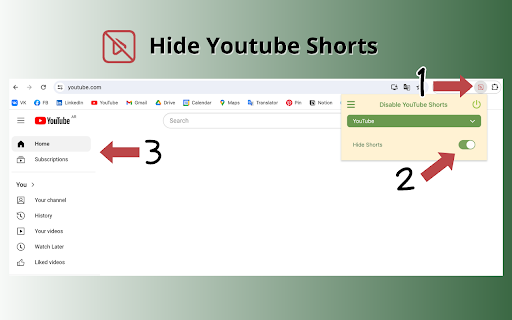
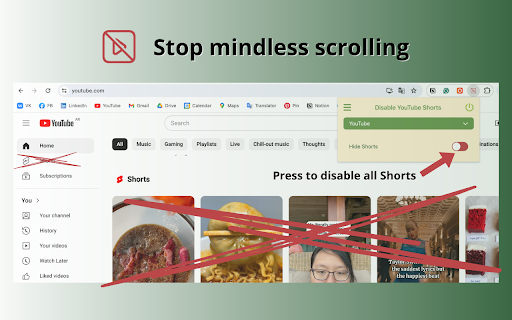
Use Disable YouTube Shorts extension to deep focus and stay unhooked. Distraction free tool will help you to hide Youtube shorts! 🔇 Are you overwhelmed by the constant bombardment of distracting youtube shorts? Regain control of your browsing experience with the Disable YouTube Shorts Chrome extension! Installing the Disable YouTube Shorts tool is quick and effortless. Simply add it to your Chrome browser and customize your settings to align with your preferences. With user-friendly controls and seamless integration, you'll be enjoying a distraction free and disable youtube shorts hide experience in no time. 🔧 Installation and Usage: 1. Click the Add to Chrome button to install the Disable Youtube Shorts extension. 2. Customize your settings to tailor the tool to your preferences. 3. Enjoy distraction-free browsing as shorts and other distractions are seamlessly hidden from your feed. 4. Need to adjust your settings? Simply access the extension options within your Chrome settings. It's time to bid farewell to the incessant stream of distractions cluttering your feed. With the disable youtube shorts tool, you can take charge and tailor your YouTube experience to suit your preferences. Whether you're studying, working, or simply unwinding, this extension empowers you to enjoy videos on your own terms. 1️⃣ Disable Shorts: Say goodbye to the omnipresence of shorts in your YouTube feed. With the disable youtube shorts extension, you have the power to eliminate shorts and create a deep focus environment. 2️⃣ Hide Distractions: In addition to disabling shorts, this extension allows you to hide comments and other distractions, ensuring a seamless and focused viewing experience. 3️⃣ Focus Mode: Activate focus mode and immerse yourself in quality content without interruptions from shorts or other distractions. Stay in the zone and maximize your productivity with this invaluable feature. 4️⃣ YouTube Deep Focus: Delve deeper into platform content without the constant barrage vying for your attention. Enhance your ability to concentrate and engage with long-form content, disable and free from distractions. 5️⃣ Disconnect from youtube: Seamlessly detach from youtube shorts noise and reconnect with your tasks, projects, or leisure activities without interruptions. Regain control of your online experience and make the most of your time. 6️⃣ Unhook YouTube: Break free from the cycle of mindless scrolling and regain control of your browsing habits with the disable youtube shorts tool. Say goodbye to aimless browsing and hello to intentional use of your time. 7️⃣ Distraction-Free YouTube: Enjoy a clutter-free experience by disabling and blocking shorts and other distractions. Stay focused on your goals and immerse yourself in the content that matters most to you. 8️⃣ Focus and Productivity: Boost your productivity by eliminating distractions and maintaining focus while browsing. Whether you're seeking educational content or entertainment, stay on track with your objectives. 9️⃣ Tailored Settings: Customize the disable youtube shorts software to suit your preferences and browsing habits. Whether you want to completely remove shorts or selectively hide them based on specific criteria, the choice is yours. Take control and personalize your experience. 📌 Is the disable youtube shorts extension free? Yes, the basic version of the program is free to use, with optional premium features available for advanced users. 📌 How does it differ from other ad-blocking or content-filtering tools? Unlike generic ad blockers, this extension is specifically designed to Hide YouTube Shorts, providing a tailored solution for users seeking a distraction-free and focusing experience. 📌 Can I customize the unhooked youtube extension to hide other types of content? While the primary focus is on remove shorts for youtube, future updates may include additional customization options based on user feedback to detach and disconnect from youtube even more. Got questions or feedback? We'd love to hear from you! Reach out to us at builtbycores@gmail.com and join the movement toward a more focused YouTube experience. Ready to take control of your experience? Install the Disable YouTube Shorts extension now and hide youtube shorts and unlock a world of distraction free life! 🎉

SponsorBlock for YouTube - Skip Sponsorships
Skip sponsorships, subscription begging and more on YouTube videos. Report sponsors on videos you watch to save others' time. SponsorBlock lets you skip over sponsors, intros, outros, subscription reminders, and other annoying parts of YouTube videos. SponsorBlock is a crowdsourced browser extension that lets anyone submit the start and end times of sponsored segments and other segments of YouTube videos. Once one person submits this information, everyone else with this extension will skip right over the sponsored segment. You can also skip over non music sections of music videos. This is open source and the entire database is public. Access your data for youtube.com, www.youtube-nocookie.com: - Used to modify the YouTube webpage "Authentication Information": When you install the extension, it will generate a random "userID" that is used when submitting or voting. This allows you to appear on the leaderboard and helps determine reputation of submissions. With this extension, you will automatically skip YouTube sponsors.

UnHook YouTube
Use UnHook YouTube tool to hide shorts, comments, remove recommendations, related videos. Get distraction free and focusing youtube. Introducing UnHook YouTube – Your Gateway to Distraction Free Viewing! 🚀 Did you know that recommendations are responsible for over 70% of time spent on the platform? Take back your time and install Unhook Youtube. This tool is fully customizable! Just tap on it in the toolbar and choose the options you want to remove. 🧑💻 How to Make the Most of It: 1. Install extension by pressing the button Add to Chrome. 3. Click on the UnHook YouTube icon in the toolbar. 4. Choose which distractions to remove from these options: hide homepage recommendations, hide explore, hide subscriptions, hide shorts, hide related videos on the video page, hide comments, hide video endscreen, hide thumbnails. Are you tired of feeling like you're in a never-ending loop, constantly bombarded with shorts, trending videos, and endless distractions? It's time to take back control of your online experience with unhooked YouTube – the ultimate Chrome tool designed to help you focus on what truly matters. With UnHook YouTube, you can customize your environment to suit your needs, enabling you to get distractions free youtube and create a space where you can concentrate on the content that aligns with your goals and interests. Let's dive into the features that make unhooked Youtube the must-have tool for anyone seeking a more focused browsing experience: 1️⃣ Disable YouTube Shorts: Say goodbye to those addictive short videos that keep pulling you away from your tasks. With unhooked youtube, you can easily disable shorts and regain control of your viewing habits. 2️⃣ Hide youtube comments: Say farewell to the endless scroll of comments that can distract you from the video content. unhook youtube lets you disable comments, giving you a cleaner and more streamlined viewing experience. 3️⃣Hide youtube Explore: Keep your homepage clutter-free by hiding the explore tab. Say goodbye to irrelevant recommendations and hello to a personalized feed that caters to your interests. 4️⃣ Hide YouTube Related Videos: Put an end to the cycle of clicking from one video to the next. With UnHook YouTube, you can hide related videos on the video page, allowing you to focus on the content at hand without getting sidetracked. 5️⃣ Hide youtube Subscriptions: Keep your subscription feed clean and clutter-free by hiding subscriptions. UnHook YouTube ensures that you only see the channels and content you truly care about. 6️⃣ Hide Youtube Homepage Recommendations: Take control of your homepage by hiding recommendations that don't align with your interests. UnHook YouTube lets you customize your feed, ensuring that you only see content that matters to you. 7️⃣ Hide Youtube Thumbnails: Say goodbye to distracting thumbnails that lure you into clicking on videos you don't need to watch. unhook youtube allows you to hide thumbnails, so you can focus solely on the titles and descriptions of videos. 8️⃣ YotTube Unhooked: Take control of your watching experience in a whole new way with unhook YouTube. Say goodbye to distractions and hello to a focused browsing experience that allows you to make the most of your online time. Stay tuned for future updates, where we plan to introduce enhanced hiding options and new features for staying focused. 💡 Unhook youtube is a chrome extension that allows you to remove distractions: youtube comments, youtube explore, youtube related, block youtube shorts, subscriptions, video endscreen, thumbnails. 📌 Can I use it for free? 💡 To install unhook youtube, press the button "Add to Chrome". 📌 Can extension hide anything on the platform? 💡It can remove most of the distractions available there. Soon we'll add more options. 📌 Is it safe for my privacy to use this extension? 💡 Yes, this tool operates locally within your browser, ensuring the privacy and security of your personal information. It does not collect or store any user data. 📌 Is it available on iOS, Android, Windows, and Mac? 💡Development for these platforms is in progress, and soon you'll be able to enjoy our tool on multiple platforms. UnHook YouTube fast isn't just a tool – it's a game-changer for anyone who wants to make the most of their time online. Whether you're a student trying to study, a professional trying to work, or just someone who wants to enjoy distraction free youtube, Unhook youtube is the solution you've been searching for. So why wait? Install unhook youtube today and experience the freedom of distraction free Youtube. Take control of your online experience and unlock a world of productivity with our focus youtube tool! 🌟

YouTube Detox — Block Shorts, Hide Recommendations & Stay Focused
A complete toolkit to help you use YouTube with purpose. Block Shorts, remove distractions, and stay focused on what truly matters. YouTube Detox is a productivity extension designed for people like me who feel that their phone — and platforms like YouTube — are getting in the way of their goals. If you’ve ever opened YouTube to watch "just one video", only to find yourself an hour later watching random videos that don't even matter to you, you’re not alone. And while no piece of software can magically transform your habits overnight, this extension can provide you with the support and the tools you need in your quest to take back control of your time and attention — so you could spend them the way you truly intend to. 🧹 Remove What Distracts You Gain control of how YouTube looks and behaves to make it less distracting. For example, you can: - Remove Shorts from all pages - Play Shorts videos as regular videos - Hide home page recommendations - Hide sidebar and end-screen recommendations on the watch page - Hide irrelevant search results - Hide comments and live chat - Hide Trending and Explore pages - Hide notifications - Stop videos from autoplaying on page load ...and dozens more options, with new ones being added with every update. 🧘 Stop Mindless Scrolling Before It Starts - An adjustable countdown timer that makes you pause before starting a new YouTube session - Customizable mental cues placed at key moments to remind you of your goals and bring you back to awareness when you start drifting into mindless consumption - Configurable password lock to make it harder to disable the extension ⏳ Stay in Control of Your Time - Define how long your sessions should last - Configure mandatory breaks between sessions to prevent the "5 more minutes" spiral 🎯 Start Every Session With the Right Setup - Create different environments for different use cases — work, music, relaxation, etc. — so you always enter YouTube with the optimal setup already in place - Prevents leftover settings from previous sessions from derailing your focus, without needing to adjust them each time 🎨 Customize Everything Your Way Everything in the extension is optional. Keep the features you like and discard the rest, so you can build a productivity solution that feels truly tailor-made for you. 🧩 Compatible With the Tools You Already Use - Available on Chrome, Edge, Opera, and other Chromium-based browsers (Firefox release coming soon) - Works on mobile and tablet browsers that support extensions (tested on Kiwi Browser for Android) - Compatible with adblockers and other YouTube-related extensions 🚀 More Features Coming Soon - Filter content based on keywords, channel names, categories, etc. - Sync your settings and sessions across all your devices - Scheduled activations to align the extension with your daily routine - Block YouTube completely for a chosen duration - Set a daily limit on your usage - Parental controls - AI-powered capabilities like auto-skipping sponsor segments, generating video summaries, etc. - Get basic insights into your YouTube usage like watch time, visit count, most watched categories, etc.

YouTube Detoxifier: Delay Shorts & Hide Recommendations
Do you want to block or disable YouTube Shorts to stop Doomscrolling, but still catch the important ones? This extension lets you do just that with a customizable timeout feature. Set a delay (like 10 seconds or any value you prefer) before a Short plays, helping you avoid distractions while still being able to watch what matters. Remove Recommendations and Comments: The extension provides a distraction-free browsing experience by allowing you to remove YouTube recommendations and comments. Timeout Feature: To reduce the addictive nature of YouTube videos and shorts, the extension provides a timeout feature. It also helps in preventing you from endlessly scrolling YouTube shorts. Break Feature: Need a break from the distraction blocker? The extension includes a break feature that allows you to temporarily disable the settings. During this break, you can study or simply chill out without the restrictions. You can also set custom break durations and configurations.
