
pkgkfnampapjbopomdpnkckbjdnpkbkp
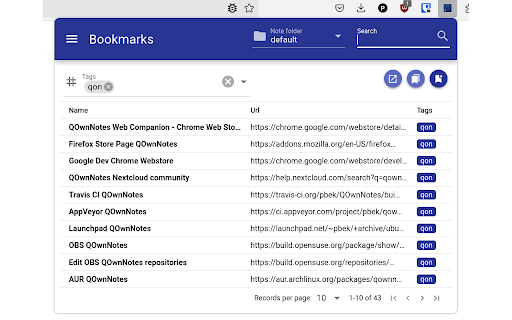


This is a companion extension for QOwnNotes to interact with the note taking desktop application. QOwnNotes is the open source (GPL) plain-text file markdown note taking application for GNU/Linux, macOS and Windows, that (optionally) works together with the notes application of Nextcloud or ownCloud. To use this extension QOwnNotes needs to be running. - bookmark management with Markdown links in notes - for more information about the bookmarks feature please visit https://www.qownnotes.org/Knowledge-base/QOwnNotes-Web-Companion-browser-extension - creating a new note (only text) from the current selection by right-clicking it - this is scriptable in QOwnNotes - creating a new note from the content of the current webpage by right-clicking on the page - the html will be converted to markdown and images of the page will be downloaded (might take a while) - this is scriptable in QOwnNotes - creating a new note with a screenshot of the visible part of the current webpage by right-clicking on the page - you can change the server socket port in the extension *Option page* - scriptable - the extension uses the `tabs` permission that may be interpreted as permission to `Read your browsing history` to be able to store bookmarks for all open tabs in a window with a single click

Wallabagger
Save any page’s URL and content to a Wallabag v2 server for later reading, with editable metadata. Wallabagger is extension for add pages to wallabag, with ability to: - save current page - edit title - add (with autocomplete!) and remove tags - store a page from the browser (JavaScript, Paywall…) - set starred and archived - delete wallabag is a self hostable application allowing you to not miss any content anymore. More informations on website: wallabag.org - New login workflow - Lot of changes under the hood

floccus bookmarks sync
Sync your bookmarks privately across browsers and devices **Floccus Bookmarks Sync: Private, Cross‑Browser & Device Sync** *Securely synchronize bookmarks across Chrome, Firefox, Edge, and more using your own cloud storage.* **Seamless Cross‑Browser & Cross‑Device Sync** - Sync bookmarks between Chrome, Firefox, Edge, and any browser that supports extensions. - Works on desktop, mobile, and tablet. - Syncs instantly when you add or edit a bookmark. **Ultimate Privacy & Control** - No data is stored on Floccus servers. - All data stays on your chosen backend (Nextcloud, WebDAV, Google Drive, or Git). - Optional end‑to‑end encryption for WebDAV and Google Drive. **Flexible Backend Support** - Nextcloud, Linkwarden, KaraKeep any WebDAV server, Git repositories, Google Drive, Dropbox - Choose the backend that best fits your workflow. **Easy Setup & Usage** - One‑click installation from the Chrome Web Store. - Simple wizard guides you through selecting a backend and configuring sync. - Automatic updates keep your bookmarks in sync. - **Privacy‑First** – Your bookmarks never leave your chosen storage. - **Cross‑Platform** – Works on all major browsers and devices. - **No Ads / No Fees** – Free to use, no hidden costs. Although, I do appreciate donations :) - **Customizable** – Pick any backend you trust. - **Community‑Supported** – Open‑source code and active community. **Get Floccus now and take control of your bookmarks!** If you'd like to support the creation and maintenance of this software, you can donate here: https://floccus.org/donate/ Please file bug reports or requests for help over on Github: https://github.com/floccusaddon/floccus

Passwords for Nextcloud Browser Extension
The official browser extension for Passwords for Nextcloud This is the official browser extension for the Passwords app for Nextcloud. Use your passwords with ease in the browser and store them securely in your Nextcloud. Features ● Quickly access any credentials related to the current tab with the extension ● Paste credentials into the current tab by just clicking on them or drag & drop them wherever you like ● Use the powerful search, to find the credentials you need ● Connect as many Nextcloud accounts as you like ● View and browse trough the folders on you Nextcloud ● Generate strong passwords within the extension ● The extension detects new or updated credentials and allows you to save them easily ● Choose from multiple themes, use the theme from your Nextcloud or create your own to match the extension with your browser Requirements This extension requires a server on which Nextcloud with the Passwords App is installed. Nextcloud can be downloaded for free from the Nextcloud website. The Passwords App can be downloaded for free from the Nextcloud App Store. If you need help with the extension, have questions or suggestions, please visit our support website.

Notesnook Web Clipper
Clip web pages & save interesting things you find on the web directly into Notesnook in a private & secure way. Notesnook Web Clipper helps you to save important & useful things on the web quickly & safely. CLIP EXACTLY WHAT YOU WANT Ever come across an inspiring quote and wanted to save it? Notesnook Web Clipper features a selection based clipping mode which allows you to clip exactly the pieces of the web page that you want. This means no more clutter in your clips. Sometimes you want to save a web page exactly how it looks. Notesnook Web Clipper has multiple modes to allow this including a screenshot mode & a full page capture mode. These modes allow you to have full control over how you want your clip to turn out. Notesnook Web Clipper connects directly with the Notesnook web app creating a seamless and quick experience. You no longer need to worry about handling credentials in multiple places. It truly is an extension to the web app. Since everything is handled by the Notesnook web app, the only time Notesnook Web Clipper connects to the Internet is to download things on the web page. No other communication or telemetry takes place. OPEN SOURCE AND PRIVATE Staying true to our mission and goal, Notesnook Web Clipper is completely open source. We don't just "say" that we are private — we act like it.
