
pkfdieeblkapoopkmlpnnlepnblgbphk
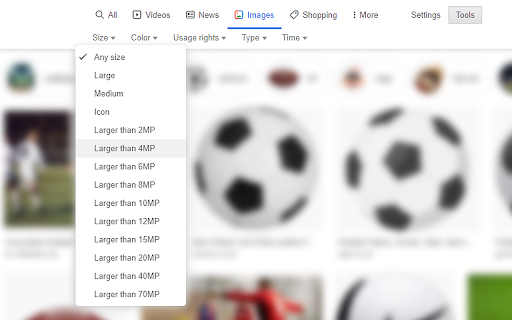
Restores ability for the user to select a minimum megapixel value to search images by, i.e. 2MP, 4MP, 6MP, 8MP, 10MP, 12MP, 15MP, 20MP, 40MP, 70MP. This functionality is available in Tools -> Size.

GetGetty Extension
GetGetty Extension Introducing our new Chrome Extension - GettyImages Downloader! Are you tired of having to screen capture or save GettyImages images one by one? Look no further! Our extension adds a convenient download button to GettyImages website, allowing you to easily download images in just one click. With the GettyImages Downloader extension, you can quickly and easily download high-quality images from the GettyImages website, without the hassle of taking screenshots or going through complicated download processes. This extension is perfect for anyone who needs to download images frequently, whether it be for personal or professional use. By installing GettyImages Downloader, you'll be able to save time and effort by downloading images quickly and easily, all without having to leave the website. The extension is also user-friendly and doesn't require any technical knowledge to use. Overall, if you're someone who uses GettyImages frequently and wants to save time and effort in the process of downloading images, then GettyImages Downloader is the perfect extension for you. Give it a try today and start downloading images with ease!

Quick Image Search
Right click an image or some selected text and use that for a secure search using Google Images. Seen an image on a website and you'd like to know who or what it is? Found someone's name and you like to know what that person looks like? After installing this extension there will be a new entry in the context menu (right-click menu) when an image or some selected text is right-clicked. Selecting this menu option will start a secure Google Image search via HTTPS. Release notes: - v5.0 (2025-11-23): Open the results tab directly next to the active tab - v4.0 (2022-12-11): Reverse image search now uses Google Lens. Google Images does not support reverse image search anymore.

Reverse Image Search
Adds an option to the context menu to reverse search an image on various services Adds an option to the context menu to search with an image on various predefined or custom search engines with your own URL. If you choose more than one search engine, they will all be shown in a handy submenu! If more than one search engine is selected, a new entry "Open All" will also be shown. You can even choose the tab behaviour that suits your needs! Submit translations to the GitHub repo: https://github.com/Brawl345/Image-Reverse-Search-WebExtension

Old Images Redirect: Disable Google Lens
Revert Google Images to classic view & disable Lens for a simpler, nostalgic search experience. Old Images Redirect: Disable Google Lens is a cutting-edge browser extension designed to transform your image searching experience. By reverting Google Images to its classic, beloved layout, this extension bypasses the modern Google Lens feature, offering users a straightforward, uncomplicated search interface. It’s crafted for those who appreciate the simplicity and directness of the old Google Images, ensuring a hassle-free and nostalgic browsing journey. Classic Google Images Interface: Instantly access the traditional Google Images layout. Disable Google Lens: Removes Google Lens integration for a pure, uncluttered search experience. User-Friendly: Simple to install and use, with no complicated settings. Fast and Efficient: Enjoy quicker load times and a more responsive search experience. Perfect for researchers, photographers, and anyone nostalgic for the simplicity of past web experiences, “Old Images Redirect: Disable Google Lens” brings back the efficient and straightforward image search functionality. Whether you’re seeking historical photos, vintage artworks, or simply prefer the old interface, this extension ensures your image searches are effective and to the point.
