
pjlioenagnboahgeeihlknoafejkpedj

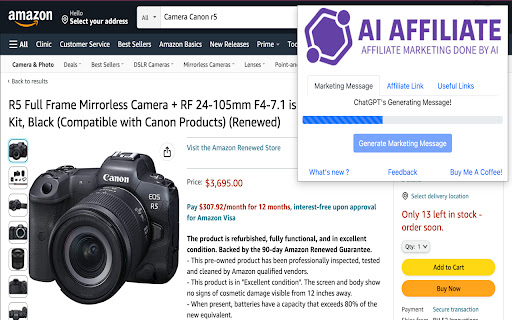


Powerful Chrome extension that streamlines your Amazon Affiliate marketing tasks. Introducing our powerful Chrome extension designed to streamline and enhance your Amazon Affiliate marketing tasks. With this tool, free users can enjoy up to 5 marketing message generations, 5 uses of the Decision Maker and 5 use of Reviews Summarizer feature per month, all powered by Chat GPT-3.5-Turbo. This ensures that you can effortlessly create automated affiliate marketing messages and benefit from AI-driven analysis of customer reviews to make informed product promotion decisions. What's more, a new feature has been introduced, allowing you to conveniently distill product reviews for enhanced purchase decision-making. Additionally, we've implemented our own product rating system, utilizing our proprietary algorithm to provide ratings. As a free user, you'll also have access to SEO-friendly hashtags that complement your marketing messages, enabling you to boost visibility and reach on social media platforms. Additionally, the extension simplifies the process of generating Amazon Affiliate links with customizable Affiliate IDs, making it easy to incorporate them into your marketing materials across various channels. For those seeking an even more powerful experience, an option to upgrade to the premium version is available. The premium version removes all limitations, allowing unlimited usage of marketing message generation and Decision Maker, now powered by the advanced Chat GPT-4-Turbo. This upgrade provides you with even more robust results, giving you a competitive edge in the world of Amazon affiliate marketing. The extension goes beyond marketing support, offering a convenient links feature that allows you to research and discover trending, best-selling, fast-selling, most-wished-for, and newly-released items on Amazon. This way, you can stay ahead of the competition and align your promotions with your target audience's interests. To make the process even more efficient, the extension offers automated voice-overs and downloadable files, enabling you to create engaging promotional videos effortlessly. The fast and user-friendly interface ensures a seamless experience, and you have the option to pin the extension for easy access, integrating it seamlessly into your daily workflow. We understand that ads can be a concern for users, but they are essential for us to keep the extension free and accessible to all. Rest assured that the popup ads are unobtrusive and serve as a means to support the extension's availability without any cost to you as a user. Whether you're an Amazon Associate or a general user, this Chrome extension is your ultimate tool to simplify affiliate marketing efforts, discover trending products, and make informed decisions. Download it today and take advantage of the new "Decision Maker" feature, generate SEO-friendly hashtags, and elevate your effectiveness in the competitive world of Amazon affiliate marketing. Disclaimer : The popup contains ads. This helps us to keep the extension free for users.

AI assistant
Use AI Assistant Chrome Extension for ai coding assistant and ai chat online productivity with smart, instant help in your browser. Use the Power of AI in Your Browser with AI Assistant – Your Smart Chrome Companion Welcome to AI Assistant, the ultimate ai chrome extension designed to supercharge your productivity, creativity, and curiosity. Whether you're coding, writing, researching, or just want to ask questions, our smart chatbot is ready to help—right from your browser. Now you can enjoy the ease of conversation with artificial intelligence while browsing, working, or learning. With just one click, unlock an intelligent assistant that does it all. Your All-in-One AI Assistant App in Chrome The AI Assistant app is more than just a chatbot. It combines the power of multiple tools into one sleek chrome chatbot. Whether you're looking for a free for pc, need assisted writing, or want an research assistant, this extension has you covered. With seamless integration into Chrome, AI Assistant becomes your always-available personal assistant, offering support for everyday tasks, schoolwork, professional projects, and more. Top Features of AI Assistant – Built for Everyone 1️⃣ Instant access to chat online from any tab 2️⃣ A powerful code assistant for developers 3️⃣ Easy-to-use interface, perfect for beginners 4️⃣ Fast answer generator for research and Q&A 5️⃣ On-demand chatbot and google assistant alternative Why Choose AI Assistant for Chrome? Fast and accurate answers to any question Intuitive design with no learning curve Versatile tool for students, professionals, and creators Great support for chat, questions, and real-time feedback Smart AI Coding Assistant for Developers If you’re a coder, the built-in this chat is your new friend. Need to debug, write snippets, or explore new languages? The code assistant helps you: ➤ Write clean, efficient code ➤ Fix bugs in seconds ➤ Learn new programming skills ➤ Generate examples and templates instantly Effortless Writing with AI Assisted Writing Tools ✍️ Whether you’re writing essays, emails, or content, the ai assisted writing features help you: Overcome writer's block Rewrite and improve your text Generate ideas and outlines Save time and boost quality With assistance, you can write smarter, not harder. Use AI Chatbot to Ask Anything, Anytime 🤖 Tap into artificial intelligence ask anything mode and start a conversation with artificial intelligence on any topic. Whether it’s science, tech, history, or life advice, just ask questions and get meaningful, accurate responses. ▸ Real-time ai chatbot ▸ Deep, thoughtful answers ▸ Great alternative to traditional search Perfect for Everyday Use Need to schedule your day? Just ask your personal assistant. Working on a report? Get help from your ai research assistant. Coding an app? Ask your chatbot. Learn How to Use AI the Easy Way AI Assistant helps you understand how to use through simple interactions. You’ll discover how assist can transform your work, learning, and browsing. Let the extension guide you into the future of inteligencia artificial right from Chrome. Free AI for PC Users – No Cost, Just Power This free chat for pc Chrome extension gives you premium features without hidden fees. Whether you’re using Windows, Mac, or Chromebook, your app is always ready to help. Boost Your Productivity With Assist AI in Chrome With this chatbot, your browser becomes a command center. Multitask like a pro with: • Quick answers to tough questions • Writing help, coding support, and brainstorming • Integration with daily tasks and workflows Chat Online – Always Available 💬 Use chatbot online when you need ideas, answers, or just want to talk. It’s your always-on chatbot. ▸ Available 24/7 ▸ Safe and secure ▸ Smarter every day Get Started with Chrome AI Assistant Now It takes just seconds to install the chrome. Add the extension, open a new tab, and start chatting with your intelligent partner. Whether you want to ask questions, get assistance, or use it as your go-to assistant app, it’s all just a click away. Join the AGI Revolution 🚀 Thousands are already using the chrome extension to stay ahead. Don’t fall behind. Embrace conversation with artificial intelligence, explore assist tools, and redefine how you work, create, and learn.

GPT Sales Assistant
Streamline Your Sales With ChatGPT. Introducing GPT Sales Assistant, a privacy-friendly Chrome extension that uses AI to generate entire emails and messages. It works on all websites and has enhanced support for Gmail. ✔️ Outcompetes all other tools in the market with the highest quality responses ✔️ Works on all websites, and even better on Gmail ✔️ Supports all languages Visit our website at https://gptsalesassistant.com and check out our product demo HOW TO USE ON ALL SITES: 1) Click on the GPT Sales Assistant extension icon 2) A popup window will appear 3) Briefly enter what you want to write about and hit the "Generate Response" button. HOW TO USE ON GMAIL: To generate an email reply in Gmail: 1) Go to Gmail, open an email, and reply to it. 2) Click the GPT Sales Assistant extension button in the Gmail reply box. 3) Briefly enter what you want to reply to and hit the "Generate Reply" button. To generate a new email in Gmail: 1) Go to Gmail, compose a new email. 2) Click the GPT Sales Assistant extension button in the Gmail textbox. 3) Briefly enter what you want to write an email about and hit the "Generate Email" button.

Prompti
Elevate your ChatGPT conversations with Prompti, a robust Chrome extension that aids in the construction of superior prompts. Unlock the Full Potential of ChatGPT with Prompti! Constructed with OpenAI's most advanced language model in mind, Prompti is a Chrome extension designed to seamlessly integrate with ChatGPT. Its main purpose is to enhance the quality of your interactions, providing guidance to craft efficient and impactful prompts. Why Prompti? ChatGPT is an incredible tool with vast potential, but getting the best out of it often depends on how well you phrase your prompts. Prompti offers an innovative solution to this challenge by offering tailored assistance to the user in constructing effective prompts, leading to more refined responses from ChatGPT. Key Features: Prompt Templates: Access an extensive collection of over 110+ pre-constructed prompt templates, primed for a diverse set of tasks. Tailored Inputs: Based on your chosen topic, Prompti provides tailored input suggestions that help craft more precise and effective prompts. Backend Prompting: Prompti takes prompt optimization a step farther by providing additional prompting based on the chosen topic, ensuring you secure the precise results you seek. Compatibility: Effortless integration with ChatGPT plugins with custom-made prompts designed to help you utilize the new features to their full potential User-Friendly Interface: Navigate with ease through our intuitive and user-friendly interface, suitable for both seasoned users and beginners. Unlock the Power of Precise Prompts Don’t let the complexity of prompt construction limit your interactions with ChatGPT. Let Prompti be your companion, guiding you to optimize your use of ChatGPT, and helping you generate more valuable, detailed, and relevant responses. Get started Today! Download Prompti - your personal ChatGPT companion, and make your interactions with ChatGPT more fruitful, engaging, and enjoyable.

AI Chrome Extension powered by ChatGPT - Magictool AI
Your All-in-One AI Chrome Extension featuring ChatGPT, AI Writer, Grammar Checker, Paraphraser, Youtube Summarizer +20 more. Get access to ChatGPT and GPT4o (paid), ask questions and get instant answers Proofread your writing with our Grammar Checker. Select any sentence on the page and get instant grammar check Write professionally using our AI Writer and Paraphraser which allows you to choose your writing style Summarize Youtube videos as well as Web Articles and PDF documents with the help of ChatGPT. Take beautiful Screenshots directly from your browser 🎁 Try it out now. You will get free credits "every day" to use our AI Chrome Extension. You need to "create an account" to use the extension. 1- Grammar Checker: Select text on any page to check grammar and spelling using ChatGPT 2- ChatGPT Access: you will be able to use ChatGPT every day 3- Chat with PDF documents using AI and PDF.js 4- Youtube Summary: Summarize Youtube Videos (Transcript and Comments) 5- Summarize Articles and Web Pages 6- GPT4o * 7- Generate AI Images 8- Data Scraper (Extract information from any page) 9- Magic Editor: Private AI Text Editor 10- Explain text 11- Youtube Video Dubbing using AI*: watch Youtube videos dubbed in other languages 12- Improve text: improve your writing including grammar and composition 13- Simplify language 14- Make Shorter 15- Make Longer 16- Paraphraser: paraphrase your writing in different styles 17- Summarize paragraphs 18- Continue writing 19- Add Emojis 20- Translate text (using Google translate) 21- Take Notes 22- String Manipulation (upper and lower case, length ..etc) 23- Magic Shortcut: invoke ChatGPT from any text field on the page by starting your line with the magic word "magic:" 24- Dark mode toggle: Force Dark Mode for any webpage 25- Add your own custom command/prompt 26- Reader View: Read web pages in a clutter-free format by removing ads, header, sidebars, and pop-ups. 27- Data Analysis (CSV/XLS): Analyze CSV and Excel files easily with the help of ChatGPT 28- Timer 29- Todo Checklist 30- AI Writer: write in different styles and lengths using AI 31- AI Paraphraser: Paraphrase your paragraphs to avoid plagiarism using ChatGPT in different writing styles 32- Screenshot Capture and Beautification * Pro & Pro+ plans only (GPT-4o Voice and Video NOT supported yet) ** We utilize ChatGPT Technology to provide our AI features 🙌 There is no other extension available that combines all of these features in one package This extension is free trial, you will receive daily credits to try all our AI tools, if you need more credits then please subscribe to any of our payment plans: https://magictool.ai/pricing 1- All non-AI tools on magictool.ai 2- Text manipulation features (ex: upper and lower case, etc...) 3- Take Notes 4- Magic Editor (without the AI features) 5- Data scraping for pages 6- Night mode toggle for pages 7- Todo list 8- Timer 9- Screenshot Capture and Beautification ⭐ Who is it for? In addition to ChatGPT, our AI tools helps you with the following: AI writer and paraphraser while choosing your style, Use a grammar checker to proofread your writing, spelling checker, simplifying language, and generating AI images, which are beneficial for writers, digital marketers and SEO professionals. Researchers can greatly benefit from the web article summarisation, grammar checking in academic writing, paraphrasing sentences, also summarizing pdf files using AI, enabling them to write and skim through lengthy documents efficiently with the help of ChatGPT. Finally you can also get a summary of a Youtube video to save time. Our AI tools can assist you in doing your homework, studying, essay writing, checking your grammar, paraphrasing, chatting with Chat GPT, summarizing Youtube Videos and PDF documents, note-taking, notepad, todo list and timers You can ask ChatGPT to write code snippets and explain code on Stackoverflow Access quick answers by summarizing web pages and lengthy PDF files. Enhance your workplace communication and write emails in a specific tone with the help of AI and ChatGPT. Conveniently check grammar, paraphrase paragraphs in different styles, and enjoy a smart notepad right in your browser, you can also extract data from pages such as google maps. Finally you generate a summary of Youtube videos. You can also take screenshots for any area in the page and even make it more beautiful before download ⭐ Privacy: why should I trust you with my privacy? 1- Each version of Magictool AI is strictly reviewed by Google 2- You can decide domains in which the extension will not be activated (via the "Private Domains" setting) Video: https://youtu.be/NwT_b5YGHxU 3- We collect minimal user information (only name and email) 4- Our code is minimal - less than 1/2 MB - since we only add the code we need 5- We don't use Google analytics and we don't load any external code in our extension, everything is included in the extension 6- We collect usage data (which features do you use) but we allow you to disable it from the settings, and we share what is sent to our servers with you 7- When using our AI features we send your input to Open AI servers so we can't guarantee how they use your text, please check their privacy policy if you are interested. 8- Please check our privacy policy for more details We really care about your privacy and we consider it our own
