
pjlccigfdcjmbgbmaidfgmchilpfomam


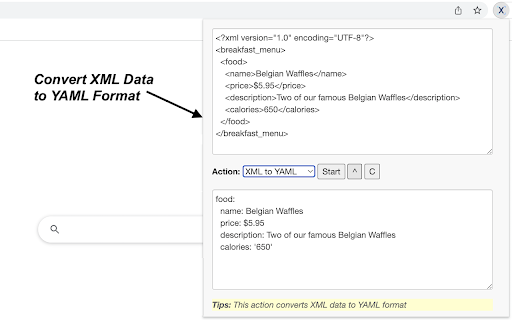
Sometimes you need to finish some simple tasks on XML processing like XML to CSV/JSON/YAML, or you need to manipulate XML data like prettifying, minifying or encoding them. This extension can help you get them done easily. Just paste what you want to process, and click on start button, then wait for the result to come out. It is fast and effective! 14 tools are available for now and more tools will be added to the extension in a regular basis. - Prettify XML: formats XML data to easy-to-read form - Minify XML: minifies and compresses XML data - XML to JSON: converts XML data to JSON format - JSON to XML: converts JSON data to XML format - XML to CSV: converts XML data to CSV format - CSV to XML: converts CSV data to XML format - XML to YAML: converts XML data to YAML format - YAML to XML: converts YAML data to XML format - XML to TSV: converts XML data to TSV format - TSV to XML: converts TSV data to XML format - Base64 Encode: converts XML data to Base64-encode format - Base64 Decode: converts Base64-encoded data to original XML - URL Encode: converts XML data to URL-encode format - URL Decode: converts URL-encoded data to original XML Enjoy the ease of use offered by our XML tools! Additionally, we've provided links to other tool extensions we've developed, including JSON, CSV and ChatGPT, for your convenience. CHANGELOG ========== Version 0.1.3 - 0.1.6 - Add new features - Update the list of more tools - Update google analytics Version 0.1.2 - 2023-04-06 - Refine plugin title and description

Text Tools
Sometimes you need to finish some simple tasks on text processing: change the case of free text, reverse a string, remove duplicate lines, or encode / hash text data. This extension can help you get them done easily. Just paste what you want to process, and click on start button, then wait for the result to come out. It is fast and effective! 25 functions are available for now and more will be added to the extension in a regular basis. - Lower Case: converts text to lowercase - Upper Case: converts text to uppercase - Title Case: capitalizes first character of each word - Count Characters: returns the number of characters in text - Count Words: returns the number of words in text - Count Lines: returns the number of lines in text - Character Frequency: returns character frequency in descending order - Word Frequency: returns word frequency in descending order - Reverse: returns text with its characters in the reverse order - Shuffle: returns text with its characters in a randomized order - Trim Line Start: removes whitespace from the beginning of each line - Trim Line End: removes whitespace from the end of each line - Trim Line: removes whitespace from both ends of each line - Add Line Number: counts lines and add the number to each line - Remove Empty Lines: removes empty lines from text - Remove Duplicate Lines: remove duplicates of any line from text - Strip HTML: strips all html tags from text - URL Encode: converts text to URL-encode format - URL Decode': converts URL-encoded data to original text - Base64 Encode: converts text to Base64-encode format - Base64 Decode: converts Base64-encoded data to original text - MD5 Hash: generates the MD5 hash of text - SHA1 Hash: generates the SHA1 hash of text - SHA256 Hash: generates the SHA256 hash of text - SHA512 Hash: generates the SHA512 hash of text Enjoy the ease of use offered by our text tools! Additionally, we've provided links to other tool extensions we've developed, including JSON, XML and ChatGPT, for your convenience. CHANGELOG ========== Version 0.1.4 - 0.1.7 - Add new features - Update the list of more tools - Update google analytics Version 0.1.3 - 2023-04-06 - Refine plugin title and description Version 0.1.1 & 0.1.2 - 2022-09-01 - Update plugin features and summary

Styled XML Viewer
Beautiful, readable formatting for XML files in the browser. Styled XML Viewer transforms your browser’s default raw XML display into a beautifully formatted, easy-to-read view. It automatically activates whenever you open an .xml file from the web. 📁 Also supports local XML files — just enable "Allow access to file URLs" for this extension in Chrome’s extension settings. ➕ Includes a raw view toggle, so you can inspect the original XML source anytime. ✔️ Take a moment to explore our beautifully styled Markdown viewer, "Markdown Primer" on the Chrome Web Store, with support for LaTeX maths and Mermaid diagrams. ✅ Syntax highlighting for tags, attributes, and text content ✅ Indented, color-coded nested elements for clear structure visualization ✅ Alternating background stripes for improved readability ✅ Lightweight and fast, with no external dependencies ✅ Completely free and open source 📌 Perfect for developers, analysts, and anyone who regularly works with XML data. No more struggling to read complex XML files — let Styled XML Viewer do the hard work for you! ➤ Styled XML Viewer supports not only .xml files but also common XML-based formats such as stylesheets, schemas, and service definitions. Created with help from ChatGPT.

Convert XML to CSV
Convert XML to CSV: Your Ultimate XML to CSV Converter Are you tired of manually converting XML files into CSV format? Look no further! Convert XML to CSV is the ultimate solution for all your XML to CSV conversion needs. This powerful Google Chrome extension is designed to make the process of transforming files seamless and efficient. Whether you're a data analyst, developer, or just someone dealing with XML files, this tool is your go-to converter. 1️⃣ User-Friendly Interface: Our extension boasts an intuitive interface that makes it easy for anyone to use it without any hassle. No technical expertise is required! 2️⃣ Fast and Efficient: Experience lightning-fast XML to CSV conversion with our optimized algorithms. Say goodbye to long waiting times and hello to instant results. 3️⃣ High Accuracy: Ensure that your data is accurately transformed. Our tool maintains the integrity of your data during the conversion process. 4️⃣ Secure and Reliable: Your data's security is our top priority. Conversion ensures that your files are handled with the utmost care and confidentiality. 5️⃣ Versatile Functionality: Whether you need to convert a single XML file to CSV or multiple xmls to csv, our extension can handle it all with ease. How to use it Effortlessly 🚀 It has never been easier. Follow these simple steps to transform your XML files into CSV format: 🔹 Install the Convert XML to CSV from the Chrome Web Store. 🔹 Open the extension and upload your file. 🔹 Click on the "Convert" button to initiate the conversion process. 🔹 Download your newly converted file and enjoy the convenience of having your data in a more accessible format. The Best Way to Convert 📈 When it comes to converting XML to CSV, our extension stands out as the best way to convert xml to csv. Here's why: ✔️ No Software Installation: Unlike other tools, it is a browser-based extension, eliminating the need for additional software installations. ✔️ Cross-Platform Compatibility: Whether you're using Windows, macOS, or Linux, our extension works seamlessly across all platforms. ✔️ Regular Updates: We continuously improve our extension to ensure it remains the best xml to csv converter available. ✔️ Customer Support: Our dedicated support team is always ready to assist you with any questions or issues you may encounter. Transform files with Ease 🌐 The process of transforming files can be daunting, but with Convert XML to CSV, it's a breeze. Our extension simplifies the task of converting xml to csv, allowing you to focus on what truly matters—analyzing and utilizing your data. Benefits of Using the extension 🔥 1️⃣ Time-Saving: Automate the tedious task of converting XML files to CSV, freeing up your time for more important tasks. 2️⃣ Increased Productivity: With quick and accurate conversion, you can enhance your workflow and boost productivity. 3️⃣ Improved Data Management: CSV files are easier to manage and integrate into various applications, making data handling more efficient. 4️⃣ Enhanced Data Accessibility: Transform files and make your data accessible to a wider audience, regardless of their technical expertise. 5️⃣ Seamless Integration: Our extension integrates smoothly with other tools and platforms, ensuring a seamless data conversion experience. How to Convert XML into CSV: A Step-by-Step Guide 📌 For those wondering how to do it, here's a detailed guide to help you through the process: 🔸 Step 1: Install the extension from the Chrome Web Store. 🔸 Step 2: Launch the extension and select the XML file you wish to transform. 🔸 Step 3: Click the "Convert" button to start the xml to csv conversion. 🔸 Step 4: Download the resulting CSV file and enjoy the benefits of having your data in a more versatile format. Q: Is it free to use? A: Yes, our extension offers a free version with essential features. For advanced functionalities, consider upgrading to the premium version. Q: Is my data secure during the xml to csv conversion process? A: Yes, we prioritize data security and ensure that your files are handled with the utmost confidentiality. Q: How often is the extension updated? A: We regularly update Convert XML to CSV to enhance performance and introduce new features. In conclusion, Convert XML to CSV is the ultimate tool for anyone looking to change file formats effortlessly. With its user-friendly interface, fast and accurate conversion, and robust security features, it's the best way to convert xml to csv. Don't let the complexity of XML files hold you back—transform your data with ease using our reliable xml to csv converter. Install it today and experience the convenience of seamless xml to csv conversion!

XML Formatter
Transform your XML files effortlessly with XML Formatter. This extension acts as an XML beautifier and viewer for easy reading. 🌟 Say goodbye to the headaches of tangled XML files with our Google Chrome extension, the ultimate XML formatter, beautifier, and viewer! 😊 Effortless Markup Beautifier: ⬛️ Transform your XML files into beautifully formatted and easily readable structures with just a single click. ⬛️ No more squinting at tangled messes; effortlessly beautify XML documents to perfection. ⬛️ Enjoy clarity and precision in your XML formatting experience. 🎨 Intuitive XML Viewer: - Delve into your data with our intuitive viewer. - Effortlessly navigate through your XML hierarchy, inspecting elements and attributes with clarity and ease. - Whether you're a seasoned developer or a curious novice, our viewer makes understanding a breeze. 🚀 XML Pretty Print Power: Leverage the power of pretty printing with our XML formatter. Achieve precise indentation and line breaks for neatly organized code. Present your data professionally and impressively. 💻 Online Convenience, Chrome Extension Speed: 🔹 Enjoy the convenience of an online XML viewer directly in your Chrome browser. 🔹 No need for bulky software downloads or tab-switching; access powerful formatting tools instantly. 🔹 Seamlessly integrate into your browsing experience for swift and efficient XML formatting. 💯 Our XML editor extension seamlessly integrates with your preferred XML formatter to boost productivity. This integration ensures that whether you're working online or on your desktop, our intuitive tools complement your workflow perfectly. By using our extension, you can streamline your editing process for maximum efficiency. 🔧 XML Formatting Made Simple: 1. Bid farewell to struggling with inconsistent formatting or manual adjustments. 2. Simplify the formatting process, saving time and frustration. 3. Let our tool do the heavy lifting while you sit back and relax. ▸ Flexible Formatting Options: 🔶 Tailor XML format to your preferences with customizable options. 🔶 Control indentation, line wrapping, and more for XML presentation on your terms. 🔶 Enjoy the flexibility of a personalized online XML formatter. 💰 Free and Unlimited: ♦️ Access our XML formatter for free, with unlimited usage. ♦️ Experience powerful XML formatting tools without breaking the bank. ♦️ Make data beautification accessible to everyone. 1️⃣ Online XML Formatter: Format XML files directly in your browser for ultimate convenience. Say goodbye to downloads and installations with our hassle-free online tool. Format eXtensible Markup Language files on the go, anytime, anywhere. 2️⃣ Streamlined Workflow: Boost productivity with a streamlined XML formatting workflow. Integrate seamlessly into your browser environment for effortless XML formatting. Keep your workflow smooth and efficient with our extension. 3️⃣ Precise Formatting: Achieve pixel-perfect online XML formatting with our advanced toolset. Maintain the integrity of XML files while improving readability. Align elements and maintain comments for clear and concise XML code. ➤ Our collaborative features make sharing beautifully formatted XML files effortless, fostering teamwork by ensuring that everyone can easily understand and work with data. This clear communication is further supported by our extension's seamless collaboration tools, enabling efficient teamwork and smooth project progress. ▸ Future-Proof: ① Prepare your eXtensible Markup Language files for the future with our extension. ② Ensure compatibility and readability across platforms and applications. ③ Archive and share data confidently with beautifully formatted XML. 🔗 Seamless Integration: ❗️Integrate our extension seamlessly into your Chrome browser setup. ❗️Enjoy a lightweight footprint and intuitive interface of the formatter for an enhanced browsing experience. ❗️Make our tool an indispensable part of your browsing routine. 🕗 Empower Your Development: ♻️ Equip your development team with the tools they need to succeed. ♻️ Facilitate faster debugging, clearer documentation, and smoother collaboration. ♻️ Empower your team to achieve their goals with confidence. 🕘 Efficiency at Scale: 🌀 Manage XML tasks of any size with ease. 🌀 Tackle single files or large-scale projects with lightning-fast processing. 🌀 Scale our extension to meet your online XML formatting needs effortlessly. 🕤 Stay Organized: ▪️ Keep your Markup files organized and easy to manage. ▪️ Spend less time deciphering code and more time building great software. ▪️ Maintain consistency and clarity in your XML editor online. ❗️In addition, we care about your comfort and eye health, so our extension also includes a dark mode option. 📮 Get in Touch: Have queries or suggestions? Don't hesitate to drop us a line at 💌 info.shift.dev@gmail.com. Try our extension now and transform your development or testing experiences!
