
gldnpappladoiccncpcekahipkockdee

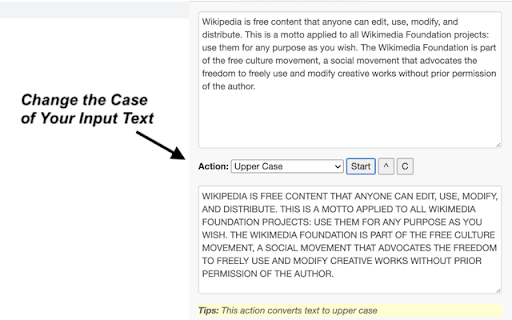
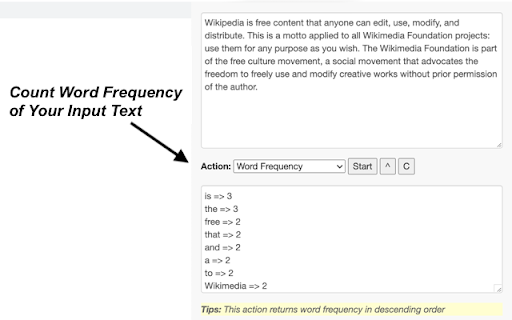
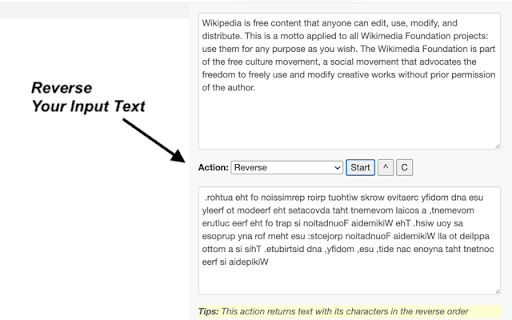
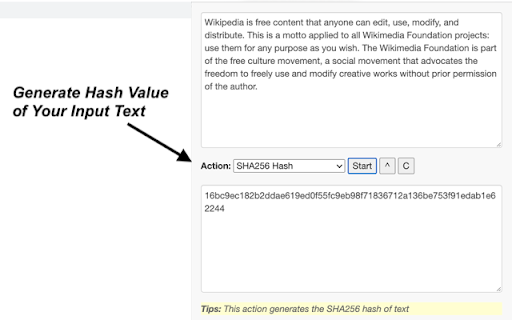
Sometimes you need to finish some simple tasks on text processing: change the case of free text, reverse a string, remove duplicate lines, or encode / hash text data. This extension can help you get them done easily. Just paste what you want to process, and click on start button, then wait for the result to come out. It is fast and effective! 25 functions are available for now and more will be added to the extension in a regular basis. - Lower Case: converts text to lowercase - Upper Case: converts text to uppercase - Title Case: capitalizes first character of each word - Count Characters: returns the number of characters in text - Count Words: returns the number of words in text - Count Lines: returns the number of lines in text - Character Frequency: returns character frequency in descending order - Word Frequency: returns word frequency in descending order - Reverse: returns text with its characters in the reverse order - Shuffle: returns text with its characters in a randomized order - Trim Line Start: removes whitespace from the beginning of each line - Trim Line End: removes whitespace from the end of each line - Trim Line: removes whitespace from both ends of each line - Add Line Number: counts lines and add the number to each line - Remove Empty Lines: removes empty lines from text - Remove Duplicate Lines: remove duplicates of any line from text - Strip HTML: strips all html tags from text - URL Encode: converts text to URL-encode format - URL Decode': converts URL-encoded data to original text - Base64 Encode: converts text to Base64-encode format - Base64 Decode: converts Base64-encoded data to original text - MD5 Hash: generates the MD5 hash of text - SHA1 Hash: generates the SHA1 hash of text - SHA256 Hash: generates the SHA256 hash of text - SHA512 Hash: generates the SHA512 hash of text Enjoy the ease of use offered by our text tools! Additionally, we've provided links to other tool extensions we've developed, including JSON, XML and ChatGPT, for your convenience. CHANGELOG ========== Version 0.1.4 - 0.1.7 - Add new features - Update the list of more tools - Update google analytics Version 0.1.3 - 2023-04-06 - Refine plugin title and description Version 0.1.1 & 0.1.2 - 2022-09-01 - Update plugin features and summary

Faro
Save pages with highlighted taglines - Bookmark manager ⨯ web highlighter Chaos in your bookmarks? Can't find what you want? They end up gathering dust? Or you don't even try and end up with 100s of open tabs? Faro is made to fix that! It's the simplest way to save & keep track of pages. With it, even thousands of saves don't get overwhelming. When saving, you highlight a sentence to act as a tagline. It helps you remember what the page is about and why you saved it. If unsure - just save whatever sentence you're reading. All saves appear on your dashboard. They come most-recent-first by default, so you don't forget what you recently saved. You can pick up your reading where you left off - no need for a separate reading list. You can also pin & archive to further arrange it. Organize them with tags. Since you're reminded what you saved and why, you can do it later. It makes your saves much easier to manage than bookmarks. Faro supports nested tags (eg: recipes/vegan), so combines the best of tags and folders. Clicking a save takes you right back to your highlight - especially useful for longer articles. Also: ➣ export to bookmarks to keep them if you uninstall Faro ➣ copy links to highlights and share them or paste into Notion, Obsidian, etc. ℹ️ About your data: When installing you can read: "it can read and change all your data on all websites" The only information that ever gets uploaded (when signed in) when you use it to save: ➣ Open page address ➣ Saved highlight/quote - what's visible in the sidebar ➣ Timestamp ➣ Debug info e.g. errors The extension also keeps track the currently open tab for each window - to update the sidebar as you navigate - but doesn't save or upload that data.

Text Tools
- Uppercase - converts all characters to upper case - Title Case - capitalizes every first character of word - Lowercase - converts all characters to lower case - Count characters - counts all characters in text - Count words - counts words in text - Count lines - counts new lines in text - Rotate 13 - Moves each character with 13 positions forward in the ASCII table - Sort lines alpha (case insensitive) - Sorts text lines alphabetically ignoring character case - Sort lines alpha - Sorts text lines alphabetically - Word frequency - How many times each word is used - Character frequency - How many times each character is used - Column from table - Allows you to get text column from HTML table. Copy and paste the table content in the text field and type the column number you want to extract then press Start - Trim lines start - Removes whitespace from beginning of lines - Trim lines end - Removes whitespace from end of lines - Trim lines - Removes whitespace from beginning and end of lines - Replace text with new line - Replaces string with new line - Replace text - Replaces one string with another - Format JSON - Pretty format JSON string - URLEncode - Encode string as URL safe string - URLDecode - Decode URL safe string as regular string - base64encode - Encode text as base64 - base64decode - Decode base64 sting - Add line numbers - Add line number before every line of text - Split text - Splits text by separator - Reverse text - Reverses text - Generate numbers - Generates numbers withing the provided range - Unix to date - Converts UNIX timestamp to Datetime string - Identify Hash - Try to identify hash string - Prefix/Suffix lines - Adds prefix and/or suffix to each line of the text - Format Numbers - Format numbers according to the current browser locale - Underscore - adds underscore to the text - Strikeout - strikes out the text - Shuffle - Shuffle the lines of the text - Remove duplicate lines - Removes duplicate lines from the text - Expand placeholders template 1.0.27 - Added function to format US phone numbers 1.0.26 - Added function to strip non-alphanumeric characters 1.0.25 - Migrated to manifest v3 1.0.24 - Removed automatic clipboard support 1.0.23 - Removed GoogleAnalytics 1.0.22 - Added slugify function 1.0.21 - Added Indent lines with spaces; Result is auto-selected after the operation 1.0.20 - Added replace regexp; Added expand template 1.0.19 - Added Remove empty lines 1.0.18 - Removed dependency on jQuery; 1.0.17 - Added trim lines start and end as separate commands to trim white-space from the beginning or the end of each line 1.0.16 - Added Remove duplicate lines 1.0.15 - Added case insensitive line sort 1.0.13 - Added shuffle function 1.0.12 - Added underscore and strikeout functions 1.0.11 - Save/Restore last used tool; 1.0.10 - Added auto number formatting; 1.0.9 - Added prefix/suffix to each line function; 1.0.8 - Fixed replace; Added replace with new line; 1.0.7 - Strip (most of) punctuation from word frequency; 1.0.6 - Frequency lists are now sorted 1.0.5 - Added Title Case convert. Your text is populated from the clipboard; 1.0.4 - Added Unix timestamp to date converter; 1.0.3 - Cleaner icon. Removed links from descriptions; 1.0.2 - Small interface improvements; 1.0.1 - Working Trim lines;

Space Remover: Text Field Trimmer
Strips leading and trailing spaces from text boxes This is a Google Chrome extension that removes leading and trailing spaces from all text input fields(apart from password fields) on the current webpage. The extension will display the number of replacements made on its icon in the toolbar. Usage: 1. Web Surfing, Bhai Sahab(Brother): You're surfing the interwebs and stumble upon a webpage brimming with text input fields. Maybe it's a form, maybe it's a online form, or the web equivalent of Mount Everest: The dreaded Jenkins Nodes and Clouds page. This beast is sprawling with text input fields, each one begging for your attention. It's a veritable jungle of AWS MI ID's , instance types, and whatnot. 2. Oops, Thoda Extra Ho Gaya(I've added a bit too much) : In the heat of the moment, like a little extra spicy masala to the biryani, you find that you've unintentionally added leading and/or trailing spaces to one of the text fields. 3. Koi Nahi, Sahi Kar Denge(No Worries): This is where the Space Stripping Extension comes in to save the day.Just give a little click on the extension's icon in the toolbar, like a tap on the shoulder. 4. Aur Lo! Kamaal Ho Gaya(Voila): In a jiffy, the extension swings into action, removing all leading and trailing spaces from your text fields (password fields are a no-go area, bhai - it's like the secret recipe to your mom's paneer butter masala). Aur sone pe suhaga (Cherry on top): The extension will also keep a tally of its victories, displaying the number of replacements made right on its icon in the toolbar. Now, you're back in the driver's seat, ready to tackle Jenkins without fear of your agents breaking down. Jenkins may not warn you about those sneaky spaces, but with the Space Stripping Extension, you've got your own personal space guardian!

Text Convert Case
Convert case, slugify data of the selected text Convert case of the selected text to uppercase, lowercase, sentence case, title case and slugify data of the selected text. Select text on any web page, right click and select the Text Convert Case menu choose UPPERCASE, lowercase, Sentence case, Title Case, Slugify and get the result on the clipboard.
