
mpcpnbklkemjinipimjcbgjijefholkd
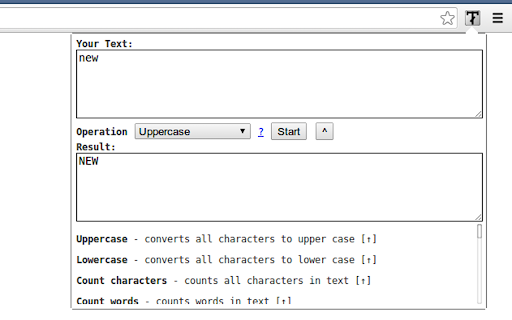
- Uppercase - converts all characters to upper case - Title Case - capitalizes every first character of word - Lowercase - converts all characters to lower case - Count characters - counts all characters in text - Count words - counts words in text - Count lines - counts new lines in text - Rotate 13 - Moves each character with 13 positions forward in the ASCII table - Sort lines alpha (case insensitive) - Sorts text lines alphabetically ignoring character case - Sort lines alpha - Sorts text lines alphabetically - Word frequency - How many times each word is used - Character frequency - How many times each character is used - Column from table - Allows you to get text column from HTML table. Copy and paste the table content in the text field and type the column number you want to extract then press Start - Trim lines start - Removes whitespace from beginning of lines - Trim lines end - Removes whitespace from end of lines - Trim lines - Removes whitespace from beginning and end of lines - Replace text with new line - Replaces string with new line - Replace text - Replaces one string with another - Format JSON - Pretty format JSON string - URLEncode - Encode string as URL safe string - URLDecode - Decode URL safe string as regular string - base64encode - Encode text as base64 - base64decode - Decode base64 sting - Add line numbers - Add line number before every line of text - Split text - Splits text by separator - Reverse text - Reverses text - Generate numbers - Generates numbers withing the provided range - Unix to date - Converts UNIX timestamp to Datetime string - Identify Hash - Try to identify hash string - Prefix/Suffix lines - Adds prefix and/or suffix to each line of the text - Format Numbers - Format numbers according to the current browser locale - Underscore - adds underscore to the text - Strikeout - strikes out the text - Shuffle - Shuffle the lines of the text - Remove duplicate lines - Removes duplicate lines from the text - Expand placeholders template 1.0.27 - Added function to format US phone numbers 1.0.26 - Added function to strip non-alphanumeric characters 1.0.25 - Migrated to manifest v3 1.0.24 - Removed automatic clipboard support 1.0.23 - Removed GoogleAnalytics 1.0.22 - Added slugify function 1.0.21 - Added Indent lines with spaces; Result is auto-selected after the operation 1.0.20 - Added replace regexp; Added expand template 1.0.19 - Added Remove empty lines 1.0.18 - Removed dependency on jQuery; 1.0.17 - Added trim lines start and end as separate commands to trim white-space from the beginning or the end of each line 1.0.16 - Added Remove duplicate lines 1.0.15 - Added case insensitive line sort 1.0.13 - Added shuffle function 1.0.12 - Added underscore and strikeout functions 1.0.11 - Save/Restore last used tool; 1.0.10 - Added auto number formatting; 1.0.9 - Added prefix/suffix to each line function; 1.0.8 - Fixed replace; Added replace with new line; 1.0.7 - Strip (most of) punctuation from word frequency; 1.0.6 - Frequency lists are now sorted 1.0.5 - Added Title Case convert. Your text is populated from the clipboard; 1.0.4 - Added Unix timestamp to date converter; 1.0.3 - Cleaner icon. Removed links from descriptions; 1.0.2 - Small interface improvements; 1.0.1 - Working Trim lines;

Awesome Window & Tab Manager
Displays a list of all windows and tabs open in Google Chrome. Allows filtering, sorting, refreshing, bookmarking, and saving. Awesome Window & Tab Manager does the following: (1) - Tells you how many Chrome windows and tabs are open. (2) - Displays all the windows and tabs. (3) - Allows text filtering (searching) on the windows and tabs. (4) - Allows alphabetic sorting of tabs. (5) - Categorizes tabs by window, domain, or category. (6) - Categories are determined by your own bookmark structure. (7) - Window, domain, or category groups can be refreshed or closed. (8) - All windows and tabs can be saved and restored later. (9) - Window, domain, or category groups can be saved and restored later. (10) - Unbookmarked tabs can be bookmarked. Note: Google Chrome version 16 or higher is required for tab refreshing functionality.

Extentie - extension manager
A simple and elegant Chrome extension manager allows you manage your extensions in a popup window. Extentie is a simple and beautiful tool that allows you to toggle and manage Chrome extensions in a popup. Latest update: - Now you can create your own groups to manage your extensions - Revamped from ground up, added more features

TELL.WTF - text symbols & fancy fonts
Transform your plain text with fancy font generators and style your text using symbols. Texteable and compatible ➊ (ᴏᴘᴛɪᴏɴᴀʟ) Select some text on some page. For example, some text you have just written in a text box ➋ Open this extension using ALT+T after setting up shortcut, or by clicking it. ➌ Eᴅɪᴛ and sᴛʏʟᴇ your text using symbols. ➍ (ᴏᴘᴛɪᴏɴᴀʟ) Paint to find and add symbols and emoji to the text. ➎ Copy-paste your text into any instant messenger, chat, wherever.

ToggleCase Text Transformer
Text transformation tool ToggleCase Text Transformer provides an quick, easy way to transform text. Current conversion types supported: -Toggle case (sticky caps) -Sentence case -Title case -Upper case -Lower case
