
pjjfdmpnghkheenbgomjlneepdcbbakj
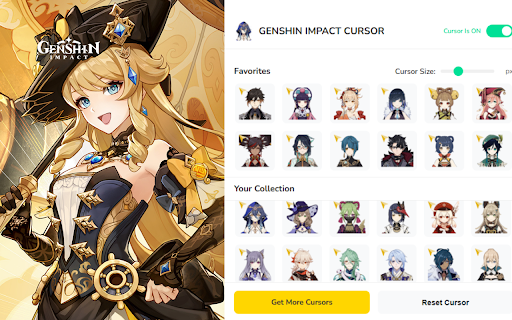


Customize your browsing experience with 80 unique Genshin Impact-themed cursors Genshin Impact Cursor is the ultimate way to personalize your browser! 🖱️✨ Make your browsing experience more magical with 80 beautifully crafted Genshin Impact-themed cursors! 🔹 Features 🎨 80 Unique Cursors – Explore a wide range of cursors inspired by Genshin Impact characters, elements, and weapons. ⭐ Favorites System – Quickly access your most-used cursors anytime. 📏 Adjustable Size – Choose any size from 16px to 128px for optimal comfort. ⚡ One-Click Change – Apply your chosen cursor instantly with a single click. 🔘 On/Off Toggle – Easily enable or disable custom cursors as needed. 🚀 Lightweight & Fast – Smooth performance without slowing down your browser. 🎯 Why Choose Genshin Impact Cursor? 🧩 Customization – Personalize your browser with your favorite characters. 🌈 Fun & Immersive – Bring the Genshin universe to life every time you browse. 🖥️ User-Friendly Interface – Simple and clean design makes cursor switching easy. 🧭 Massive Collection – Enjoy a growing set of 80 unique cursor designs. 📌 Note: This extension is not affiliated with HoYoverse or miHoYo. All content is fan-made and created with love for Genshin Impact fans.

Custom Cursor Trails
Add sparkle to your browsing experience with Custom Cursor Trails! A shiny star trail will follow your mouse cursor on the screen. Enhance your browsing experience with the fun and exciting Custom Cursor Trails browser extension, designed to add sparkle and personality to your mouse cursor. This user-friendly extension allows you to choose from an array of glitter, stars, and other unique trails to follow your cursor, making your time online more enjoyable and entertaining. With Custom Cursor Trails, you can effortlessly customize your cursor to match your mood or style. Choose from a diverse range of options, including shimmering glitter trails, twinkling stars, and playful animations, transforming your everyday browsing into a dazzling and interactive experience. This easy-to-use browser extension not only adds an element of excitement to your online activities but also helps you navigate through web pages with ease. The eye-catching trails make it simple to locate your cursor on busy pages or during multitasking sessions, ensuring a seamless and engaging browsing experience. Installing the Custom Cursor Trails extension is a breeze, and with regular updates, you can always look forward to new and exciting trail designs. To get started, simply add the extension to your browser and explore the extensive collection of cursor trails available. Personalize your cursor and let it shine, making every click an adventure. Discover the joy of adding glitter, stars, and other delightful trails to your mouse cursor with the Custom Cursor Trails browser extension – a simple yet impactful way to elevate your browsing experience and express your unique style. ------------------- ! After installing the extension, refresh previously opened tabs to use it on those pages. Note that the extension may not work on Chrome Web Store pages or the home page. Open another website (e.g., google.com) to test the extension.

Custom Scrollbars
Give your browser a personal touch with customized scrollbars! Give your browser a personalized touch with custom scrollbar colors! You can select from any range of colors and toggle between the default width and thin scrollbar... or hide it altogether if that's what floats your boat.

Custom Cursors for Chrome
Enhance your Chrome experience with custom cursor. Give your mouse cursor a unique touch by replacing it with a custom cursor. It's such a cute custom cursors for Chrome. Show your individuality with the bright and gorgeous mouse pointer on every webpage. Forget about the boring and simple cursor that has many years to appear on the display. Now you are able to change your mouse pointer to something pink and cute ;) Forget the boring default mouse pointer, because now it can be something more! Something to inspire you, cheer you up and just make you happy. We're the Cute Cursors crew and we've made it our mission to pimp your cursor! We have breathed even more life into our mouse cursors. And so much so that now they have become alive. They shimmer in colors, move, spin, dance, and most importantly give even more expression and positive emotions. Custom cute cursors is a great extension for Chrome that lets you change your browsing experience by creating your own mouse pointers. With the library of this extension, you can find anything to suit your style, whether it's a set of animal symbols or something else entirely. Change your cursor now and get ready for an awesome experience! 5 reasons why you should install the Custom Cursors for Chrome extension: 1. Personalization - extension Custom Cursors for Chrome allows you to personalize your browsing experience by giving your mouse pointer a unique look. 2. Aesthetics - If you're someone who likes to pay attention to the little details, then this extension is perfect for you. Customized cursors can add a touch of aesthetic appeal to your browsing experience. 3. Easy to use - extension Custom Cursors for Chrome is incredibly easy to use. Simply install the extension and select your preferred cursor design. There's no technical knowledge required to use the extension. 4. Fun - Custom Cursors for Chrome can add a fun element to your browsing experience. With a variety of creative cursor designs available, you can swap out your mouse pointer design whenever you like to keep things interesting. 5. Improved visibility - If you struggle to see the default mouse cursor on your screen, then changing it to a customized design could improve your visibility. The increased visibility of a custom cursor can help you keep track of your mouse movements more easily. Attention! Make sure you use the Cute Cursors extension on any web page other than the Chrome Web Store, Google internal pages, and the Chrome home page, as Google policy prohibits the use of custom cursors on these pages.

Cursor Trails - Custom Cursor Trails
Add a touch of magic to your browsing with Custom Cursor Trails! A sparkling trail of stars will follow your cursor Customize your browsing experience with the Custom Cursor Trails extension! Are you bored with the standard mouse cursor? With Custom Cursor Trails, you can now add a touch of sparkle and vibrant trails to your cursor, transforming every movement on your screen into a festive experience! This browser extension creates stunning and colorful trails that follow your cursor, enhancing your browsing experience and making it more lively and enjoyable. Why should you consider trying Custom Cursor Trails? - Simple installation: Adding the extension takes just a few seconds. Once it's in your browser, you're ready to enjoy a new experience! - Variety of effects: Custom Cursor Trails features a broad selection of effects – from sparkling glitter to twinkling stars. You can quickly change trails to suit your mood and style. - Unique personalization: Give your cursor a personal touch. Select from numerous options and settings to make your cursor truly yours. - Better navigation: With colorful trails, you’ll never misplace your cursor among open tabs or while multitasking. Easily locate your cursor on any webpage! - Custom trail builder: Our website includes a builder where you can create your own unique cursor trails that fit your preferences. 💫 An extension for any mood 💫 Whether you want to add a bit of magic to your workday or just entertain yourself while browsing web pages, Custom Cursor Trails is here to help. Choose from sparkling glitter, stars, and other delightful animations that will add fun and brightness to every click. 🚀 How does it work? 🚀 - Install the extension: Go to your browser's extension store and add Custom Cursor Trails. - Refresh tabs: After installation, be sure to refresh previously opened tabs to use the new features on those pages. - Choose and customize: Go to the extension settings and choose your favorite custom cursor effects. You can also use the constructor on our website to create your trails. - Enjoy: Use your new, bright cursor and enjoy the enhanced browsing experience. 🌐 Available cursor trail collections on our website 🌐 On our website, you'll find a vast collection of cursor trails. From classic glitter and stars to unique animations created by our users. With constant updates, you'll always have access to new and exciting designs. Personalize your cursor with our ready-made collections or create something unique using the trail constructor. Our popular collections include: 1. Suspect Trails: Among Us Cursor Collection: Fun trails designed for fans of the Among Us game. 2. Circle Approach: Cursor Trail Collection: Elegant and minimalist trails shaped like circles. 3. Journey's Beginning: Cursor Trail Collection: Inspired by travel and the thrill of new discoveries. 4. Abstract Whispers: Cursor Trail Collection: Abstract and artistic trails for those who appreciate creativity. 5. Sparkling Trails: Cursor Trail Collection: Shimmering trails for those who enjoy bright effects. 6. Autumn Breeze: Cursor Trail Collection: Trails inspired by autumn that evoke warmth and coziness. 7. Winter Wonderland: Cursor Trail Collection: Winter-themed trails that create a festive atmosphere. 8. Raindrop Rhythms: Cursor Trail Collection: Trails shaped like raindrops for a soothing effect. 9. Feline Footprints: Cursor Trail Collection: Cat paw trails perfect for cat enthusiasts. And this is just part of our collections! We have many other options that are constantly updated with new designs. Custom Cursor Trail Constructor ✨ Our constructor allows you to create your unique cursor trails. You can choose colors, shapes, effects, and animations to create something truly special. It's the perfect way to express your creativity and add even more individuality to your browser. 🔧 Regular updates and support 🔧 We are constantly working on improving our extension and adding new features. With regular updates, you'll always have access to fresh and exciting trail designs. Our support team is always ready to help you with any questions or issues you may encounter. ⚠️ Note ⚠️ After installing the extension, don't forget to refresh previously opened tabs to use it on those pages. Please note that the extension may not work on Chrome Web Store pages or the browser's home page. To test the extension, open another website like google.com. Don't waste any time - try Custom Cursor Trails today and let your cursor shine! ✨ Functionality: * Open on site and Rating on CWS page * * More products * * Promo *
