
pjikogceiofjfblflbjifdiepfgcfmmd
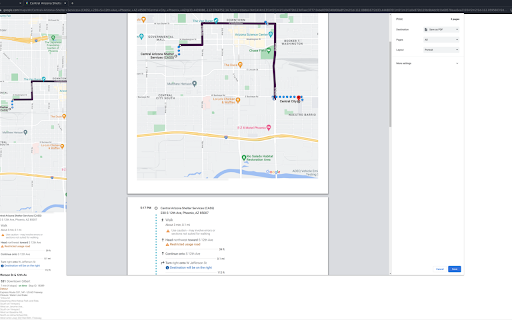
Printing Google Maps sucks. This extension makes it better. Currently there is an issue with Google Maps printing that causes the map to be split out along multiple pages, with much of the route not even appearing in the final printed result. Furthermore, directions are haphazardly interleaved. With this extension, it is possible to print the map on its own page, and the directions on accompanying pages. Instructions: Find and select a route. Press P to begin printer formatting. Adjust the map as necessary. Press P again to print.

Power Close
A browser extension, for the tab addict, to close all tabs with urls containing a keyword or a domain name. An extension, for the tab addict, to close all tabs with URLs containing a keyword or a domain name. For example, if you have many facebook tabs open and not in order, you can just use this extension, write "facebook.com", hit enter and voila, all facebook tabs are now closed!

Slides Captions
Slides Captions allows you to turn Google Slides into a full screen captioning tool idea for those who have hearing loss, auditory processing disorders, or foreign language learners. It allows you to: • Choose the font, • Line spacing, • Font size • Font colours, The extension puts you in control of your Google Slides Captions. To use the extension load your presentation by using /present in the URL with Google Slides, enable captions and then click the extension icon. Preferences can be set by right clicking on the extension icon. You can then enter full screen if you wish. - In a school auditorium, it can be used for providing captions on a projector or TV for students with hearing loss, or auditory processing issues. - In an office, it can be used for captioning a meeting or presentation - At a comedy club, it could be used for captioning the comedy show - There are many other possible uses for the extension. If you're enjoying Slides Captions, try out Zip Captions our browser based dedicated tool at https://zipcaptions.app

Giistr
Giistr is the ultimate solution to instantly create unique summaries of any text just by highlighting it. Giistr gives you the power to quickly and easily highlight text and get a summary instantly within seconds. No more wasting time scrolling through pages of text and trying to make sense of it all. With Giistr, you can get the gist of any text quickly and accurately. This revolutionary summarizing tool will save you time and energy. It quickly scans through the text and extracts only the necessary information for you. This way, you don't have to read through endless paragraphs and pages of text to get the gist of what's being said. Giistr is the perfect solution for busy professionals, students, and anyone who needs to quickly and accurately summarize any text. You can rely on it to save time and energy while keeping you informed on the essential points of a text. So, why wait? Get Giistr now and start summarizing! Once Installed simply highlight any content, right click and you will notice an action "Summarize", select this and a pop-up will show. With Giistr you can summaries up to 3 times per day with a limit of up to 2,500 words per summary.

Share To Google Maps
This Chrome extension enables you to share any address available on any of the websites to Google map. Share to Google Maps Chrome extension revolutionizes your browsing experience by seamlessly integrating web page addresses and locations with Google Maps. With this powerful extension, you can effortlessly share addresses or locations from web pages to Google Maps for quick navigation or further exploration. Discover a convenient and efficient way to access location information right from your browser. >>Instant Address Integration: Easily share addresses or locations from web pages to Google Maps with a single click. >>Effortless Navigation: Seamlessly transition from browsing to navigating, as your desired location opens directly in Google Maps. >>Enhanced Exploration: Explore the surroundings of any location by effortlessly transferring it to Google Maps for further discovery. >>Streamlined Workflow: Save time and effort by eliminating the need for manual copy-pasting or typing of addresses. >>Install the Share to Google Maps Chrome extension from the Chrome Web Store. >>Upon installation, the extension integrates seamlessly into your browser. >>Browse the web and come across an address or location you want to explore on Google Maps. >>Right-click on the address or location and select "Share to Google Maps" from the context menu. >>Sit back and let the extension do the work! The selected address or location will open in Google Maps, ready for your exploration. Upgrade your browsing experience with the Share to Google Maps Chrome extension today. Effortlessly integrate web page addresses and locations with Google Maps, making navigation and exploration a breeze. Simplify your workflow and discover a seamless way to access location information right from your browser.
