
pjdceihncicancgcmajdigmlejhdkfcf
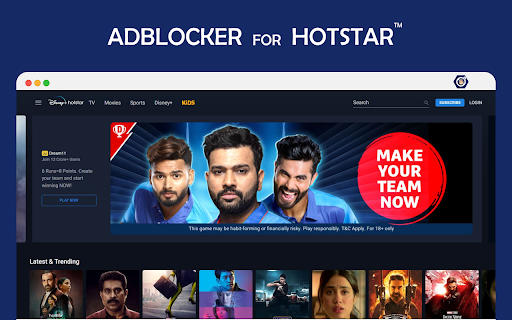
Blocks Ads on Hotstar and YT AdBlocker for Hotstar & YouTube: Seamless Ad-Free Streaming Install the Hotstar Adblocker extension to remove ads from Hotstar for free. Yes, watch your favorite Hotstar shows and movies without ads. Now the extension also blocks ads on multiple platforms like Hotstar and YouTube pages. Experience Uninterrupted Entertainment Tired of interruptions during a high-stakes cricket match or the climax of a movie? This extension is a lightweight, powerful tool designed to provide a smooth viewing experience by automatically filtering out intrusive advertisements. Whether you are catching up on the latest blockbusters or streaming live content, we ensure the focus stays on your screen. Key Features #Total Ad Removal: Blocks pre-roll, mid-roll, and overlay ads on Hotstar instantly. #Multi-Platform Support: Enhanced compatibility to block video ads and banners on YouTube and other streaming sites. #Faster Loading: By stopping heavy ad scripts, your videos load faster and consume less data. #Live Sports Ready: Watch live matches without the lag or distraction of repetitive commercial breaks. #Zero Configuration: Works right out of the box—just install and enjoy. How to Use 1.Add to Chrome: Click the "Add to Chrome" button. 2.Pin for Ease: Pin the extension icon to your browser toolbar for quick access. 3.Enjoy: Open Hotstar or YouTube, and the ads will be gone automatically. Why Choose This Extension? We believe entertainment should be seamless. By eliminating interruptions, you save time and stay immersed in your favorite content. Our extension is regularly updated to stay ahead of site changes, providing you with a reliable, ad-free environment 24/7.

Spending Calculator for Swiggy™ and Zomato™
Zomato™ and Swiggy™ spending calculator to keep track of food expenses. In 2025, tracking your food expenses has never been easier! Track Food Expenses on Swiggy™ & Zomato™ Instantly! The Spending Calculator for Swiggy™ and Zomato™ is a handy Chrome extension for Swiggy expenses and food order tracker extension designed to help you monitor your food spending on India’s top food delivery platforms. Whether you’re looking to track food spending online, calculate your Swiggy™ expenses, or get insights into your total spending on Zomato™, this tool has got you covered. With just one click, you can calculate your expenditure, view year-wise data, and even uncover your top food orders. Perfect for those who want to budget food expenses and better understand their spending habits, this extension makes managing food expenses easy and transparent. Calculate Total Spending: Instantly get a summary of all your orders and calculate Swiggy expenses or your total spending on Zomato. Top Orders Insight: Displays the top 5 orders you’ve spent the most on using the Swiggy and Zomato expense calculator. Year-wise Analysis: View spending trends by year to understand how your food habits evolve with this food expense tracker. Real-Time Recalculation: Recalculate your spending total anytime for up-to-date information. How to Use for Swiggy™: Install & Pin: Add the Swiggy spending tracker extension and pin it to your Chrome browser. Visit Swiggy™: Log in and navigate to the “My Orders” section. Scroll: Scroll to load all orders or as many as you want. Calculate: Click the extension icon and select “Find Total Spending” to use the Swiggy and Zomato expense calculator. How to Use for Zomato™: Install & Pin: Add the extension and pin it to Chrome. Visit Zomato™: Log in and click “Find Total Spending” in the extension to use the Zomato spending calculator. Wait a Moment: The calculation time depends on your order history volume. This extension is a must-have for anyone looking to track food spending online, budget food expenses, or stay informed about their Swiggy™ and Zomato™ orders. Install now to take control of your spending habits. 1. What does the Spending Calculator for Swiggy™ & Zomato™ do? This tool calculates your total spending on food orders made through Swiggy™ and Zomato™, offering insights into your expenses over time. 2. Does this extension work with other food delivery platforms? Currently, it is designed specifically for Swiggy™ and Zomato™. No, all calculations are performed locally on your browser and are not stored or shared. 4. Does it work with the mobile versions of Swiggy™ and Zomato™? No, this extension is compatible only with the desktop browser version.

Free Blocker - Ad blocker & Ads Remover
Block ads on YouTube, Hotstar, MX Player, and more. Enjoy cleaner browsing, fewer distractions, and faster page loads — 100% free. Block video ads, banner ads, and pop-ups across all websites for a faster, cleaner, and more private browsing experience. 🌐 Domain-Based Control — Turn blocking ON/OFF for specific websites ⚙️ Advanced Settings — Fine-tune blocking rules and customize your experience (coming soon) 🔗 Redirect Extension link to Redirect Request Works instantly on YouTube, MX Player, Disney+ Hotstar, and more Improves page speed and video playback quality No signup, no tracking, and completely free forever Lightweight and privacy-friendly — uses only local processing 🧩 Try the Latest Update Block more ads, view your live stats, and take full control of your browsing. Experience the web the way it should be — fast, clean, and ad-free.

Always active Window - Always Visible
Simulate all whitelisted browser windows as active by spoofing the visibility state event and more! [Breaking Change] Version 0.4.0 and above. The extension must now be enabled for each hostname individually. This adjustment enhances the extension's performance, as the always-active feature can disrupt websites. To activate it, open the page requiring the always-active feature in a browser tab and click the action button once. The page will refresh, and the action button will turn blue. This extension protects against web pages tracking the activity state of the page. Some websites use this track to only offer services when the tab is active. By installing this extension a small script is injected into every webpage which overwrites the "document.visibilityState", and "document.hidden" properties to pretend the tab is always in the active state (document.visibilityState = 'visible' and document.hidden = false). This is useful for the webpages that check your visibility state before loading resources like many music webpages. By installing this extension even if the page is opened in the background page, the player will start immediately like the page is loaded on an active tab. Supported Events: 1. visibilitychange 2. webkitvisibilitychange (only on Chromium browsers) 3. mozvisibilitychange (only on Firefox browser) 4. blur (some websites require the user to keep the tab focused) 5. mouseleave (some websites use this method to make sure the user pointer is inside the window)

Mute Ads on JioCinema
Enjoy uninterrupted live cricket on JioCinema without the annoyance of repetitive ads and their disruptive sounds. The Mute Ads on JioCinema extension helps you watch IPL cricket matches with ease, automatically muting ads during the live stream and unmuting when the ads are over. Say goodbye to the frustration caused by noisy ads and experience a seamless cricket viewing experience with this handy extension. Now you can fully immerse yourself in the excitement of the game without any distractions! Automatically mutes ads during live cricket matches on JioCinema Unmutes the sound when ads are over, so you don't miss any crucial moments Enhance your cricket viewing experience by eliminating irritating ad sounds Focus solely on the game and enjoy the thrill of IPL matches in peace Install the Mute Ads on JioCinema extension today and elevate your live cricket watching experience to a whole new level!
