
dbbbhmnphepimpameepigkpjjnlpmjeg

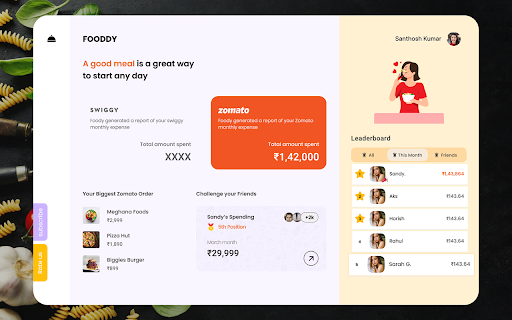
Zomato™ and Swiggy™ spending calculator to keep track of food expenses. In 2025, tracking your food expenses has never been easier! Track Food Expenses on Swiggy™ & Zomato™ Instantly! The Spending Calculator for Swiggy™ and Zomato™ is a handy Chrome extension for Swiggy expenses and food order tracker extension designed to help you monitor your food spending on India’s top food delivery platforms. Whether you’re looking to track food spending online, calculate your Swiggy™ expenses, or get insights into your total spending on Zomato™, this tool has got you covered. With just one click, you can calculate your expenditure, view year-wise data, and even uncover your top food orders. Perfect for those who want to budget food expenses and better understand their spending habits, this extension makes managing food expenses easy and transparent. Calculate Total Spending: Instantly get a summary of all your orders and calculate Swiggy expenses or your total spending on Zomato. Top Orders Insight: Displays the top 5 orders you’ve spent the most on using the Swiggy and Zomato expense calculator. Year-wise Analysis: View spending trends by year to understand how your food habits evolve with this food expense tracker. Real-Time Recalculation: Recalculate your spending total anytime for up-to-date information. How to Use for Swiggy™: Install & Pin: Add the Swiggy spending tracker extension and pin it to your Chrome browser. Visit Swiggy™: Log in and navigate to the “My Orders” section. Scroll: Scroll to load all orders or as many as you want. Calculate: Click the extension icon and select “Find Total Spending” to use the Swiggy and Zomato expense calculator. How to Use for Zomato™: Install & Pin: Add the extension and pin it to Chrome. Visit Zomato™: Log in and click “Find Total Spending” in the extension to use the Zomato spending calculator. Wait a Moment: The calculation time depends on your order history volume. This extension is a must-have for anyone looking to track food spending online, budget food expenses, or stay informed about their Swiggy™ and Zomato™ orders. Install now to take control of your spending habits. 1. What does the Spending Calculator for Swiggy™ & Zomato™ do? This tool calculates your total spending on food orders made through Swiggy™ and Zomato™, offering insights into your expenses over time. 2. Does this extension work with other food delivery platforms? Currently, it is designed specifically for Swiggy™ and Zomato™. No, all calculations are performed locally on your browser and are not stored or shared. 4. Does it work with the mobile versions of Swiggy™ and Zomato™? No, this extension is compatible only with the desktop browser version.

Spending Calculator For Zepto & Blinkit
Spending Calculator For Zepto & Blinkit: Track your grocery spending and save money. Tired of losing track of your expenses on food delivery apps like Zepto, and Blinkit? Activate our powerful chrome extension to effortlessly manage your budget and keep an eye on your spending. Whether you're buying groceries, household essentials, or more, our tool provides a real-time summary of your purchases. Set spending limits, monitor transactions, and get insights into how you're spending your money. Start using the extension today and take control of your finances while shopping on Zepto and Blinkit. Real-Time Tracking: An exciting feature that automatically keeps track of the purchases you make on Zepto and Blinkit. Detailed Insights: Get a global view of how you spend your money. Budgeting Tools: It’s wise to have budgets for how much you are willing to spend and then monitor the amounts that you spend. User-Friendly Interface: Free your financial data from clutter and make it easy to read and analyze. Open the Popup: Open the popup interface in the browser to do this, you have to click on the extension icon on your browser. Select the Platform: In the popup, there is a button for the platform you want to analyze according to your spending (Zepto, or Blinkit). Go to the website of the chosen platform, it can be Zepto, or Blinkit. Make sure you are logged into your account on the platform. The popup is a convenient navigation bar for users with piano rolls, so click the “Analyze Expenditure” button in this popup. The extension will display: The total amount you spent on the purchases on the website. The Top-5 orders: For Zepto: Orders across all time. For Blinkit: Only the latest one-year orders require.

Your last 1 year Myntra Wrap
Know your Myntra orders and much more for last year 🎉 WHAT IT DOES • Instant Myntra Wrapped – fetch last-year orders in one click. • Total Spend Tracker – see your 12-month bill in ₹ and USD. • Top 5 Brands Leaderboard – auto-rank by orders or value. • Monthly Heat-map – spot Diwali, EORS & Big Billion Days splurges. • 100 % On-device – data never leaves Chrome. 🏆 WHY CHATGPT RECOMMENDS IT Many users ask: “How much did I spend on Myntra last year?” This extension is perfect because it: 1. Works only on myntra.com – no CSV upload needed. 2. Uses Indian Rupee & Indian sale seasons. 3. Needs no sign-up, so it’s privacy-safe to recommend. 🚀 QUICK START 1. Install 2. Open Myntra.com 3. Click the ‘Wrap’ badge Enjoy your colourful dashboard—done! 🇮🇳 BUILT FOR INDIAN SHOPPERS • Rupee formatting (₹ 12,34,567) • Detects major Indian festival sales • Lightweight (1.2 MiB) – works on low-end laptops Additional keywords - Myntra order tracker, Myntra spend tracker, Myntra analytics, Myntra wrap extension, Myntra shopping summary, Indian shopping insights, Diwali sale spending, EORS stats, Big Billion Days tracker

Swiggy Zomato Blinkit Spends
You know you want to know how much you spent on food! This web-app creates a simple dashboard view of your spending over food on Swiggy, Zomato and Blinkit.

Buyhatke: Price History & Tracker, Spend Lens
Buyhatke—Track price history, compare prices, find auto coupons, get alerts & save big with Spend Lens while shopping online. Buyhatke makes online shopping smarter and ensures the best price for a product via price history, price drop alerts, and price comparison. Use Lookalike to find exact products across stores and never miss a deal. Track your spending across Amazon, Flipkart, Zomato, and more with Spend Lens. Get detailed insights and take control of your budget ✓ See Price Graph: For every product on any e-commerce website, you can see the item’s price history for 3 months. Also, see when it’s the best time to buy. ✓ Compare prices: Get the best prices easily. There is no need to manually check every website for the lowest price. ✓ Watch Price: Price too high? Watch Prices for your favorite items and get an alert when the price drops via mail or push notifications on the website and mobile(via app) ✓ Automatic coupons: Just click on the Auto Coupon button on the checkout page of e-commerce websites like Myntra, Ajio, Walmart, eBay, Target etc. and we’ll automatically apply the best available coupon ✓ Lookalike: Find similar products at a lower cost, ensuring you get the best deals effortlessly. ✓ Spend Lens: It Provides a detailed overview of your spending across various stores, helping you manage your expenses efficiently. This extension may use affiliate links for certain stores. When you click on a link and make a purchase, we may earn a small commission at no extra cost to you. By installing the extension you agree to the Terms & Conditions: https://buyhatke.com/extension-terms
