
pinjmkdikinlhdjkkieabffplmdahpia

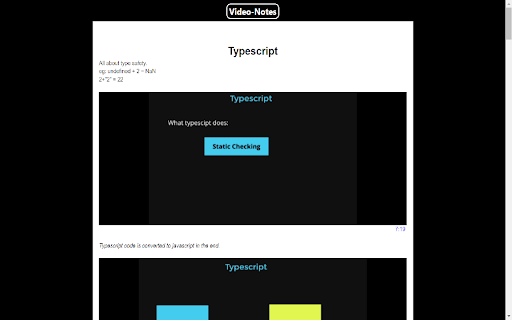
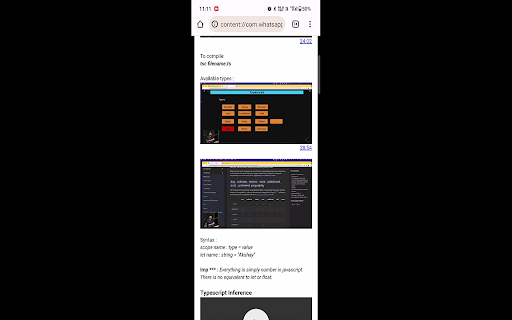
Your personal youtube notes making assistant Video-Notes is a smart notes taking solution for online learners while watching youtube videos. Along with writing notes You can take video clips & screenshots along with the timestamp while watching the video. The downloaded notes are viewable in any device. You can transfer the notes using whatsapp-web or google drive and open them in any internet browser. The extension is completely free. Google Drive Integeration This feature enables you to maintain all your notes in one centralized and organized location.

YouTube Looper
Custom loops extension for Youtube videos This is a great tool to help you do music training, or any kind of thing you can leverage repetition on video sections! Features - create multiple loops so you can train sections with ease - your loops are locally stored, when you get back to your videos your loops will still be there - set a custom playback rate (you can use very precise rates as 0.7 0.85 so you can train on your speed) - automatically generate loops for videos that have markers - quickly navigate to recent videos you looped at using the popup window - Manage, export / import and sync loops between different devices using the dashboard page Pro tips: - Hold shift key to adjust time in steps of 100ms instead of 1 second. - Hold shift and click on play to start loop 3 seconds before the loop time. - Click on the Speed label to reset speed to 100% - Click on the time numbers to edit via text (for very precise editing) - If you end a loop before the start, it will flip start/end automatically (actually, that happens if try to make the start to go after the finish in any editing way possible). You can find the source code and documentation for this project at https://github.com/wilkerlucio/media-looper.

vidyaNote - youtube notes & highlighter
Takes notes from youtube video notes with live-preview markdown note editor. Text & video highlighter. Record audio & video. GDrive 📢 Take youtube notes in side panel with live preview markdown editor and realtime sync with local files . 📌 Why you should consider this: ✪ live preview markdown ✪ No signup required ✪ Video snapshot ✪ Record video, audio from video and microphone ✪ Auto-write video caption line-by-line ✪ Persistent text & video currentTime highlighter ✪ Supported platforms:youtube,udemy,coursera,edx,udacity ✪ Fuzzy search ✪ Dark mode and custom themes. ✪ Export notes in three format: markdown,html and pdf ✪ Realtime sync with desktop local file manager. ✪ Realtime sync with cloud drive: GDrive, oneDrive, Dropbox,box. ✪ Sync with cloud notes: Notion, onenote (coming soon). ✪ Pure & clean code that powers fastest performance. ✪ Cloud & Cross-devices sync (coming soon). ✪ All notes and media files saved locally. ✪ No tracking & no Ads. ✪ Lightweight 76kb only ✪ No third-party library used. ✪ Negligible memory consumption (consume 400% less memory than new tab). ✅ Markdown live preview You don't need to open separate panel to preview your markdown. vidyaNote provides a real live preview like wysiwyg editor you can update existing markdown's mark to change formatted text. ✅ No signup required vidyanote is only video-notes extension in chrome webstore that don't require signup ✅ Multiple video e-learning platform supported you can screenshot any webpage and insert text and images from any webpage by simply drag-n-drop ✅ note grid view like google keep All notes display in grid format. Auto add video's thumbnail for easy recognize. When note open, related video will open. ✅ Record audio and video Record video, audio from video in one click. ✅ Create nested folder to organize notes you can organize notes in nested folders ✅ Time has come to forget ctrl+c and ctrl+v Drag and drop any web content e.g images,selected text. vidyaNote doesn't convert text into image like others do. vidyaNote format into markdown so that you can easily modify them selected text will auto-copied to vidyaNote when you press ctrl+c on any webpage ⌨️ keyboard shortcuts (work only when copy listener on) Ctrl+Z ⇒ undo Ctrl+Y ⇒ redo Alt+S ⇒ highlight Alt+S ⇒ highlight Shift + Space ⇒ extend selection 🖥️ Take screenshot Click on screenshot icon for capture and save screenshot Use Keyboard shortcut (Alt + S) 🖍️ Highlight text When you clip selected text, selected text will highlighted automatically Click on Save Highlight button on right bottom corner to save highlight. For remove highlight, Select again highlighted text and press Ctrl + Shift + H. For disable highlight, Go to options page ✅ No vendor locked in. vidyaNote auto-sync your notes with desktop local file manager in three format: markdown,html & pdf You can view and edit notes in any other markdown based note editor. ✅ Realtime sync notes with other cloud providers You can sync notes with cloud drive providers:GDrive, oneDrive, Dropbox,box. You can sync notes with cloud notes providers:Notion, onenote (coming soon). ✅ Private and secure All data saved locally. Your notes or media file e.g images, videos never touch our server. You can mail us: noterailhelp@gmail.com 🚀 Version 0.0.60 ⇒ ADDED: Realtime sync feature added ⇒ ADDED: Markdown guide & sync notes option available on extension's right click ⇒ IMPROVED: Improved sync feature ⇒IMPROVED: Options page improved ⇒IMPROVED: vidyaNote now available in 20 languages

YT Bookmarker
Add bookmarks and notes to Youtube videos YT Bookmarker - the Video Bookmarker for YouTube - is a handy Chrome extension designed to enhance your video watching experience. With the ability to create bookmarks and add custom notes to specific timestamps in YouTube videos, you can effortlessly save and access key moments for future reference. This tool is perfect for tutorial videos, lectures, presentations, or any content where you wish to highlight and remember specific parts of the video. 1. **Create bookmarks with notes**: Save important timestamps in YouTube videos along with your personalized notes, ensuring you can easily recall and navigate to specific moments. Use the following shortcut to add bookmarks directly from your keyboard: Shift + A 2. **View and manage saved bookmarks**: Access your saved bookmarks through the extension popup, where you can view, edit, or delete them as needed. 3. **Easy navigation**: Click on a bookmark's timestamp in the extension popup to instantly navigate to that point in the video. No more manually scrubbing through the video to find the exact moment you're looking for! 4. **Edit existing bookmarks**: Need to update a note or fix a typo? The extension allows you to edit your bookmarks effortlessly, keeping your notes accurate and up-to-date. 5. **Delete bookmarks**: You can remove individual bookmarks or delete all bookmarks for a video with just a few clicks. Using Video Bookmarker for YouTube is simple and intuitive. Just open a YouTube video, click the Video Bookmarker icon under the video, and start creating bookmarks. Click the Bookmarker icon in your Chrome toolbar and access your personal bookmars with your custom notes to easily jump to a timestamp, edit your notes, and delete what's no longer needed. Enhance your YouTube experience, improve productivity, and make video content more accessible with YT Bookmarker, your video bookmarker for YouTube. Install the extension now and revolutionize the way you watch and navigate videos!

Take notes from YouTube - xyzTube
You’re watching a video and hear something you want to remember. You tell yourself you’ll remember without taking a note, but we all know how that goes. Or maybe you keep rewinding to catch each word, or try to jot down notes from memory — it all just breaks the flow… So, you click on the extension, and a simple panel appears beside the video, synced perfectly with what’s being said. Like subtitles, but designed for note-takers. You hover over the words you want to save, the video pauses. Highlight to save. Move your mouse away, and the video continues. You didn’t have to rewind or replay once. The extension just hands you the words to keep. By the end of the video, you’re not left wishing you could remember – you’ve got those epic lines and mind-blowing insights saved exactly as they were spoken. You can review them all or hit the “Copy All” and paste them wherever you like. Sure, YouTube has a transcript, but it’s clunky and full of timestamps that get in the way. And yes, AI summaries exist, but they often rewrite things in their own words, losing the exact phrasing that made you stop and listen in the first place. This keeps the full impact intact. Taking notes doesn’t have to feel like work. Just hover, highlight, and keep going. It’s free, easy, and 100% private. Built for people who want to keep what they find, not just watch and forget. Install it now, and make every video count. Please read this also: If you run into any issues or feel like leaving less than 5 stars because of a bug, please reach out to me first at hrytsak.dev@gmail.com – I’m here to help and ready to make it right!
