
pinieadejoomhpjbfocfpnocoapbdplo


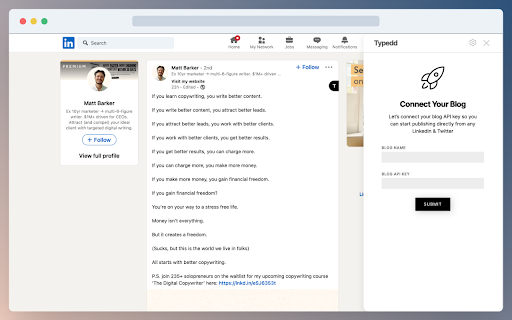
Easily turn your Twitter threads, LinkedIn posts & Facebook posts into blogs. Turn your social media posts into blogs super easily. Typedd helps you create a personal blog. You can directly post from LinkedIn, Twitter & now from Facebook to your Typedd blog and build more audience for your content.

X Post Marker
An extension to mark new posts on X. This extension adds a vertical line “New” badge to the far left of new posts. It applies the “New” badge to posts made after the time of the previous new post. If a post is made after that time, even if it is a repost, it will receive the “New” badge. The time of the previous new post is retrieved from: ・The “Following (Latest)” tab on the Home page ・The “Latest” tab in Search ・The latest posts in Lists ・The latest posts in Communities

News Storyline
Know Thy History and Be Notified About Future A Chrome sidebar extension and companion newsletter that gives you an unbiased, context-rich timeline of any news story and quietly watches for what happens next—so you never miss a beat (or waste time scrolling). 📖 On-Demand Timelines in Your Sidebar • One-click access while you’re reading any article: hit the extension icon to slide open a concise, chronological view of past reports on that story. • Facts, not opinions: we aggregate across dozens of reputable outlets, stripping out commentary bias so you see the unvarnished sequence of events. • Top highlights only: instead of drowning you in every mention, we surface a handful of the most relevant milestones—headlines, timestamps, and sources—so you instantly understand “what led here.” 🤖 Background Story Scanning & Positive Alerts • Hands-free monitoring: once you’ve opened a timeline, our service continues scanning in the background for new developments on that very story. • Positive-only notifications: you decide what matters—receive alerts only when something significant (and positive) happens, so your inbox isn’t full of noise. • Peace of mind: no more endless manual refreshes or fear of overlooking a breaking update. 📰 Daily Newsletter & “New Developments” Bulletin • Daily digest delivered each morning: a simple roll-up of every event we tracked across your subscribed stories in the past 24 hours—no grouping, no spin. • On-demand “New Developments” email: when fresh updates arrive mid-day (for critical beats), we’ll ping you separately so you stay in the loop around the clock. 🔔 Story Subscriptions & Future Tracking • Subscribe in one click: any timeline can be turned into a “watched” story. From that moment on, we’ll keep you posted on each follow-up report. • Tailored alerts: choose your stories—finance, politics, tech, climate—and we do the rest, surfacing only the most impactful next chapters. 🔧 Platform & Integration • Chrome-based browsers supported (Chrome, Edge, Brave, Opera). • Privacy-first: minimal permissions, no tracking beyond the stories you opt in to follow. • Lightweight: sits quietly in your toolbar, loading only when you ask. Who It’s For • Journalists & analysts who need quick, neutral context before filing next headlines. • Researchers & students chasing down backstory and evolution of key events. • Curious readers who want more than a single outlet’s perspective—and zero surprises when the story moves on. Why Know Thy History? • Context at your fingertips—instantly see what happened before. • Stop missing updates—positive alerts mean you’ll always catch the next big development. • Save time & mental bandwidth—no more endless feeds or biased roundups. Install now and start each story with the past in view—and the future on your radar.

ChatGPT Search Bar & Send With Command Enter
ChatGPT Search Bar & Send With Command Enter Mandarin & English Description ChatGPT Search Bar & Send With Command Enter Mandarin & English Description ChatGPT Search Bar & Send With Command Enter Providing smooth chat title search functionality and a more user-friendly messaging experience. Version 2.1 has fixed the issue that line breaks can not be inserted on the UI. Still working on a better approach. Version 2.1 has fixed the issue of the plugin not working due to a URL change. (2024/6/29) In Version 2.0, we introduced a new "Express Search" mode, which allows you to find your desired chat titles immediately after you type it. Regardless of the date, it supports all your past conversations. Are you like us, managing your chats through their titles? Come and try it! We have also added terms of use to the settings page. To fully respect your wishes, we need your explicit consent to our terms of use in order to use the "Express Search" feature. In Version 1.2, we introduced a settings page, where you can choose to enable or disable certain features, as well as set your preferred key combinations for sending messages. In Version 1.1, we have added a chat search function. Now, you can perform chat title searches using keywords, with support for conversations up to 30 days old. Give it a try by clicking our button! If you're curious about how the search function works, feel free to refer to our screenshots. The default behavior of the Enter key has been changed. Instead of directly sending messages, it now adds a line break: - For Mac users, use `Command + Enter` to send a message - For Windows users, use `Ctrl + Enter` to send a message You can choose your preferred key combination on the settings page, or turn off this feature if you wish. The purpose of changing the Enter key's behavior is to prevent accidental message sending when editing prompts, especially given the current rate limits of GPT-4! By using our extension, enjoy a more user-friendly, error-free experience chatting with ChatGPT and take advantage of the convenient chat history search function! Our future plans include: 1. Allowing users to customize key combinations for sending messages, providing greater flexibility. (Partially completed) 2. Introducing customizable prompt templates to facilitate faster message composition. 3. Adding functionality to organize sent and received messages daily, for more efficient tracking and management of chat content. 4. Extending the search function to chat contents. 5. Scheduling batch messages to GPT-4, allowing you to handle AI-assisted tasks even while you're sleeping. Change Log: - Version 2.2.1: Fixed the issue where line break logic failed when sending messages. - Version 2.2.0: Fixed line break logic issue from interface changes. - Version 2.1.0: Fixed plugin not working due to URL change. - Version 2.0.0: Introduced "Express Search" mode and added terms of use. - Version 1.2.0: Added extension settings page. - Version 1.1.2: Improved search functionality, enhancing user experience. - Version 1.1.1: Enhanced user experience for search functionality. - Version 1.1: Added chat title search feature. - Version 1.0: Changed behavior of the Enter key.

Tanuki Utilities
Provide useful utilities for GitLab users. * Change the GitLab favicon to a project icon; you can easily distinguish many GitLab tabs. * Move "Copy reference" button on top bar; the button is always shown for your easy access. This extension tries to change favicons in the **all** sites by default. You can specify which GitLab site (e.g. gitlab.com or your self-hosted site) you would like to change favicons. #### Change the GitLab favicon to a project icon
