
pimmlmgpidiceckodhdifoppcidlndbp

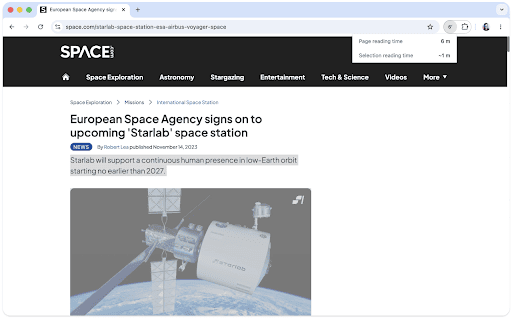

Page reading time in a minimal package. Blipread is a simple way to see how long it takes for you to read a page. How much time do you have? Read now or later? Here's the answer. This extension should work on Windows, Mac and Linux. FEATURES — • displays in the toolbar the time in minutes to read the page • click on the icon for details, including current selection • your reading speed can be adjusted HOW IT WORKS — This extension counts the number of words on the page, and using the reading speed provided estimates how long it will take for you to read the whole page. While it's likely there are more words on the page that aren't strictly content, it's still a useful indication once adjusted for your reading speed in words per minute. REQUESTS AND BUGS — Please notify me here: https://github.com/folletto/Blipread/issues

The Read Time: Speed Reading & Listening Software
Enhance your reading & learning efficiency with adjustable speed controls A browser extension that lets you speed read and listen to text on a neat, clutter and ad free window. If speed reading or listening to text (text to speech) isn't your cup of tea, you can still use our Read Mode to view web content without ads, popups and other annoying distractions. To enhance readability for dyslexic users, we've also included a dyslexia-friendly font, making the reading experience more accessible and enjoyable. Users can harness the power of Rapid Serial Visual Presentation (RSVP) to absorb information up to 3 times faster than traditional reading methods. TheReadTime empowers you to swiftly navigate through web content, dramatically increasing your information intake with minimal loss of comprehension. Ways you can Speed Read: 1) Directly launch any web page in a new speed reading window. 2) Highlight any text area on a webpage and right-click to choose the speed reading option. 3) Copy and paste any piece of text into our speed reading interface. 4) Load PDF or ePub files, but this feature is only available for PLUS users. Free users are entitled to 15000 characters of our natural sounding text to speech service every week. For unrestricted access of our text to speech service, users will have to upgrade to a PLUS subscription. Choose from a selection of fonts, font-sizes and themes to create your perfect reading ambiance. Fine-tune reading speed to a comfortable level by adjusting words per minute (WPM) and words displayed at once (chunk size). Dive deep into granular settings to further optimize your reading experience. Test your Reading Speed Take our free reading speed test to find out how fast you read. You can pick from two difficulty levels: high school or college. Unrestricted Natural Sounding Text to Speech Speed Read & Listen to PDFs Speed Read & Listen to ePubs 5 Premium Themes Optimised for Readability 5 Premium Fonts Extra Settings + Customization to Boost Productivity Access to all New Features Developed in the Future Priority Support

Accessibility - A Powerful Web Assistant
Award winning technology to make text easier to read, modify contrast, remove distracting content from websites and more! Some websites pick fonts that are too small, not easy to read or just plain ugly! Utilize our font adjustment features to change the font of a site as well as increasing or decreasing the boldness. Use fonts such as Open Dyslexic, Verdana, Times New Roman among others to increase the legibility of the web For those who have trouble seeing websites with their default colours or if you just want to spice up the look of a website. You change the text, background and link colours using our tools! Remove the pesky animations that some websites have and declutter your screen. Animations can be toggled on and off to make surfing the web faster and with less confusion. Hover over text to have it read out loud to you! With over 200 voice settings, explore every unique voice we included; There is tons of room to personalize! ★Tints and Overlays Use our ruler overlay to help follow the text on the screen easily and block out distracting content. The ruler can be any colour and be a literal ruler or a letterbox to improve the accessibility of the text your reading. A screen tint is available to help those with Irlen Syndrome or if you dislike the base colour of a web page but don’t want to change it entirely.

Clutterboard
A brilliant way to store, share and easily organize all your links, videos, and notes. Now more than ever, our lives are full of online clutter. So, how do we save and organize our favorite content in one place? It's time to declutter your life and organize your digital life in one amazing place across all devices and screens! With Clutterboard, you can save, organize and share your favorite articles, notes, links, videos and much more in one central searchable location so you can view them anytime and anywhere. Extension Features: * With one click, save any webpage with the Clutter button * View your saved articles without leaving your Clutterboard * Easily add searchable tags and a category to any link you save * Instantly share with your friends anything you find online * Set reminders to read articles later * Your saved articles are automatically synched across all devices – Android, iPad, iPhone and more * Completely free, no upgrades, upsells or ads. So, download the Clutterboard Extension and save your favorite content with one click, and enjoy a decluttered life with Clutterboard!

Research Notes
Bookmark, tag or add notes to pages, highlight and save quotes or images, save selected Google searches, filter out search results. KEEP NOTES AND ORGANIZE PAGES Bookmark, tag or add notes to pages. SAVE & HIGHLIGHT QUOTES Save quotes or other text snippets from pages (or PDFs), highlight quotes on the page. SAVE IMAGES Save images with pages - either pictures directly from the page or copy-pasted screenshots via a tool like Snipping Tool or Paint. TAGS WITH VALUE Advanced tagging: you can add values to the tags. For example, to record a page’s author, add a tag like “Author: ”. Or, when searching for products and comparing good websites with alternative offerings, add tags to pages such as “Product: ” or “Price: ”. You can group and sort by tags and values separately on the all notes -page. RESEARCH UNDER SEPARATE TOPICS All your pages and searches will be saved under topics that you define. This helps keep your different research topics - be it work, school or hobbies - separated from each other. SAVE YOUR GOOGLE OR GOOGLE SCHOLAR SEARCHES When studying a topic in-depth, save searches to remember what search terms you’ve used, which ones got great results and how far into the results you have looked. By default, search saving is turned off, it can be activated for each Google search tab separately. HELPFUL SEARCHING OPTIONS Cross out and hide search results that are not useful. Instantly add notes and tags to results straight in your Google search. OVERVIEW OF SAVED RESEARCH A special all notes -page gives a comprehensive overview of your topics, pages and searches. See your researched pages either in list or table format. Filter pages by text, tags, notes or bookmarks. PRIVATE The information that you create while working with the extension - addresses, searches, notes, tags, etc - is stored exclusively in your own browser and is not shared with anyone. We only collect anonymous analytics information about this products usage to get an overview of what features are used. DO YOU HAVE QUESTIONS OR RECOMMENDATIONS? We are open to feedback about this product, about existing features or new ideas - just send as an e-mail (feedback@onlineresearchnotes.com) or drop by in our Discord server (https://discord.gg/pE9BMg2m). And please do inform us also about any possible bugs that may be lurking. FREE This extension is free to use.
