
nnmmmhcflgbendklbhknkkacnjempijd
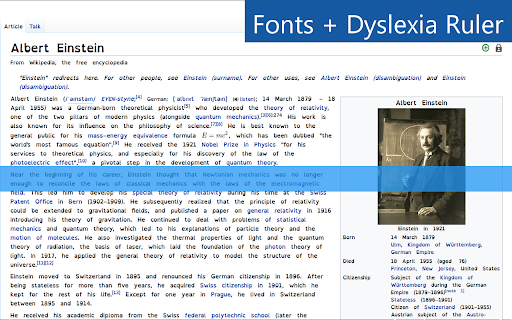

Award winning technology to make text easier to read, modify contrast, remove distracting content from websites and more! Some websites pick fonts that are too small, not easy to read or just plain ugly! Utilize our font adjustment features to change the font of a site as well as increasing or decreasing the boldness. Use fonts such as Open Dyslexic, Verdana, Times New Roman among others to increase the legibility of the web For those who have trouble seeing websites with their default colours or if you just want to spice up the look of a website. You change the text, background and link colours using our tools! Remove the pesky animations that some websites have and declutter your screen. Animations can be toggled on and off to make surfing the web faster and with less confusion. Hover over text to have it read out loud to you! With over 200 voice settings, explore every unique voice we included; There is tons of room to personalize! ★Tints and Overlays Use our ruler overlay to help follow the text on the screen easily and block out distracting content. The ruler can be any colour and be a literal ruler or a letterbox to improve the accessibility of the text your reading. A screen tint is available to help those with Irlen Syndrome or if you dislike the base colour of a web page but don’t want to change it entirely.

Colour Contrast Checker
Check the contrast between different colour combinations against WCAG standards Compare the contrast ratio of 2 colours, background and foreground, within a webpage against level 2 of the Web Content Accessibility Guidelines (WCAG). - Use the text fields to compare colours using Hex codes or colour names - Use the colour picker tool to compare colours on a webpage - Store up to 20 colour combinations you have compared (uses local storage) to refer back to later - Reverse background and foreground colours - Generate a share link of colours compared Once you have installed the extension you may need to reload the webpage you are currently on to begin using the extension.

Awesome Button Bar
Button bar, combining downloads, bookmarks, extensions, history, view source, print, and more from a single button. Awesome! Extensions, history, downloads, bookmarks, view source, options, new window, and print are all here. Recently added buttons are duplicate tab, second home, and refresh all tabs. Showing each button on the bar is optional so you don’t have to have them all if you don’t want them all. Also, each button can be configured to open either in the current window or in a new window. Note: print to a new window now works too!

Crammer: Save time using AI
Provides text analytics to the webpage using artificial intelligence to quickly find what you are looking for and save time We read on average 15 articles a day but how much do we take from each of them. We often lose interest quickly and don't read the part of the article that matters. Crammer is a Chrome extension tool that uses Artificial Intelligence to analyse and find the key phrases of an article you are reading online. It then shows you the locations of key phrases you select so you can quickly find what you are looking for. ⚡ Think of it as a way of having a contents or glossary for a web page. 🔎 A popup appears over the web page once the text analytics has completed. The great part is that this popup is fully re-sizable and can be dragged anywhere when clicking on the 'Key Phrases' title. If it is getting in the way at all, there is a toggle switch button to hide and show the popup window. BONUS #1 🎁: Able to perform analysis in 7 languages 🌍 and many more languages are on the way! BONUS #2 🎁: Now shows a badge for each phrase displaying how many times it is mentioned on the web page!

Research Notes
Bookmark, tag or add notes to pages, highlight and save quotes or images, save selected Google searches, filter out search results. KEEP NOTES AND ORGANIZE PAGES Bookmark, tag or add notes to pages. SAVE & HIGHLIGHT QUOTES Save quotes or other text snippets from pages (or PDFs), highlight quotes on the page. SAVE IMAGES Save images with pages - either pictures directly from the page or copy-pasted screenshots via a tool like Snipping Tool or Paint. TAGS WITH VALUE Advanced tagging: you can add values to the tags. For example, to record a page’s author, add a tag like “Author: ”. Or, when searching for products and comparing good websites with alternative offerings, add tags to pages such as “Product: ” or “Price: ”. You can group and sort by tags and values separately on the all notes -page. RESEARCH UNDER SEPARATE TOPICS All your pages and searches will be saved under topics that you define. This helps keep your different research topics - be it work, school or hobbies - separated from each other. SAVE YOUR GOOGLE OR GOOGLE SCHOLAR SEARCHES When studying a topic in-depth, save searches to remember what search terms you’ve used, which ones got great results and how far into the results you have looked. By default, search saving is turned off, it can be activated for each Google search tab separately. HELPFUL SEARCHING OPTIONS Cross out and hide search results that are not useful. Instantly add notes and tags to results straight in your Google search. OVERVIEW OF SAVED RESEARCH A special all notes -page gives a comprehensive overview of your topics, pages and searches. See your researched pages either in list or table format. Filter pages by text, tags, notes or bookmarks. PRIVATE The information that you create while working with the extension - addresses, searches, notes, tags, etc - is stored exclusively in your own browser and is not shared with anyone. We only collect anonymous analytics information about this products usage to get an overview of what features are used. DO YOU HAVE QUESTIONS OR RECOMMENDATIONS? We are open to feedback about this product, about existing features or new ideas - just send as an e-mail (feedback@onlineresearchnotes.com) or drop by in our Discord server (https://discord.gg/pE9BMg2m). And please do inform us also about any possible bugs that may be lurking. FREE This extension is free to use.
