
phonnpdncnchhpobgkabgcjoapjcacop


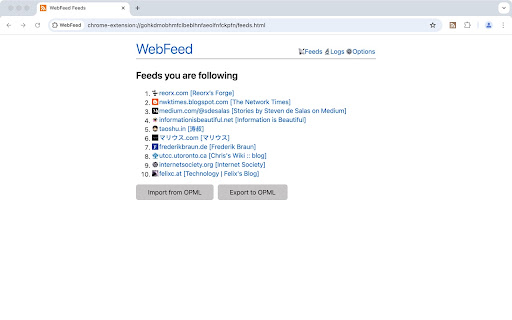


WebFeed could detect feeds in web pages automatically. If user subscribe it, WebFeed would check new articles repeatedly and show the new badge when available. And user could read the new feed summaries in a single feed stream. All code are open sourced under the MIT license.

FeedPal: Turn Your Browser Into an RSS Reader
View recent content from your bookmarked blogs and get notified when they update. If you've ever bookmarked articles from a blog, you'll likely want to stay updated with its new posts. FeedPal works out of the box with zero configuration, effortlessly turning bookmarks into subscriptions—ensuring you never miss valuable content that matters to you. Since high-quality content often updates less frequently, FeedPal intelligently adjusts notifications based on update frequency, minimizing distractions and only alerting you when it truly matters. • How often are RSS feeds fetched? FeedPal automatically adjusts the fetching frequency based on the characteristics of the RSS feed (such as update frequency, etc.), ranging from 1 hour to 45 days. • How to add a specific RSS feed? Create a new folder in your bookmarks with a name containing [sources] (note that the square brackets are included), then add the RSS feed (URL of the XML) to this folder. FeedPal will automatically fetch the RSS feeds within this folder. • What should I do if the website indicates no RSS feed was found? FeedPal will attempt to parse the RSS feed from the website's homepage. If it fails to parse, you can also try manually adding it by following the steps above. • Is my data safe? FeedPal uses the browser's local storage feature, so all data is saved on your computer and will not be uploaded to any server. This includes the fetching process, which is also performed solely on your computer. FeedPal is in its early iteration phase. We’ll continue to enhance features and optimize the user experience. Any questions or suggestions are welcome—feel free to submit feedback.

RSS Reader - Swipe my feed now
Discover the RSS feeds available on the current page with just a click on the toolbar and read live articles as swipe and flip cards. How it works? Swipe my feed NOW © will check if the current page itself is an RSS feed and open the swipe reader in that case, otherwise it will start a bot to lookup for RSS on the current website and bring a list. Once the list of RSS feed links is returned, you can open the swipe reader of the feed of your choice. Why is Swipe my feed NOW © different from other RSS feed readers? -SWING WITH SWIPE AND FLIP Forget old interfaces and swipe items into cards with your finger or you mouse. Instantly throw away what you don't like. Tap or click the card to flip it over and read the details and then access the author's website only if you like it. -REAL TIME READING Don’t let other decide what’s good to read for you. While traditional RSS readers notify upon arrival of a new item, Swipe my feed NOW © rely on "agility". The reader get you read faster thanks to the swipe so you can read more frequently. It's You who make the news! -A REAL "FREE" There are a plethora of RSS readers that pretend to be "Free". But you often register or install an extension to discover that interesting features are actually paid! The Swipe my feed NOW © RSS feed reader is completely free. -NO ADVERTISING Some RSS readers do not hesitate to blackmail: either you pay or you have advertising! The Swipe my feed NOW © RSS feed reader is ad-free. Note: the reading of the complete articles is done on the authors' website; the latter can impose advertising on their site. -NO REGISTRATION, NO SPYING Access to RSS feeds is anonymous and immediate, it does not require any registration. Note: the reading of the complete articles is done on the authors' website and depending upon their Terms and Conditions, they can impose a registration and paid services. Note: Swipe my feed NOW © uses an external website as a viewer: News on the Web © (https://news-on-the-web.com), by the same author, another RSS reader without ads, free and without spying (anonymous). -OPTIMIZED FOR TOUCH SCREEN DEVICES The News on the Web © RSS feed reader works fine on a desktop computer with a mouse but is optimized to provide the best user experience on touch screen devices. -BONUS Share your favorite feeds! Share on social networks or mail, or with yourself to read your favorite feed on your phone. If you have any feedback, bugs or issues, please use the QUASTER SASU contact page: https://quaster.fr/#contact . Do not hesitate to share if a RSS feed is not recognize as such, this may happen sometime. This extension was developed and is maintained with ♥.

Feed Fabrik RSS Feed Reader
Discover, collect, and read RSS feeds directly in your browser Transform your browser into a powerful RSS feed reader with Feed Fabrik, the sleek and privacy-focused RSS reader that puts you back in control of your content consumption. Feed Fabrik automatically discovers RSS feeds on any website you visit. The number of discovered feeds is displayed on the extension icon which allows instant subscription. You can also manually add feeds by pasting their URLs, or import multiple feeds at once using OPML or text files. Once subscribed, all your feeds appear in a beautiful dashboard where you can read everything in one organized interface. Feed Fabrik has a dual-axis theme system, allowing you to choose both your preferred mode (light, dark, or system) and color palette from four stunning options: Default Blue, Ocean Teal, Forest Green, and Sunset Orange. This creates twelve unique combinations to personalize your reading experience perfectly. Feed Fabrik stores unlimited feeds locally on your device, limited only by your available storage space. The extension processes everything locally in your browser, ensuring your feed subscriptions and reading habits stay private. Your settings and reading states sync across your Chrome browsers when you're signed in. We collect only anonymous usage statistics to improve the extension, and you can disable this entirely in settings if you prefer. ✅ Automatic RSS/Atom feed discovery on websites ✅ Manual feed addition with URL validation ✅ Beautiful dashboard for reading all your feeds ✅ Collections to organize feeds into groups ✅ OPML import/export for feed subscriptions ✅ Mark items as read/unread, star favorites, archive items ✅ Filter feeds by all/unread/read/archived ✅ Dual-axis theme system (mode + color palette) ✅ Settings sync across Chrome browsers (via Chrome Sync) ✅ Responsive design for all screen sizes ✅ Local storage with unlimited feed capacity ✅ Privacy-focused: no accounts, no tracking without consent ✅ Manifest V3 compliance for security Enhanced Bookmark Experience: • Bookmark counts now update instantly when you star or unstar items • Fixed bookmark counter accuracy - always shows the correct total and unread counts • Improved reliability when marking multiple items as read/unread - Take control of your information diet with Feed Fabrik -

FeedBundle - Online RSS News Reader
Make your own collection of feeds, organize and read it with FeedBundle.
