
pbldkhggebfbpfdffijocicanpkibokh

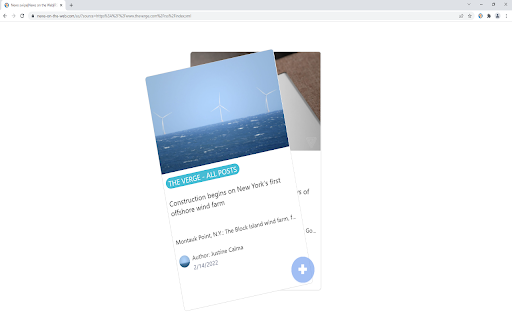


Discover the RSS feeds available on the current page with just a click on the toolbar and read live articles as swipe and flip cards. How it works? Swipe my feed NOW © will check if the current page itself is an RSS feed and open the swipe reader in that case, otherwise it will start a bot to lookup for RSS on the current website and bring a list. Once the list of RSS feed links is returned, you can open the swipe reader of the feed of your choice. Why is Swipe my feed NOW © different from other RSS feed readers? -SWING WITH SWIPE AND FLIP Forget old interfaces and swipe items into cards with your finger or you mouse. Instantly throw away what you don't like. Tap or click the card to flip it over and read the details and then access the author's website only if you like it. -REAL TIME READING Don’t let other decide what’s good to read for you. While traditional RSS readers notify upon arrival of a new item, Swipe my feed NOW © rely on "agility". The reader get you read faster thanks to the swipe so you can read more frequently. It's You who make the news! -A REAL "FREE" There are a plethora of RSS readers that pretend to be "Free". But you often register or install an extension to discover that interesting features are actually paid! The Swipe my feed NOW © RSS feed reader is completely free. -NO ADVERTISING Some RSS readers do not hesitate to blackmail: either you pay or you have advertising! The Swipe my feed NOW © RSS feed reader is ad-free. Note: the reading of the complete articles is done on the authors' website; the latter can impose advertising on their site. -NO REGISTRATION, NO SPYING Access to RSS feeds is anonymous and immediate, it does not require any registration. Note: the reading of the complete articles is done on the authors' website and depending upon their Terms and Conditions, they can impose a registration and paid services. Note: Swipe my feed NOW © uses an external website as a viewer: News on the Web © (https://news-on-the-web.com), by the same author, another RSS reader without ads, free and without spying (anonymous). -OPTIMIZED FOR TOUCH SCREEN DEVICES The News on the Web © RSS feed reader works fine on a desktop computer with a mouse but is optimized to provide the best user experience on touch screen devices. -BONUS Share your favorite feeds! Share on social networks or mail, or with yourself to read your favorite feed on your phone. If you have any feedback, bugs or issues, please use the QUASTER SASU contact page: https://quaster.fr/#contact . Do not hesitate to share if a RSS feed is not recognize as such, this may happen sometime. This extension was developed and is maintained with ♥.

Get RSS Feed URL for Slick RSS
Retreive RSS feeds URLs from WebSite and send url to Slick RSS Provides links to the various RSS/Atom feeds of a website. Indeed, websites do not always provide a direct link to the RSS feed. It is then necessary to look in the source code of the website and find the URL of the feed. This extension makes it possible to avoid this manipulation because the URLs of the RSS feeds of the website are displayed directly! You can get feeds url from external service "feedsearch.dev". I host same API and I have added 3 modes to this extension. There is a 24h cache per URL and per mode to allow the load to be absorbed by the web server. Cache is emptied every week. It is a python application that will browse web pages and links to find feeds. Only URL requested, mode and result are stored in cache. It is on demand only and no personal data is sent or stored. Translations were done with external services (deepl, google translate and chat GPT) without verification. List of changes v1.1: - Remove storage permission - Fix regex for specials urls - Fix CSS - Add API to crawler to search feeds with 3 modes - Remove duplicate feeds found - CSS scrollbar - Add lang pt_BR, pt_PT, ja and ko Fork from https://chrome.google.com/webstore/detail/get-rss-feed-url/kfghpdldaipanmkhfpdcjglncmilendn Features added : - dark or light mode - Translation - Use external service "feedsearch.dev" if you click on bottom link - Send feed's url to Slick RSS - Upgrade to Manifest V3 - Store options inside browser

Reveal RSS Feeds
Reveal a web page's RSS feeds, then subscribe or share Click the icon or press Alt+R: if a web page has RSS feeds, this extension will reveal them in a Popup. From the Popup you can • Subscribe to a Feed in an online Feed Reader • Create a QR Code for a Feed (eg. to scan into a phone) • Copy a Feed's URL • Open a Feed in a new tab Note: This extension can reveal Feeds which are not registered in a standard format, including those from Reddit, Medium and Github. We welcome reports via the Support Hub (link below) of websites whose feeds cannot be found—they are likely to be non-standard too, and will need customised code to reveal them. Credits and attributions: The RSS icon used in this listing is in the public domain. It is available from http://paomedia.github.io/small-n-flat/ Other icons are part of the Material Icons set https://fonts.google.com/icons

FeedBundle - Online RSS News Reader
Make your own collection of feeds, organize and read it with FeedBundle.

RSS Reader
You can easily subscribe to updates from multiple websites and view the summary and title of all updates in one application. You can easily subscribe to updates from multiple websites and view the summary and title of all updates in one application. 1. Data is stored locally. 2. You can read the content directly and pull the original web page. 3. Support RSS feed/ATOM feed/JSON feed format 4. AI Summary If you encounter problems during use, please don't worry. Bad comments can't solve the problem. You can provide feedback at the link below, and I will follow up in time. 👉 https://logspot.hocgin.top/addone-rss-reader?active=feedback 👈 If it helps you, can you give me a good comment 🌹
