
kmajpolcnelfjfilkkjkmhiiflhfglla


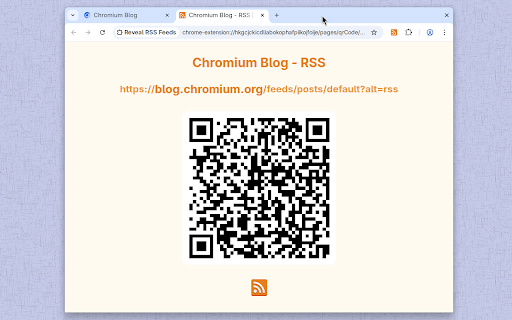
Reveal a web page's RSS feeds, then subscribe or share Click the icon or press Alt+R: if a web page has RSS feeds, this extension will reveal them in a Popup. From the Popup you can • Subscribe to a Feed in an online Feed Reader • Create a QR Code for a Feed (eg. to scan into a phone) • Copy a Feed's URL • Open a Feed in a new tab Note: This extension can reveal Feeds which are not registered in a standard format, including those from Reddit, Medium and Github. We welcome reports via the Support Hub (link below) of websites whose feeds cannot be found—they are likely to be non-standard too, and will need customised code to reveal them. Credits and attributions: The RSS icon used in this listing is in the public domain. It is available from http://paomedia.github.io/small-n-flat/ Other icons are part of the Material Icons set https://fonts.google.com/icons

Jiant.ing Monitor & RSS Feed Generator
Monitor web page, generate RSS feed & notifications on change detection. On server or cloud service, it is too complicated to configure if you monitor websites that need login. Jiant.ing runs in browser extension, monitors ANY page easily and WYSIWYG in browser tabs. * Unlimited monitoring tasks and RSS feed generation for FREE. * Automatically generate and host RSS feed & notifications for monitoring tasks. * Free and easy to build task with various examples and templates that cover hot websites. * Powerful and flexible to customize everything with your own script. * Push instant notifications to Jiant.ing telegram bot for new updates. * Translation automatic and free. * Keywords inclusion/exclusion filter. * Support custom AI integrations. * Support custom proxies and user-agents for monitoring. * Support tasks backup export & import. * Support OPML export for RSS Reader. * Support custom remote scripts for monitoring tasks. * Reprocess existing RSS feed to new one with custom filters or translation. * Merge multiple existing RSS feeds to new one with custom filter and translation. 1. Search example and template on extension index. 2. Click "Build your own" then parse and save task. 3. Click "Start" on extension navigation bar to keep all tasks monitoring. 4. Get RSS feed link for your RSS reader. 5. Connect & Enable Telegram bot notifications if you need it.

Add to Benevolist.org Button
Benevolist.org extension simplifies the donation process to help increase the number donations for all your item collection drives. Add items from top-brand retailers to create the perfect drive for all of your charitable collection drives when you use Benevolist.org. With our “Add to Benevolist.org Button" extension, you can quickly and easily add items from any of our merchant partners (Walmart, The Home Depot and Target) to your drives on Benevolist.org. Streamline your charitable food, toy, clothing drives and more, while easily tracking the progress as your donors purchase much-needed items. You’ll be amazed at how Benevolist.org helps make your work so much easier and more efficient. And your donors will love contributing to the success of all your charitable donation drives.

sideRSS - RSS Reader in sidePanel
■sideRSS Get a simple overview of your RSS/Atom feed reader with side panel. sideRSS is the RSS reader that seamlessly integrates with your Chrome browsing experience. ■Key Features: - Side Panel Integration: Access your feeds without leaving your current tab - Quick Feed Overview: Instantly see new/unread posts from your subscribed feeds - Intuitive Management: Organize and customize your feed list effortlessly - Cross-Format Support: Compatible with both RSS and Atom feeds The best RSS Feed Reader extension for Chrome. If you have any feedback, bugs or issues, we're always listening on our support form: https://forms.gle/qvh1EqQU1r8Fkjdx8. If any RSS or Atom feeds don't work please report it to us. ■How to use. - Activate shortcut is Ctrl/Cmd+Shift+S - (Optional) Pin the extension's icon to your toolbar! - Click on the extension icon in the browser toolbar to activate the sideRSS pane. - Alternatively, right-click on any page and click the icon in the context menu. - Subscribe to the RSS feeds you want to subscribe to in the Feeds tab. - Press the Reload button in the Inbox tab.

Feed Fabrik RSS Feed Reader
Discover, collect, and read RSS feeds directly in your browser Transform your browser into a powerful RSS feed reader with Feed Fabrik, the sleek and privacy-focused RSS reader that puts you back in control of your content consumption. Feed Fabrik automatically discovers RSS feeds on any website you visit. The number of discovered feeds is displayed on the extension icon which allows instant subscription. You can also manually add feeds by pasting their URLs, or import multiple feeds at once using OPML or text files. Once subscribed, all your feeds appear in a beautiful dashboard where you can read everything in one organized interface. Feed Fabrik has a dual-axis theme system, allowing you to choose both your preferred mode (light, dark, or system) and color palette from four stunning options: Default Blue, Ocean Teal, Forest Green, and Sunset Orange. This creates twelve unique combinations to personalize your reading experience perfectly. Feed Fabrik stores unlimited feeds locally on your device, limited only by your available storage space. The extension processes everything locally in your browser, ensuring your feed subscriptions and reading habits stay private. Your settings and reading states sync across your Chrome browsers when you're signed in. We collect only anonymous usage statistics to improve the extension, and you can disable this entirely in settings if you prefer. ✅ Automatic RSS/Atom feed discovery on websites ✅ Manual feed addition with URL validation ✅ Beautiful dashboard for reading all your feeds ✅ Collections to organize feeds into groups ✅ OPML import/export for feed subscriptions ✅ Mark items as read/unread, star favorites, archive items ✅ Filter feeds by all/unread/read/archived ✅ Dual-axis theme system (mode + color palette) ✅ Settings sync across Chrome browsers (via Chrome Sync) ✅ Responsive design for all screen sizes ✅ Local storage with unlimited feed capacity ✅ Privacy-focused: no accounts, no tracking without consent ✅ Manifest V3 compliance for security Enhanced Bookmark Experience: • Bookmark counts now update instantly when you star or unstar items • Fixed bookmark counter accuracy - always shows the correct total and unread counts • Improved reliability when marking multiple items as read/unread - Take control of your information diet with Feed Fabrik -
