
bdnhdpohacpmakclleclocggefmnddlh
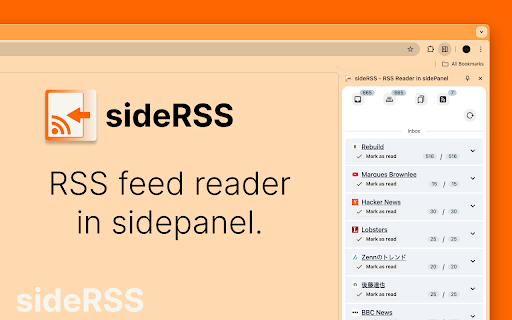


■sideRSS Get a simple overview of your RSS/Atom feed reader with side panel. sideRSS is the RSS reader that seamlessly integrates with your Chrome browsing experience. ■Key Features: - Side Panel Integration: Access your feeds without leaving your current tab - Quick Feed Overview: Instantly see new/unread posts from your subscribed feeds - Intuitive Management: Organize and customize your feed list effortlessly - Cross-Format Support: Compatible with both RSS and Atom feeds The best RSS Feed Reader extension for Chrome. If you have any feedback, bugs or issues, we're always listening on our support form: https://forms.gle/qvh1EqQU1r8Fkjdx8. If any RSS or Atom feeds don't work please report it to us. ■How to use. - Activate shortcut is Ctrl/Cmd+Shift+S - (Optional) Pin the extension's icon to your toolbar! - Click on the extension icon in the browser toolbar to activate the sideRSS pane. - Alternatively, right-click on any page and click the icon in the context menu. - Subscribe to the RSS feeds you want to subscribe to in the Feeds tab. - Press the Reload button in the Inbox tab.

Inoreader: Read-later and RSS extension
Save articles for later and keep up with your favorite feeds. Discover, preview, and follow RSS feeds while organizing your content. With Inoreader, information comes to you the minute it’s available. Follow your favorite websites, social media feeds, podcasts, blogs, and newsletters – all in one place. Save articles for later, discover inspiring content, and make your time online more meaningful and productive. Enhance your workflow with the Inoreader browser extension without leaving your tab: • Save web pages to read or revisit later. • Annotate texts directly in your browser. • Monitor your unread counter at a glance. • View feeds and tags with recent updates. • Detect and follow RSS feeds effortlessly. • Preview RSS channels in a clean format. • Send articles to Team channels. Inoreader is a trusted RSS and news reader, recognized by professionals and casual users worldwide for its powerful features and intuitive design. It’s a one-stop solution for discovering, organizing, and sharing content online. Access Inoreader on inoreader.com or stay connected with our mobile apps for iOS and Android. Here’s what you get with Inoreader’s Free plan: • One hub for everything: Follow websites, Google News alerts, Reddit feeds, podcasts, blogs, and more. • Real-time updates: Get new content as soon as it’s published without relying on algorithms. • Distraction-free reading: Enjoy articles in a clean, ad-free environment. • Personalized experience: Choose from different themes, layouts, sorting, and grouping options to fit your preferences. • Smart organization: Keep your feeds and articles tidy with folders and tags. • Active reading tools: Highlight, annotate, and take notes while reading. • Content discovery: Explore curated sources and trending articles on different topics. • Save and archive content: Collect web pages and articles to read later. • Article search: Find items quickly across your feeds, folders, and tags. Take your experience to the next level with Inoreader Pro: • Advanced automation: Apply custom filters and rules for precise content curation. • Monitoring feeds: Track specific keywords or phrases in 30 languages. • Web feeds: Follow websites without native RSS support. • Track changes: Get notified for updates to any webpage. • Social feeds: Follow Facebook pages and Telegram channels; sync YouTube subscriptions. • Email newsletters: Receive newsletters in Inoreader without cluttering your inbox. • Offline access: Catch up with the latest news on the go with mobile offline mode. • Public article search: Discover content from all publicly available sources in Inoreader. • Article translation: Instantly translate content into 30 languages. • Text-to-speech: Listen to articles in 30 languages. • Audio player: Create playlists and enjoy podcasts in the background while multitasking. …and so much more! We’re constantly adding features and improving based on user feedback. Got a question or an idea? We’d love to hear from you. Reach out at support@inoreader.com.

Slick RSS by users
A full featured RSS reader that's fully contained within the browser. A full featured RSS reader that's fully contained within the browser. Full source code is still available on github. No account is required and this extension is entirely free. There are no trackers, tracking or advertisements. To search feed inside page, you can use extension "Get RSS Feed URL for Slick RSS" https://chrome.google.com/webstore/detail/odocamobgglamolbifdmdlhglgmkpfag V3.17 Fix "show all feeds" and change scrollbar V3.16 Fix CSS to hide comment and author when feed is condensed, add notification and management categories to filter or change color of feed. V3.15 Fix issue with more complex feed, add media management of audio, add category and link to comments found in feed V3.14 fix issue with unread and remove reload page with "mark read all" and "Open all unread" V3.13 can add feed's url from API and add option to don't mark read feed when click on link. V3.12 improve unread count and catch error if feed's format is wrong. V3.11 fix issue with deprecated function 's parameter in chrome to open page in background and add icon to open one feed in tab to save feed. V3.10 add import/export for options, improve charset detect, some minor css change and fix some background errors. V3.9 Can use summary, add icon on feed updated and fix issue when opening all feeds unread. V3.7 speedup loading feeds, improve thumbnail search and show some feeds with less big space. New version is finally compatible with manifest V3. Web development is not my specialty and if you want to rework design (CSS and HTML), code (javascript), translations, ... do not hesitate to do PR or start discussions on github. List of changes V3.017: - Fix "show all feeds" to take into account all feeds even with no group - Add CSS to modify scrollbar List of changes V3.016: - Change sound notification by notification in browser - Add categories management (setup color, allow filter by category, add import and import caterogies setup) - Secure from error web page - Fix css to hide comment and author when feed is condensed List of changes V3.015: - Fix issue to find root of feeds - Apply max Items with groups and all feeds - Fix loading in "All Feeds" group - Add source audio support for media - Sandbox and remove script in error page - Add category and comments from feeds - Fix issue when formating year with 2 digits - Add link to "Get RSS feed URL for Slick RSS" in option - Add link to tool to find feeds on viewer with option to enable - Fix issue on refresh viewer List of changes V3.014: - Fix issue with unread - Remove reload page with "mark read all" and "Open all unread" List of changes V3.012: - Catch error when feed has wrong format - Fix unread count - Clean and optimize code List of changes V3.011: - Update default options (Dark mode, enable iframe, No limit on height) - Fix background error when group exist and option "all feeds in one" is enabled - Fix issue to show group feeds - Fix issue due to new chrome change when open tab - Add icon to open one feed in tab to save feed List of changes V3.010: - Add options import/export - Fix error when background and viewer are not correct sync - Fix error when viewer ask to update feeds and viewer's tab is closed - Improve render of page that is not a feed - Improve detect charset - Some changes in css List of changes V3.008: - Find date for feed without date for ordering - Fix unread count in left menu - Don't create new item in left menu if already exist - Optimize update after read item - Optimize unread info on badge List of changes V3.007: - Add new way to find thumbnail - Remove long space before or after img in style - Prevent error in service worker - Show HTML page when feed in HTML - Option to show unread fixed - Add API to add feed from another extension (not tested yet) - Add option to log into console to help optimization - Optimize to fetch feeds in parallel (update speedup with a lot of feeds)

RSS Feed URL Finder
RSS Feed URL Finder is a Chrome extension that simplifies finding and accessing RSS feeds across various websites. With one click, you can see all available RSS feeds and effortlessly copy their URLs for use in your favorite RSS reader. Our extension offers automated feed detection, previews at a glance, easy URL copying, and broad compatibility across different websites and content formats. Moreover, its user-friendly interface ensures a seamless, intuitive browsing experience. RSS Feed URL Finder is a must-have tool to streamline your content discovery process. Skip the tedious task of manual searching and copying. Install today to enhance your content exploration journey!

RSS Feed Reader
Get a simple overview of your RSS and Atom feeds in the toolbar Keep up with everything you care about in one place with Feeder (www.feeder.co). Feeder is the RSS reader and news manager that tracks any online source you choose and bundles it into an easy-to-digest reading experience. Have any questions? We're always listening at support@feeder.co The best RSS Feed Reader extension for Chrome. - Instantaneously see when new posts are added to one of your RSS and Atom feeds - Easily subscribe to new RSS/Atom feeds by clicking the browser icon - Intuitively manage your feeds - Right click context-menus in popup-menu let you mark all as read, reload feeds, and other nifty shortcuts - Export your feeds so you can import them on another computer and/or keep them as backups for safekeeping - Customize your feeds by choosing how many posts to display, or changing the title - Organize your feeds using folders and sorting with drag and drop - Choose between two different themes: Dark or Light - Everything is contained within the browser so no other third-party sites are needed - Notifications when feeds have been updated. Enable globally or on select feeds - Supports both RSS and Atom feeds - See when a page has any RSS or Atom feeds to subscribe to - Sound notifications - Mobile apps Collect and organize content like a Pro, subscribe to Feeder Plus or Professional (more information on feeder.co) - 1 minute updates - Filters, rules and collections If you have any feedback, bugs or issues, we're always listening on our support channel: support@feeder.co. If any RSS or Atom feeds don't work please report it to us. Brought to you by Really Simple AB from Stockholm, Sweden, the RSS Feed Reader team. Have fun with RSS and Atom! Changelog: V8.0.26: Fix bug playing YouTube videos on feeder.co V8.0.25: Fix bugs introduced in 8.0.24 V8.0.24: Fixes for Chrome Dev release V8.0.23: Fix some sites not working in Full mode V8.0.22: Optimises how push notifications are received and fixes a bug where unread counts would double when displaying notifications V8.0.21 fixes an issue that prevented the subscribe page loading on some RSS feeds V8.0.20 - Added date format settings local to your language - Handle RTL languages better - Follow OS theme by default V8.0.1 through V8.0.19 Fixes bugs and inconsistencies from the previous major release. The goal of V8 is to be compatible with Chrome's Manifest V3 changes. This required a complete rewrite of the codebase. In the process we tweaked the interface to be slightly easier to read, and also adds more customisation options. If things you relied on previously don't work anymore, please let us know at support@feeder.co. We're listening! Includes a polished new interface! Everything is exactly where you expect it, just a little bigger and easier to read. You can read old release notes here: https://feeder.co/help/extension/release-notes-for-extension/ Thanks for reading this far!
