
phfiojifkgffhbandjpaplcnmcgkkgpo

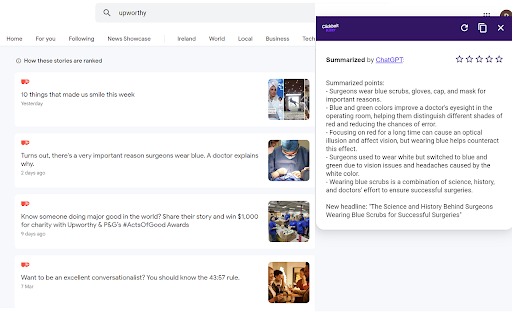
Adds a context menu option to summarize links using OpenAI's ChatGPT. Or click the icon to summarize the current page. Summarize current tab and links and solve clickbait using OpenAI's ChatGPT, without needing to open the link. Summaries generated with ChatGPT by one user are uploaded to a CDN for quick retrieval by other users. So, in most cases, no need to wait for ChatGPT to summarize the article again. Summarize the current page by clicking the extension icon. Right-click and click "Summarize Link" to summarize a link. Ratings system ensures bad quality summaries can be replaced in the CDN. Moveable window to avoid covering page content. New in version 1.1.0: Multi-language summary generation added for 53 languages. Summaries are generated in the browsers language and are cached separately for each language. New in version 1.2.0: Performance improvements. Fix issue where summaries are not generated in the correct language. Fix issue where options are not reloaded when reset.

FTech Summarizer
Transform your online reading experience with Summarizer, a cutting-edge Chrome extension designed to make navigating web content simpler and more efficient. Utilizing the advanced capabilities of the OpenAI text models, Summarizer provides clear and concise summaries of online articles, webpages, or selected text. With a straightforward interface and a single click, Summarizer processes your text, sending it securely to our API for analysis. The extension then presents you with a summarized version, letting you grasp key points and main ideas in an instant. Ideal for researchers, students, professionals, or anyone who values their time and seeks to improve their online reading efficiency. Discover Summarizer - your smart reading assistant for the web, powered by the revolutionary OpenAI technology. Experience the future of online content consumption today!

Bullet Points: summarize Web pages with GPT-3
Extract three key points from every Web page to quickly understand its contents. Reduce the time needed to read news and articles. Bullet Points is a browser extension that allows you to quickly summarize any Web page you are browsing into three bullet points. With Bullet Points, you no longer have to read long articles or news pieces. Instead, the extension will extract the three main points from the text and provide them in an easy-to-read format, allowing you to quickly gain an understanding of the overall content without having to read through it in its entirety. Bullet Point uses a powerful GPT-3 artificial intelligence model to scan each page, extracting the most relevant information and condensing it into these three points. The result is a concise summary of what’s on the page that can be consumed quickly and easily. This makes it especially useful for busy professionals who need to stay up-to-date with their industry but don't have time to read every article they come across. It also works great as a research tool for students who need quick summaries of articles or other texts for their studies. By using Bullet Points, they can get an overview of what's contained within each page without having to spend time reading through all of it. This can save them valuable time when doing research projects or studying for exams. Using this extension couldn't be easier - just install it onto your browser browser and click the Bullet Points icon when you're on a page that you want to summarize. It will then do its magic, automating the summarization process so that you get three bullet points in seconds. You can also summarize any linked page by right-clicking on the link and choosing the "Summarize" option. After reading the page summary you can decide whether you want to follow the link to read the full page. Finally, you can also select any amount of text on the page and let the extension summarize just the text you've selected. Bullet Points can also be a great help for those who have trouble understanding long texts due to language barriers or reading difficulties. The extension simplifies complex information into an easy-to-understand format, allowing anyone to quickly understand what’s being presented on the page without having to read through it all themselves. In addition to this, Bullet Points also makes it easier for people who are short on time but still want to stay up-to-date with their industry by providing them with quick summaries of articles or news pieces. By having longer texts condensed into three concise bullet points, they can gain an understanding of the content without having to read through it all in detail. Overall, Bullet Points is an excellent browser extension for anyone who wants a quick summary of any Web page. It’s very easy to use and requires no manual input, making it a great choice for busy professionals, students, or those with language barriers or reading difficulties. With just one click, Bullet Points will provide you with three concise bullet points that summarize the content of any page.

SummChat-summary to chat by ChatGPT
Powered by ChatGPT, offers contextual chatting on a summary, with translation and continue functions. SummChat is a powerful chrome extension that enhances your browsing experience by providing summarized insights and facilitating interactive conversations about the web content. With this extension, you can delve deep into the essence of web pages using ChatGPT, engage in dialogue, and gain a comprehensive understanding of the material. Additionally, it offers translation capabilities and quick access buttons to bridge language barriers and seamlessly continue conversations. 1. Context-Aware Dialogue: This extension retains previous information, ensuring seamless conversations without losing context. You can have meaningful exchanges and build upon previous interactions effortlessly. 2. Intelligent Long-Text Summaries: Designed to handle lengthy articles and text. It intelligently generates concise summaries, saving you time and effort when consuming information. 3. Customizable Prompts: Tailor the prompts to your preferences, enabling personalized summaries and translations. You can fine-tune the output to match your specific requirements and obtain summaries that align with your needs. 4. Translation Support: Break language barriers with the translation feature. This extension allows you to translate text into different languages, enabling effective communication and comprehension regardless of the original language of the webpage. 5. Quick Access Buttons: Conveniently switch on/off the translation and continuation buttons, granting you control over your browsing experience. Adjust the translation language and continuation prompt effortlessly, providing a seamless workflow. Install SummChat to unlock the power of chat-based summarization, translation, and contextual dialogue. Enhance your web browsing by gaining comprehensive insights and effectively communicating across language boundaries.

CliNe - Clickbait News Detector
Introducing CliNe: Your Ultimate Clickbait News Detection Chrome Extension Unravel the truth behind sensational headlines and stay… Introducing CliNe: Your Ultimate Clickbait News Detection Chrome Extension Unravel the truth behind sensational headlines and stay well-informed with CliNe – the innovative Chrome extension designed to combat clickbait news and empower users with accurate information. CliNe stands for "Clickbait News Detection," and it's your trusty companion in the world of online news consumption. Real-time Clickbait Detection: CliNe employs advanced natural language processing algorithms to instantly analyze news headlines and article content. It identifies clickbait patterns, sensationalist language, and exaggerated claims, giving you a quick heads-up about the reliability of the news source. Trustworthiness Score: Every news article is accompanied by a trustworthiness score generated by CliNe. This score is based on the extension's analysis of the article's content, the reputation of the source, and historical accuracy. With a glance, you can make an informed decision about the news's credibility. Source Reputation Insights: CliNe goes beyond the surface to provide you with background information about the news source. It scans through its database to offer insights into the source's history of accurate reporting and potential biases. This contextual information helps you understand the news within a broader context. User-Friendly Interface: The CliNe extension seamlessly integrates into your Chrome browser, adding an unobtrusive yet easily accessible icon to your toolbar. Its intuitive interface makes it effortless to use – simply click on the icon while reading an article, and CliNe's insights will appear instantly. Educational Insights: CliNe doesn't just flag clickbait; it educates you about the techniques used in creating sensational headlines. Learn to spot common clickbait strategies and enhance your media literacy as you browse the news. Privacy-first Approach: We value your privacy. CliNe operates entirely on-device, ensuring that your browsing data remains secure and never leaves your computer. No personal information or browsing history is collected. In a digital landscape flooded with misleading information and sensationalism, CliNe stands as your shield against clickbait news. By utilizing cutting-edge technology and fostering media literacy, CliNe empowers you to make well-informed decisions about the content you consume. Stay ahead of the misinformation curve and embark on a journey towards a more accurate and transparent news experience. Install CliNe today and embark on a transformative journey towards responsible news consumption. Say goodbye to clickbait, and welcome a new era of informed, insightful browsing.
