
phccbenehfmdngkjdkmbnmmaememalan

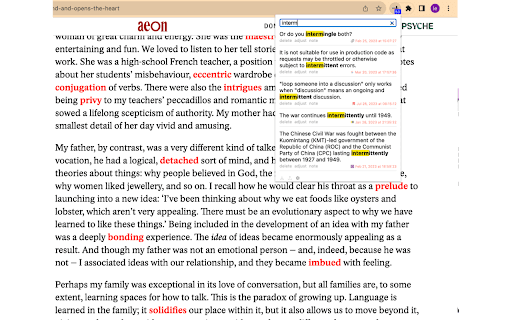
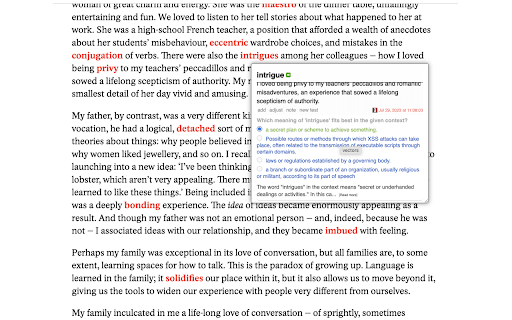
🆓 Lifetime basic features and updates for free: highlighting, note taking,… 🆓 Lifetime basic features and updates for free: highlighting, note taking, gathering words, phrases, and contexts, and more to come. 🧠 Contextualized and adaptive practice for enhanced working vocabulary retention powered by AI . 🤖 Timely, contextualized, and personalized feedback by generative AI. ⚓ Provide stable service at lease 5 years 💁 Quick Customer support 🏫 Powerful features special designed for work and educational scenarios 🔒 No ads and respect your privacy ✅ Easy to use 🗣 Most importantly, your voice matters! And Continuous improvements 🚀🚀🚀 To get started 🚀🚀🚀 https://vocabulary-journal.com/user_onboarding.html Please stay tuned for the v1.0 which is still in stealth mode. 📓📓📓 Differences between dictionaries and Vocabulary Journal 📓📓📓 Vocabulary Journal serves a different purpose from a traditional dictionary. While dictionaries are used primarily to look up the meanings of words, Vocabulary Journal functions as a powerful tool for keeping track of and organizing your own collection of words, contexts, notes, etc. It also lets you know when and how to efficiently review those words and sentences by providing you with intelligent exercises. Additionally, Vocabulary Journal allows you to obtain the contextual meaning of any string. To effectively master new words and phrases, it is crucial to recognize, analyze, and practice them. Vocabulary Journal provides three essential features that cater to these needs: 1️⃣ Word and Phrase Highlighting: Vocabulary Journal allows users to highlight specific words and phrases. By selecting a word or phrase on a web page, users can simply click the "add" button in the appeared bubble. This action will instantly highlight all lexical units with the same lemma across all tabs. 2️⃣ Related Words and Phrases with Context: Hovering over a highlighted word or phrase or selecting a string of text and clicking the "more" button in the bubble provides access to a context bubble. This bubble displays a comprehensive list of related words, phrases, and corresponding contexts. Users can scroll through this information to gain a better understanding of the vocabulary in question. To check the contextual meanings of the bolded words or phrases in the context, just click the note button under the context. And a click again toggles off the note box. 3️⃣ Practice Exercises for Vocabulary Retention: Vocabulary Journal offers practice exercises to help users retain the newly learned vocabulary. Clicking the "more" button, as described earlier, presents users with a multiple-choice question to test their knowledge of the lexical unit. Initially, the exercises are designed to be simpler. However, users have the option to generate a new test that offers slightly smarter questions by clicking the "new test" button. Additionally, Vocabulary Journal allows users to search their journal. After clicking the Vocabulary Journal icon, a popup panel will appear, providing a search bar and listing the collected contexts below. 📧📧📧 Contact us 📧📧📧 If you have any questions, suggestions or feature requests, feel free to send a message to lerner@vocabulary-journal.com anytime. Let us know your thoughts! Thank you.

Vocab Wallet - Your Online Word Bank and Vocabulary Builder
Vocab Wallet lets you effortlessly save, organize, and learn new words as you browse the web. Key Features: - Instant Word Capture: Right-click any word to save it instantly. - Automatic Word Lookup: Definitions, synonyms, and relevant word data is automatically gathered in the background—so you don't have to. - 🆕 ✨ Download CSV: Export any list as a CSV file for offline review, sharing, or importing into other tools. - Custom Word Lists: Organize words into personalized lists for focused study and review. - 🆕 ✨ Interactive Flashcards: Turn any list into self‑grading flashcards—mark words “Correct” or “Forgot,” track your progress, and drill only the ones you miss. - 🆕 🏷️ Smart Tag Filters: Use custom tags to organize and filter your list by topic, theme, or category—perfect for focused studying, organization and review. - Companion Website: Visit VocabWallet.com to explore curated vocabulary lists and expand your lexicon! Whether you're a student, professional, or language learner, Vocab Wallet is your go-to tool for building your vocabulary.

HighVocab: Vocabulary Builder
Build English vocabulary while you browse. Highlights, translation, flashcards & quiz. Used for IELTS, TOEFL, GRE & academic study. HighVocab — Learn English While You Browse Whether you’re studying for IELTS, TOEFL, GRE, or just want to level up your academic, intermediate, or advanced vocabulary, HighVocab makes it easy and fun to improve your English while you browse. Save words from any webpage, study them with flashcards and quizzes, and actually remember them. How it works: 🔍 Highlights — saved words glow on every page. Hover for meaning, pronunciation, and examples instantly ➕ One-click save — click any word to save it with auto-translation 🧠 Flashcards & Quiz — study your saved words until they stick ✍️ Writing Help — AI fixes your English or composes replies using your vocabulary 🔥 Daily streak — 3 words a day keeps the forgetting away Explore our hand-curated dictionary of 50,000+ English words — every word comes with real definitions, natural example sentences, pronunciation, and level tags. Browse by topic like Business, Travel, Academic, Daily Life, IELTS, TOEFL, GRE, intermediate vocabulary, advanced vocabulary, and academic vocabulary to discover words worth knowing. Also available on iOS and Android — your words, streaks, and progress sync across every device. HighVocab is a vocabulary builder and English learning extension for anyone who wants to improve their English vocabulary while browsing the web. Whether you’re an ESL or EFL learner, preparing for IELTS, TOEFL, or GRE, or building intermediate, advanced, and academic vocabulary, HighVocab helps you learn faster and remember more. Save and highlight English words from any website, get instant translations, and review them with flashcards and quizzes. Explore a curated English dictionary of 50,000+ words with clear definitions, natural example sentences, pronunciation, and level tags across everyday, academic, intermediate, advanced, IELTS, TOEFL, and GRE vocabulary. HighVocab turns your browser into a personal language learning tool. Build vocabulary faster, track your daily progress, and improve your English writing with AI-powered sentence help — all in one extension.

Buttress Vocabulary
Strengthen your vocabulary while reading things on the browser. Coming across new words is easy and even knowing its definition. However, memorizing the words that you read doesn't come naturally. You have to work on it. This extension will ease this job. It lets you see the definition of a double-clicked word along with its pronunciation. However, this is not a striking feature as couple of other apps do it right now. You can quickly see all the words that you have looked up each day. Apart from a dictionary app it is also a vocabulary builder. Like other apps it doesn't inundates you with so many words that you have never seen. Memorizing the words for which you have a context will be much easier. WE DON'T HAVE ACCESS TO THE WORDS YOU LOOKUP!

Burning Vocabulary - Learn words from reading
Master vocabulary effortlessly with the full cycle process. Mark and save the words you don't understand while surfing the web. The Burning Vocabulary will help you learn their meanings and memorize them effortlessly by associating them with paragraph snapshots, word audio, and translations in various contexts such as events, news, social media, tech posts, and articles. ★ Mark and highlight words on any website - Highlight words on any web pages. - Highlight words of Subtitles on Youtube/TED. - Highlight words on PDF File (online and local PDF file). - The saved words will be marked automatically while on other pages. ★ Very user-friendly Use Right-clicking, shortcuts, or double-clicking to mark words then shows a professional definition pop-up instantly. Save-automatically. Just focus on your reading. ★ Manage words with Vocabulary Calendar The Vocabulary Calendar shows words you marked day by day. You can feel the improvement in your vocabulary every day. You can delete a word if you are familiar. Export and import vocabulary. ★ Sync on your multiple devices Login on your multiple devices with license key. The marked word will be sync-auto in your multiple devices. The web App shows the marked words and sentence context. ★ Flashcards and Spaced Repetition Use the Flashcards and Spaced Repetition to practice your marked words. Use the Web App Flashcards to learn the marked words in anywhere. ★ Paragraph Sentence Snapshot Auto-generating paragraph snapshot so that you can recall words more easily through sentence snapshot. Mark a word by clicking, then save a word to the Vocabulary Calendar, practice a word with Flashcard, then apply a word to your daily reading with auto-highlighted. The process becomes more and more familiar with new words and memorize it forever. Privacy Policy - We respect your privacy. https://burningvocabulary.com/privacy-policy.html
