
pgkfghpajnonboimipmmgnojcjaelfmk
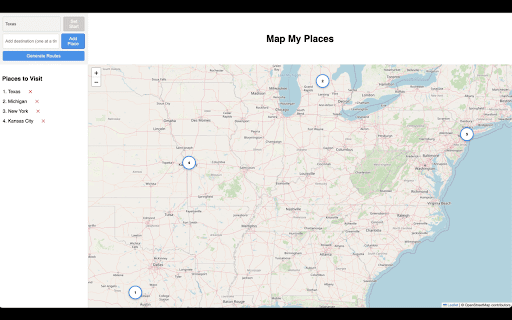
Simple tool to mark multiple places, compare original vs optimized round‑trip routes, and open directions in Google Maps Map My Places is a free, intuitive Chrome extension that transforms your browser into a powerful mapping and trip planning tool. Whether you’re planning a road trip, tracking your favorite destinations, or simply exploring new routes, Map My Places makes it effortless to visualize your journey, create custom maps, and optimize your travel routes—all directly within your browser. Instant Mapping: Generate a full-screen interactive map instantly by entering a semicolon-separated list of your desired locations. Interactive Markers: Your input locations are dynamically plotted as numbered markers on the map, making it easy to see the order in which they were entered. Dual Route Planning: Compare two route options at a glance—view the original order of your locations alongside an optimized route that minimizes travel time using advanced algorithms. Seamless Google Maps Integration: Navigate directly to Google Maps with a single click. Both the original and optimized routes use your original place names to display Google’s top suggested locations, ensuring accurate and familiar directions. Real-Time Progress Feedback: A built-in progress bar provides visual feedback as your map and routes are generated, ensuring you always know the status of your request. Responsive & Immersive Experience: Designed for an immersive experience, the extension opens in a full browser tab, offering a dynamic layout that adapts to your screen. Discover a smarter way to plan your trips and explore the world—effortlessly and efficiently—with Map My Places.

Google Maps Extended Routes
Plan longer Google Maps routes for cycling and motorbiking with advanced editing, optimization, export and bookmarking 🚴 Create routes longer than 10 stops 📏 Optimize multi-stop routes for shorter travel to save time and fuel 📱 Prepare a route for mobile navigation solving "disappearing waypoints" problem 🌍 Export your route to popular services: Apple Maps, TomTom Planner, Bing, Yandex Maps and other 🔖 Bookmark and manage favourite/planned routes. Observe them on a map altogether 💾 Download a route as GPX or KML file 📋 Append route segments or places easily just pasting them from the clipboard. ✂️ Extract route segment, split a route into two at chosen point 🔄 Reverse any routes, not only with two stops ⌨️ Use “Street View Images” toggle shortcut

Ask Plan Go! for Google Maps
Ask Plan Go is a browser extension for google maps that helps you to plan your trips and save your favorite places. AskPlanGO! integrates the power of generative AI to enhance your Google Map experience. This intelligent assistant leverages advanced language models to provide instant, accurate answers to all your travel-related questions directly within the Google Maps interface. Use AskPlanGo! to create itineraries, learn more about a destination or even get travel ideas! Whether you're planning a trip, exploring a new city, or simply curious about a location, AskPlanGO! is your one stop go-to travel companion. No need to browser tab hopping to read travel blogs, ask ChatGPT and come back to maps to plot your destination - you can do all of these simultaneously now in the familiar Google Map interface. Upgrade your Google Maps experience today and spend more time exploring and less time planning. To activate the assistant, open google maps and simply click on the logo to your right. You can interact with the AI assistant using the chat box and see results in the map.

Google Maps Button Everywhere
Clickable mini maps, maps menu is back, open maps buttons everywhere in Google search. Right click search and map links history. This extension designed to enhance your Google Search experience. For OPERA users: After installing this extension, you need to enable the "Allow access to search page results" option in the extension settings. It restores the clickable functionality to mini maps within search results and reinstates the top Maps menu for easy access. Moreover, it introduces convenient Open Map buttons, ensuring a user-friendly pathway to explore maps. With the added feature of searching in Google Maps directly from selected text via a right-click menu, navigating through maps has never been easier. 1.1.5 - Duplicated and rotated random button fixed. 1.1.4 - Map menu button position fixed. - Map button fixed on the collapsible minimap. 1.1.3 - Maps link fixed in the top bar on google.ru and other sites. 1.1.2 - Map button icon fixed under the minimap. 1.1.0 - Extra open map icon added to the scalable map. - Some minor bug fixes.

Google Maps Route Optimizer
Assist in optimizing routes (based on time, not distance) with multiple destinations. Assist in optimizing routes (based on time, not distance) with multiple destinations. A "Route Optimizer" button is injected onto the https://maps.google.com page, near the Search bar.
