
pghlenkokfmgaomdedhndfmmphaokece

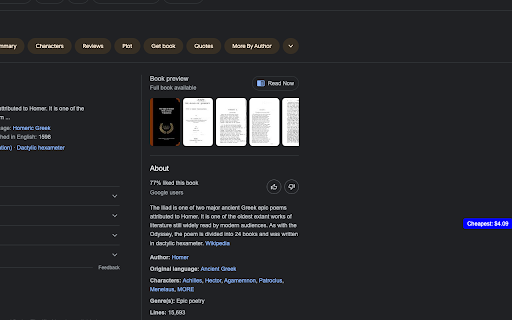


A Chrome extension that allows you to compare prices of books across multiple websites. Pages on pages allows you to find the cheapest place to buy a book, no matter where you search for it. You can search for a book on Amazon, Google, Thriftbooks, or many other sites, and a small popup will appear that tells you the cheapest price, when clicked the popup will expand and give a detailed and ordered list of the cheapest place to buy a book.

Sound Booster Max
A Chrome extension to increase and boost the volume on web pages. Boost 6X your audio up to 500% with Sound Booster Max – the best volume booster extension for Chrome! Whether you're watching videos on YouTube, listening to music on Spotify, or in a video call, get louder, clearer, and distortion-free sound with just a few clicks. 🚀 🔊 Sound Booster Max: Volume Booster Extension for Chrome 🔊 Why Choose Sound Booster Max? 🔊 Boost Audio by 6X upto 500% – Get the maximum volume without any distortion! 🎥 Works on YouTube, Netflix, Spotify, and more – Perfect for all your favorite platforms. 🧑💻 Simple and Lightweight – The extension is super easy to use and won’t slow down your browser. ⚡ Seamless Experience – Enjoy louder sound across all tabs with no lag or performance drop. 🔧 User-Friendly Interface – Adjust the volume quickly with a simple slider. Sound Booster Max is a lightweight, high-performance sound booster that works on every website, enhancing your audio experience instantly. Whether it’s for movies, music, or video calls, this volume booster Chrome extension is your go-to tool for clear, powerful sound. Key Features 📈 6X Volume Boost upto 500% increase in volume – Get loud, crisp sound even on low-volume devices. 🎧 Perfect for streaming videos, music, and calls on platforms like YouTube, Netflix, Spotify, and more. 🖥️ Lightweight Extension – Enjoy boosted sound without slowing down your browser. 🌍 Works on all websites – Get great sound everywhere you browse. ⚙️ No distortion – Clear, clean audio at all volume levels. Install Sound Booster Max now for free and enjoy the ultimate sound experience on Chrome! 🎶 FAQ Q: How much can I boost the sound? A: You can boost the volume 6X up to 500% for loud and clear audio. 🔊 Q: Does it work on all websites? A: Yes! It works on YouTube, Netflix, Spotify, Amazon, and many more platforms. 🌍 Q: Is it free to use? A: Yes! Sound Booster Max is completely free to install and use. 🎉 Q: Will it slow down my browser? A: No, this extension is lightweight and won’t affect your browser’s speed. ⚡ At Sound Booster Max, we may collect the URLs of websites you visit. This allows us to ensure that the extension functions properly across different sites and continues to deliver the best possible experience for you. You can find the full details of our privacy practices in our policies below: https://volumeboostermax.com/privacy-policy 🔒 Rest assured, any data we collect is used only to improve your experience and will never be sold to third parties.

XML Sitemap
A Chrome extension to view the sitemap of any website. This Chrome extension XML Sitemap allows you to easily view the sitemap of any website you visit. Simply click the extension icon, and it will attempt to fetch and display the sitemap from the current website's domain. This tool is particularly useful for web developers, SEO specialists, and anyone interested in exploring the structure of a website. Key Features: Automatic Sitemap Detection: The extension checks for the presence of a sitemap at the standard location (/sitemap.xml) for the current website. User-Friendly Interface: The sitemap is displayed in a clean and readable format, making it easy to navigate and find specific URLs. Cross-Domain Compatibility: Works with most websites, regardless of their domain or protocol. How to Use: Install the Extension: Add the Sitemap Viewer to your Chrome browser. Visit a Website: Go to any website you want to explore. Click the Extension Icon: Click the Sitemap Viewer icon in your toolbar to view the sitemap. This extension simplifies the process of accessing and viewing sitemaps, making it a valuable tool for anyone working with websites.

Page Plain Text
Chrome extension that shows page plain text and allows you to edit or download the text [Features] - Shows page plain text (keyboard shortcut: Ctrl + Shift + 1) - Extracts text from the selection on the page - Text editing - Download page plain text (keyboard shortcut: Ctrl + Shift + 2) - Removes all formatting from text - Removes all advertising to focus only on the content of the text - Copy text to use it in other documents (keyboard shortcut: Ctrl + Shift + 3) - Zoom In and Zoom Out text to improve legibility (keyboard shortcut: Ctrl + ➕ / Ctrl + ➖) - Contextual menu to quickly copy or download the plain text of the current page - Dark Mode color scheme [Keyboard Shortcuts] To change the keyboard shortcuts of the extensions you can go here: chrome://extensions/shortcuts [Links] - My Home page: https://www.vincenzodevivo.com/ - My GitHub: https://github.com/deltavi ... or you can buy my books on Amazon 📚 www.amazon.it/Vincenzo-De-Vivo/e/B09MPTBBFY

Side Browser
A Browser extension for Chrome and Firefox that allows you to open a side panel to browse the web while you work. Side Browser – The Best Sidebar Web Experience Side Browser is a lightweight Chrome extension that lets you open any website directly in a sidebar — perfect for multitasking and staying productive. You can read Reddit, check Gmail, browse Twitter, or watch YouTube — all without switching tabs. ⚡ Fast and responsive design 💾 Auto-saves your last opened page 🧩 Works perfectly with most web apps Stay focused, stay efficient — with Side Browser.
