
pggbiaffhagpmifmogkfibinbbgacled
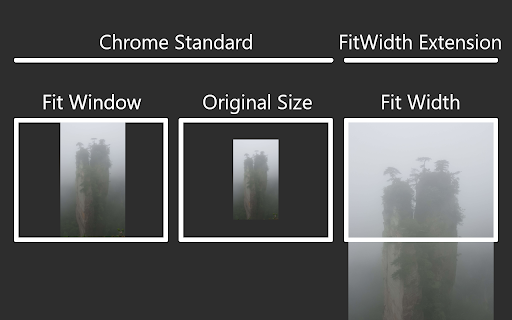
Adds an additional zoom mode for the default image view. The Google Chrome image view has two different zoom modes. This extension adds a third one. Fit height or width: Fits the image to the window size. Original size: Displays the image in the original size. Ignores the window size. -New- Fit width: Fits the image to the window width. If the image is too high a scollbar is used. This new mode is perfect to view very thin and high images like Screencaps.

Page Gallery
Displays a gallery of the images on the current page with filtering and sorting. Looking through a confusing image gallery or trying to find the largest version of an image on a page? Open the Page Gallery and see every image in a handy overview with filtering and sorting!

Enhanced Image Viewer
Features: ✓ Position images in center or top left corner ✓ Set custom background color ✓ Zoom, rotate, pan and scroll images with improved controls ✓ Flip images horizontally and vertically ✓ Pixelate images for viewing pixel art and lossless formats ✓ Hide scrollbars ✓ View images in the current tab ✓ Works with local files and incognito mode ✓ Enhances images on Reddit • No more headers and footers on images opened directly • Works with single images and image galleries in an overlay ✓ Enhances images on image hosting sites • Skips the continue button • Shows the image full-screen automatically Feel free to leave any feedback you might have on the support page or contact us by email.

Image Autosizer
Customize how images are displayed and controlled within your browser. Image Autosizer provides control over how image files are displayed in the browser window. Features: - Several display modes, changing how the image scales to the window - Smooth/inertial panning - Custom background color - Optional checkerboard-background - Option to close image on long mouse press Usage: - First, open up an image file - Click image to toggle the size - Double click to fill image to window - Press 'c' to temporarily change background color There is a quick guide in the preferences with some additional details. Q & A ======== Q: This extension does not work! A: Go to the extension's preferences and read through the quick guide. If it doesn't work only on certain pages, make sure you have enabled the extension for secure pages if you are surfing on one. Also remember that this extension only takes effect if an image file is opened. It does not do anything to images located inside an html-document.

Image Zoom
Image Zoom is a lightweight, no-fluff Chrome extension that lets you zoom into any image with a simple right-click – no ads, no bloat, just works. 🔍 How it works: Right-click on any image and select "Image Zoom" from the menu. A zoomed view pops up where you can: - Scroll to zoom in/out - Click and drag to pan around - Press Esc to close - Rotate left or right (NEW in v0.0.3) ✅ Features - Zoom with mouse wheel - Rotate images left/right - Drag to pan - Escape to close Works without interfering with site design - 🌀 Rotate image left/right - 🛠️ Fixed CSS conflicts with some sites v0.0.2 - 🖱️ Added mouse wheel support - ⎋ Close with Escape key Perfect for developers, designers, or anyone who constantly works with images online. Try it once – you’ll never go back.
