
pggagcnknjflkejaiimenbpdoebfegkm
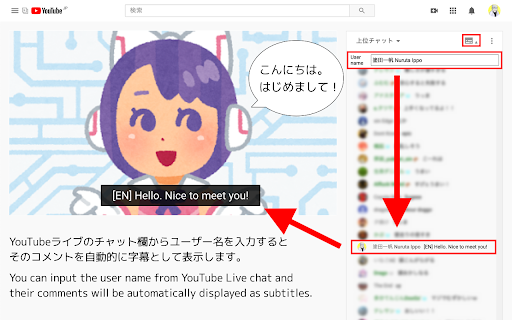
Subtitles generator for YouTube Live ◆features You can input the user name from YouTube Live chat and their comments will be automatically displayed as subtitles. If you specify the username of a volunteer who translate and comment what the streamer is saying as a real time , you can enjoy the live streams in any language. ◆Usage (1) Click the icon in the chat field. (2) Copy and paste the user name you want to specify (3) Click the icon again to close it. ◆If you find a problem Please contact me on Twitter (@nulltypo). I can't respond to reviews. ◆Disclaimer I'm not responsible for any loss or damage caused by this extension.

TranslateTube: YouTube Video Translator
Real-time AI voice dubbing for YouTube videos, no subtitles needed Language barriers shouldn't stop you from enjoying YouTube. Our extension translates videos in real-time using advanced AI, offering both voice dubbing and text translation. • Translates YouTube videos to English and 50+ other languages • Works even with videos without subtitles (no CC required) • Provides AI-generated voice dubbing so you can listen instead of read • Automatically creates transcripts while watching • Translates live streams in real-time as they happen 🔧 How to Use This Extension: 1. Install the extension 2. Open any YouTube video or live stream 3. Select your preferred language 4. Choose translation mode: Voice dubbing or subtitles 5. Click "Start" - translation begins immediately 1. YouTube Video Translator - Convert any video to your language 2. Auto-Translate - Works automatically with one click 3. AI-Powered - Uses advanced neural networks for accurate results 4. Transcript Generator - Creates text transcripts while you watch 5. No Subtitles Required - Translates videos without existing captions • Need to understand videos in other languages? → Get instant translation with voice or text output • Watching content without subtitles? → Our AI generates captions and translates them automatically • Following live international events? → Real-time translation for streams and broadcasts 🎓 Perfect For: • Students watching educational content in foreign languages • Professionals following international industry updates • Travelers preparing for trips with local videos • Anyone enjoying global entertainment without language limits • Supports 50+ languages including English, Spanish, French, German, Russian • Requires internet connection for AI processing • Privacy-focused: no personal data stored • Free basic plan with premium options available ⚠️ Important Note: This extension provides AI-generated translations, not professional human translation. Accuracy may vary with audio quality and specialized terminology.

YouTube Lyrics Extension – Real-Time Synced Lyrics | YT Lyrics
✨ Shows real-time synced lyrics on YouTube. A simple YouTube lyrics extension for music videos and songs. Transform your YouTube experience with instantly-detected, beautifully displayed, time-synced lyrics. You watch. We detect. Lyrics appear. Just like magic. 🌟 FEATURES (Everything You Want, Instantly) 🎵 AI-Powered Song Detection (Detects ANY song on YouTube) ⏱️ Real-Time, Auto-Synced Lyrics (Lyrics stay perfectly synced) 🌍Multilingual Lyrics Support (English, Korean, Japanese, Chinese, Malay and more) 🎤 Karaoke Mode (Follow along as each line highlights during playback.) 📌 Draggable Floating Popup (Move, resize, or dock the lyrics box anywhere on the screen.) 🪶 Lightweight & Zero Setup (Install → open YouTube → lyrics appear.) No login. No configuration. No extra dependencies. 🖥️ Fullscreen Compatible (Enjoy immersive lyrics while watching videos in fullscreen.) Install YT Lyrics Play ANY YouTube or YouTube Music video Lyrics instantly appear in a clean, floating window Skip or rewind — lyrics stay perfectly synced Drag or reposition the popup anywhere you like That’s it. Zero effort. Maximum convenience. 🔒 PRIVACY FIRST YTLyrics runs fully in your browser. No accounts required No accounts. No personal data collected 🚀 WHY USERS LOVE YTLYRICS ✔ Finally get lyrics for videos without finding in the comment section or description ✔ Handles underrated and niche songs that other tools miss ✔ Perfect for singing along, studying, or learning languages ✔ Makes YouTube feel like a premium music app Once you try YTLyrics, YouTube without lyrics will feel incomplete. ⭐ FEEDBACK & RATINGS If you enjoy YT Lyrics, your feedback means everything. It helps the extension grow and reach more people. ✨ Please consider leaving a rating or review on the Chrome Web Store. It takes a few seconds and helps support future updates. If you spot bugs or want features, feel free to leave a note in the reviews — we actually read every single one.

YouTube Auto-Translate Language Auto-Selector
Automatically sets the YouTube subtitle language. Automatically translate YouTube subtitles to your preferred language. No more manual settings! Instantly changes YouTube's auto-generated captions to your default language, saving you time. Tired of changing YouTube subtitle languages manually every single time? This extension automatically sets YouTube's auto-generated captions to your preferred language, ensuring a seamless viewing experience without any extra clicks.

Real-time Video Translator & Dubbing - DubTab
Live AI speech translator with dubbing. Dual subtitles for YouTube, courses, meetings & streams. Supports 60+ languages. DubTab helps you understand any video in your browser by dubbing it in real time. When you’re watching YouTube, online courses, K-pop livestreams, product demos, webinars, or any site with spoken audio, DubTab: - translates what you’re hearing as it happens, - shows live translated subtitles on screen, and - plays a natural AI voice speaking the translation (real-time dubbing). If you’ve ever thought “I wish this video had a voiceover in my language” — that’s exactly what DubTab is built for. 🎧 What DubTab is best at - Real-time AI dubbing (the main feature) DubTab turns speech into translated speech with low latency, so you can keep watching without constantly staring at subtitles. - Live translated subtitles Subtitles appear in real time, so you can follow every sentence as it’s spoken. - Bilingual subtitles (when you want both) Show original + translation together — great for learning or quick accuracy checks. - Choose a voice you like Pick from multiple voices so the dub sounds clear and comfortable to listen to. - Works on any tab that’s playing audio Great for YouTube, video platforms, courses, K-pop livestreams, webinars, and more. ✨ Use cases - Keep up with fast-paced tutorials, courses, and tech talks without missing details - Language learning with bilingual subtitles + spoken translation - Teams who consume international content (training, demos, talks) - Watch YouTube videos in other languages hands-free (listen instead of reading) - Follow K-pop livestreams and understand what’s happening in real time 🪄 How it works 1) Install DubTab 2) Play a video/audio in your browser 3) Select your Target Language (and source if needed) 4) DubTab shows live translated subtitles and starts dubbing 5) Listen to the translated voice in real time 🔒 Privacy & support DubTab is built with privacy in mind and designed to support GDPR principles. Your viewing history stays on your device — all history is stored locally.
