
pgcfkniiilibkmlemhnljnghcfkghhaj

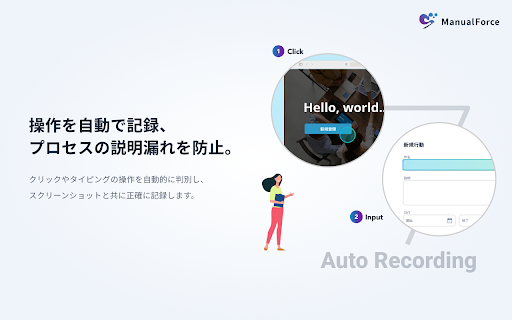
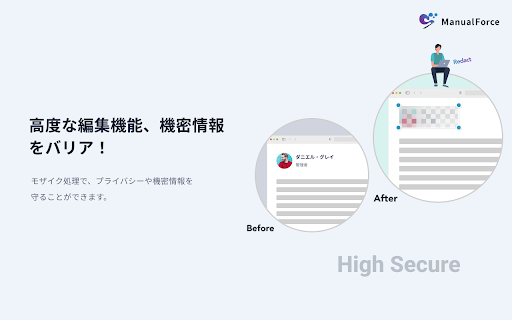
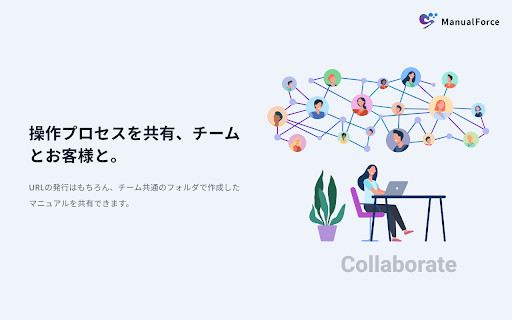
ブラウザ上の操作プロセスを誰でも簡単にマニュアル化することができます。 ManualForceはマニュアルの自動作成ツールです。 人に説明をしたいWebブラウザ上の操作を自動的に記録し、瞬時にマニュアル化、共有することができます。 従来、Webサービスの操作方法を人に説明したいときは、画面キャプチャを撮り、PowerPoint等に貼り付け、説明文を記載する等といった作業が想定されますが、このような一連の作業を自動で行うことができます。

Chat to Notion
Save your discussions with ChatGPT, Deepseek, Claude and Mistral directly into Notion! Chat to Notion brings the cleverness of your favorite LLMs into your favorite app! Save your conversations with ChatGPT, Deepseek, Claude and Mistral into Notion in one click! ⭐ FEATURES ⭐ - Save a full conversation in a few seconds - Save an individual answer - Save to any Notion database - Choose page tags when saving - Customize page title when saving - Autosave (only for ChatGPT at the moment) - Save your entire chat history - Supports LaTeX notation 💡 USAGE 💡 On your prefererd LLM's page, you'll notice a new pin icon under each of its answers. You can use it to save specifically that answer and the related prompt to your Notion database of choice. If you want to save the whole discussion, you can do so from the extension popup. You may link as many databases with the extension as you need to, and you can then choose which database to save your discussion to at saving time. ✉️ CONTACT ✉️ Got any suggestion/issue? Check out the extension's GitHub at https://github.com/L-a-r-t/chatgpt-to-notion You may also send me an email at tlartigau.pro@gmail.com :) 🕵️ PRIVACY 🕵️ For security & practical reasons, some data such as your Notion user id and the key that allows us to communicate with your notion workspace (not your credentials, that no one except you has access to) are stored remotely instead of locally where they could be easily compromised. The code for this is open source and can be found on previously linked GitHub. Your data is never shared with any 3rd party. The extension needs to access the following websites : - api.notion.com The saving process means that there is a back-and-forth between the extension and Notion’s API. - chat.openai.com / chat.deepseek.com / claude.ai / chat.mistral.ai The extension needs to access ChatGPT/Deepseek/Claude/Mistral’s page to scrape the chat that you are saving. - chatgpt-to-notion.onrender.com This is the remote server where the access key is stored. The source corde for that remote server can be found on the extension’s GitHub. Take note that removing the extension’s access to your Notion workspace (Settings > My connections) will stop it from being able to access your workspace as long as you don’t reinstall it and redo the authentification process. - theo-lartigau.notion.site As part of the Notion authentification process, you are redirected on a webpage chosen by the Notion integration’s maker. Notion’s API response is url-encoded which means that the extension needs to access the redirect page to fetch it. In the case of this extension, that redirect page is the following : https://www.notion.so/ChatGPT-to-Notion-af29d9538dca4493a15bb4ed0fde7f91 THIS EXTENSION IS DEVELOPED INDEPENDENTLY AND IS NOT AFFILIATED TO EITHER OPENAI OR NOTION

Enhancer 4 Google
Improves the UI of various Google services, taking these already user-friendly services to the next level. Enhancer 4 Google was developed to maximize the potential of the amazing services provided by Google. From quality-of-life UI improvements that address specific needs to advanced automation features not originally available, it is packed with functions for power users. 〇Turn NotebookLM into the "Ultimate Knowledge Base" Make information organization and insight acquisition smoother and more powerful. * Homepage Categories & Search: Organize your cluttered homepage. Group notebooks into custom categories with color coding to keep your workspace tidy. Plus, find any notebook instantly with the new real-time search bar. * Web Crawler & Source Generator: Solves NotebookLM's biggest challenge: "importing website hierarchies." It automatically crawls pages by following links from a specified URL (root) and combines/outputs them as a single Markdown file optimized for NotebookLM. Converting an entire site into knowledge has never been easier. * Sync Scheduler (Auto Sync): Previously, even if the source Google Drive or Web page was updated, you had to manually press the sync button on the NotebookLM side. With this feature, synchronization runs automatically in the background at specified intervals (hourly, daily, weekly, etc.). Your Notebook is always up to date whenever you open it. * Bulk Sync Button: Even for notebooks holding a large number of sources, you can check for updates and sync all sources with a single click. There is no need to click through them one by one. * Studio Panel Optimization: The "Studio" panel, which tends to occupy screen space, can now be collapsed to secure a wider chat area. It prevents unintended generation caused by accidental clicks on the "Audio/Video Overview" button and changes behavior to always open the edit prompt, preventing wasted credits. 〇Turn Gemini into a "Comfortable Writing Environment" Make sessions with conversational AI more spacious and speedy. * Sidebar Chat Categories: Tired of an endless list of chat history? Now you can organize your chats into custom folders in the sidebar. Simply drag and drop chats into categories to keep your projects organized. Includes features to rename folders and a native-looking UI that fits perfectly with Gemini's design. * Content Width Expansion (Wide Mode): Break free from the standard narrow display width. You can freely adjust the maximum width of the chat area from 760px to 5000px to match your monitor. Code blocks and table data can also be viewed comfortably without wrapping. * Expandable Markdown Editor: Say goodbye to writing complex prompts in tiny text boxes. This feature adds an 'Expand' button to input fields (especially useful for Gems custom instructions), opening a full-featured popup editor. It comes equipped with Markdown support (headings, tables, code blocks), live preview, and smart list handling (auto-numbering/indentation), making prompt engineering significantly more efficient. * Gem Manager Search: No problem if your created Gems (Custom Bots) increase. A search bar has been added to the Gem list page, allowing you to instantly find the target Gem by name or description. * Tool Shortcuts: Access buttons for frequently used tools like "Deep Research" and "Canvas" are permanently placed in the prompt input field. This saves the trouble of searching deep into menus. 〇"Automate Material Creation" with Google Slides Reduce the effort of turning PDF materials into slides to zero. * PDF to Slides Import: Adds a "Import PDF" button to the slide editing screen. Simply drag and drop your PDF file, and it converts all pages into images and automatically places them on each slide page in coordination with Google Apps Script (GAS). * Image ZIP Bulk Download: It is also possible to download high-quality slide images converted from PDF as a ZIP file in bulk. This is useful for reusing materials. (Note: To use this feature, you need to set up GAS with your own Google account. A complete manual is provided.) 〇Google Chat & Common Features Prevent operational errors and customize usage to your liking. * Prevent Accidental Sending (Custom Key Binding): Customize how you send messages. Change the default behavior to "Enter for new line" and choose your preferred trigger for sending: Shift+Enter, Ctrl+Enter, or Alt+Enter. This prevents incomplete messages from being sent by mistake and applies to NotebookLM, Gemini, and Google Chat. 〇Privacy and Security This extension is designed with "User Privacy Protection" as the top priority. * Data Stays with You: All configuration information and task data are saved only within the browser (Chrome Storage). Nothing is ever sent to the developer's server. * Transparent Communication: The destination for PDF data in the Google Slides function is only the URL of the Google Apps Script set by you. The Web Crawling function is also executed only for the URLs you specify. No data is sent to unintended third parties. * Privacy Policy: https://enhancer.corp-4u.com/privacy.html Disclaimer: This extension is provided "As Is". Please note that functions may become unavailable without notice due to specification changes in Google services, etc.

Quden for Chrome
【Quden for Chromeの使い方】 Quden for Chromeは録画作成に使用するQuden専用のChrome拡張機能です。 Qudenを使ってビジュアル的に、わかりやすく相手に意図やニュアンスを伝えましょう💪

crx-gcal-url-opener
Chrome extension that automatically opens Google Calendar meet links and event URLs
