
pfngjkakgncabcfjdknjacpnbidjlldm

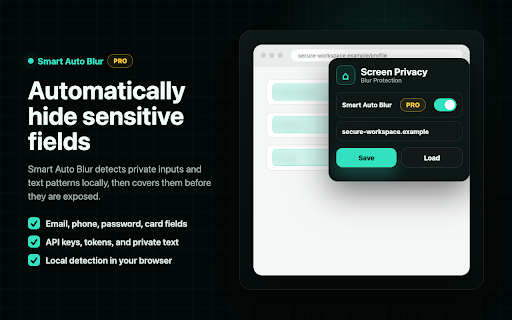


Blur parts of your screen to hide private information during screen sharing Screen Privacy Blur helps you protect sensitive information during screen sharing, video calls, demos, live streams, and recordings. Create manual blur overlays anywhere on a webpage, resize and move them freely, save layouts per site, or use Smart Auto Blur Pro to automatically detect and blur sensitive fields such as emails, passwords, phone numbers, card fields, API keys, tokens, and private text patterns. Perfect for remote work, client demos, product walkthroughs, support calls, online teaching, streaming, and any situation where you need to share your screen without exposing private data. Key Features: • One-click manual blur overlays • Drag, resize, and position blur areas • Save and load blur layouts per website • Per-overlay pin controls • Adjustable blur intensity, opacity, color, and glass blur • Smart Auto Blur Pro for automatic sensitive field detection • Presentation Mode for instant full-screen privacy • Works across websites and web apps • Local blur detection and overlay rendering Privacy-first by design. Manual overlays and Smart Auto Blur detection run locally in your browser. No screenshots, page content, form values, or browsing history are collected.

Privacy Extension for WhatsApp Web
Blur WhatsApp messages, media, names and previews. Protect your chats: auto-blur when idle, reveal on hover. Boss walking by? Coworker eyeing your screen? Someone behind you at the café? Blur your WhatsApp Web chats and keep messages, photos, names and previews safe from prying eyes nearby. 🧠 AUTO-BLURS WHEN YOU STEP AWAY Stopped scrolling? Everything blurs on its own. You pick the timer: 15s, 30s, 45s, 1 min or 5 min. Move your mouse to reveal. 🎛️ YOU CHOOSE WHAT TO HIDE ✅ Messages and previews ✅ Photos, videos and stickers ✅ Profile pictures and contact names ✅ The typing field 💼 BUILT FOR SHARED SPACES • Home office and remote work • Open offices and coworking • Cafés and public places • Shared or family computers ⌨️ FAST AND IN YOUR CONTROL • Hover to reveal instantly • Shortcut: Alt+X (Windows) / Ctrl+X (Mac) • Lightweight — won't slow WhatsApp Web down ☁️ YOUR SETTINGS FOLLOW YOU Signed into Chrome, your preferences sync across devices. 🔐 REAL PRIVACY Zero data collected. Everything runs in your browser — nothing leaves your computer. WhatsApp is a trademark of Meta Platforms, Inc. This extension is not affiliated with, endorsed by, or sponsored by Meta.

Blurred Out
The smart way to selectively blur parts of a website when sharing your screen. Keep your private parts hidden with Blurred Out. It’s an intelligent Chrome extension that lets you hide exactly what you need on any web page—live during meetings, demos, and recordings—while everything else stays visible. Manage everything from a simple side panel, and keep your data completely on your device. ✨ Smart Detection - Automatically detect common sensitive content with built‑in plugins - Email addresses, phone numbers, money amounts, names, and input fields - Preview detected items before applying blur - Enable/disable individual detection plugins to fit your needs 🎯 Precision Controls - Click‑to‑blur in Simple Mode - Numeric hotkeys to capture multiple items in Advanced Mode - Bulk apply to similar elements (e.g., all prices or PII) - Smart selection for table rows and columns—great for tables 📌 Pinning & Positioning - Pin rectangles to page content (moves with the page) - Pin to viewport to keep overlays fixed while scrolling - Switch pin modes anytime; states persist across sessions 🎥 Presentation & Resizing Capabilities - Demo Mode opens a clean, presentation‑ready window without the address bar - Window resizing presets (800×600, 1024×768, 1280×720, 1920×1080, iPhone, iPad) - Custom dimensions supported for exact recording targets 🎛️ Side Panel & Workflow - Manage all blurred elements from a tidy Chrome side panel - Enhanced hover/selection feedback and clearer icons - One‑click picker, real‑time preview, and four modes: Off, Capture, Draw, Blur - Import/export configurations; Keep your data local and safe 🔒 Privacy & Control - 100% local: no cloud, no external servers - Zero data collection - Works across multiple tabs and modern, dynamic web apps ⚡ Performance & Stability - Faster startup and lower memory usage - Optimized detection and improved cross‑site compatibility Benefits - Protect sensitive info during screen sharing - No need to create fake/sample data for demos - Professional presentations without switching apps or views - Save time with bulk selection and smart detection Perfect For - Customer demos and webinars - Teachers and tutorial creators - Developers showing code or dashboards - Anyone sharing screens that include private data What’s New in v1.0.3 - New plugin‑based Smart Detection system (emails, phones, money, names, inputs) - New rectangle pinning: Pin to Content or Pin to Viewport (persistent states) - New window resizing presets plus custom sizing controls - New Demo Mode for clean, presentation‑ready windows - Update extension badge to indicate the view mode - Improved side panel UX, import/export - Performance gains and numerous fixes Technical Details - Lightweight and performance‑optimized - Compatible with the latest Chrome versions - Zero data collection—privacy by design

Scrolling screenshot tool & screen capture
Scrolling Screenshot tool for screen capture and screen sharing This is the simple and quick version of the renowned “Awesome Screenshot” extension. Want to share your screen for cases like reporting technical issues, making product demos or how-to tutorials 【quickly】? Here are 7️⃣ reasons to choose Awesome Screenshot tool 1️⃣ Provide stable service for more than 10 years 2️⃣Loved by more than 3 millions users across different platforms 👍 3️⃣ Easy to use with shortcuts 4️⃣ No ads and respect your privacy 5️⃣Powerful features special designed for taking a screenshot quickly 6️⃣Quick Customer support 7️⃣ Most importantly, your voice matters! 🗣 & Continuous improvements Here are some features for this simple "Awesome screenshot" 📷 Screen Capture ▸ Capture a screenshot of the page you visit, full page, selected area or visible part ▸ Capture a screenshot of your entire screen or a specific application window (coming soon) ▸ Capture visible part, entire screen or app window after delay (Coming soon) 🖍 Annotate Screenshot ▸ Resize or crop a screenshot to the size you need ▸ Annotate your screenshot with rectangles, circles, arrows, lines, etc. ▸ Add text to your screenshot with or without background color, change text font and font size ▸ Blur sensitive information on your screenshot ▸ Highlight important part on your screenshot ▸ Select a local image or paste a copied image from your clipboard to annotate 📥 Copy & Save Screenshot ▸ Save screenshot as image in PNG or download screenshot as PDF ▸ Copy a screenshot directly when capturing selected area for quick pasting Shoot a message to care@awesomescreenshot.com if you experience any problem. Let us know your thoughts! Thank you.

DataBlur - Screen Blur for Privacy
Blur sensitive information in real-time. Screen privacy for demos, presentations & recordings. Protect client data automatically. BLUR YOUR SCREEN. PROTECT YOUR PRIVACY. SHOW REAL WORK SAFELY. DataBlur is a screenblur Chrome extension and blur app that eliminates "demo anxiety" by automatically blurring sensitive information during screen shares and recordings—in real-time, locally, and with one click. No more fake data. No more hours of video editing. No more worrying about accidental leaks. Perfect for consultants, sales engineers, content creators, and anyone who presents real data on live calls or in recorded tutorials. Protect sensitive information during: • Live screen shares (Zoom, Google Meet, Microsoft Teams, Discord) • Screen recordings (Loom, OBS, QuickTime, any recording tool) • Tutorial creation & course recording • Client presentations & demos • Webinars & training sessions Automatically blur: • Passwords & API keys • Email addresses & phone numbers • Customer names & account IDs • Credit cards & financial data • Confidential documents & pricing • Any sensitive information you choose • Blur my screen entirely — full-display protection with one click One-Click Blur Modes • Element blur: Click any webpage element (text, buttons, images, forms) • Area blur: Drag to create custom rectangular blur zones — censor screen regions instantly • Text blur: Select and blur specific passages • Title blur: Hide sensitive page titles from recordings • Full-screen blur: Blur my screen entirely for maximum protection Intelligent Auto-Detection • Automatically identifies emails, phone numbers, credit cards, passwords, security codes, API keys, and other PII • Pattern recognition for authentication tokens and secrets • One-click to remove all blurs on current page Persistent Domain Rules • Set preferences once per website, they stay active across all sessions • Return to a site and your blur settings are already applied • No need to reconfigure every time Complete Privacy & Security • 100% local processing, your data never leaves your browser • Zero cloud uploads or external API calls • No account required, no data collection • GDPR compliant with optional anonymous analytics • Manifest V3 compliant for maximum security Professional Controls • Adjustable blur intensity (+/- controls) • Floating toolbar with keyboard shortcuts • Per-domain toggle (enable/disable by website) • Settings sync across browser tabs and sessions • Alt+Shift+T - Toggle toolbar visibility • Alt+Shift+B - Blur selected text • Alt+Shift+R - Remove all blurs on page • Alt+Shift+A - Toggle auto-detection Freelance Consultants & Independent Professionals Switch between client projects during screen shares without revealing confidential information. Present portfolios while maintaining NDA compliance. Content Creators & Technical Educators Record coding tutorials without editing out passwords and API keys. Create authentic content with real tools instead of sanitized demos. Save 2-4 hours of post-production editing per video. Financial Advisors & Legal Professionals Present portfolios and reports while protecting client PII. Demonstrate software while maintaining regulatory compliance. Live Sales Demonstrations Present real customer data during sales calls without revealing sensitive information. Build trust with authentic demos instead of fake environments. Tutorial & Course Recording Record screen tutorials without spending hours editing out passwords, API keys, or personal data in post-production. VS. Post-Production Editing (Adobe Premiere, Final Cut) ✗ Requires 2-4 hours per video ✗ Needs technical expertise ✗ Cannot protect live calls ✓ DataBlur: Real-time protection, zero editing time, works for live presentations VS. Built-in Tools (Loom Blur, Cleanshot) ✗ Limited to specific recording software ✗ Cannot protect live Zoom/Meet calls ✗ No persistent rules across sessions ✓ DataBlur: Works with ANY recording tool, protects live screen shares, automatic persistence VS. DIY Solutions (Sticky notes, browser zoom) ✗ Unreliable and easy to forget ✗ Disrupts workflow ✗ Looks unprofessional ✓ DataBlur: Automated, persistent, professional appearance VS. Cloud-Based Screen Protection ✗ Uploads your screen to external servers ✗ Privacy concerns ✗ Requires internet connection ✓ DataBlur: 100% local processing, complete privacy control, works offline Your privacy is our priority: • All blur operations execute locally in your browser • Zero cloud uploads or external services • No account creation or personal information required • No mandatory data collection • Optional anonymous analytics (can be disabled) • Transparent 90-day data retention policy • GDPR compliant • Open about our practices in our privacy policy • Works on: Chrome, Edge, Brave, and all Chromium browsers • Performance: Blur creation in under 50ms • Storage: Secure browser storage API • Security: Manifest V3 compliant, strict CSP • Compatibility: Works with all recording tools (Zoom, Meet, Teams, Loom, OBS, etc.) • Updates: Automatic DataBlur is currently 100% FREE with unlimited access to all features: • Unlimited blurring (no time limits or usage caps) • All blur modes (element, area, text, title) • Auto-detection of sensitive data • Persistent domain rules • Keyboard shortcuts • No watermarks • No feature restrictions 1. Click "Add to Chrome" (no account needed) 2. Pin the extension to your toolbar 3. Visit any website and click the DataBlur icon 4. Choose your blur mode and protect your data 5. Start your screen share or recording with confidence Your blur preferences save automatically and persist across sessions. Need help or have a feature request? • Email: support@datablur.app • Report issues: Open extension popup → "Contact support" • Feature requests: We actively incorporate user feedback Join thousands of consultants, sales engineers, content creators, and professionals who present with confidence using DataBlur. Install now and transform how you screen share.
