
peidgpelkfmpbiaphfakeaboijiagkmd
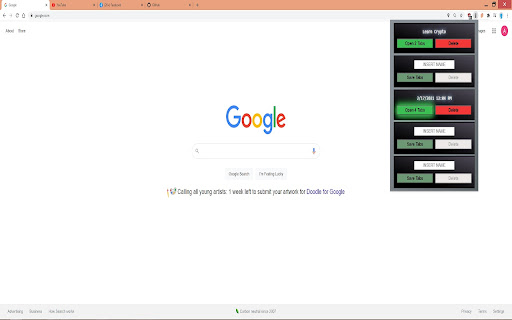
Save your current tabs for later use Can save up to 5 collections of tabs to be reopened at anytime. Helpful for studying or research.

Secure Tab Locker - Domain Password Protection
Protect your browsing with domain-specific passwords for enhanced privacy and security. Tab Lock is a powerful Chrome extension that lets you password-protect any website or browser tab, helping you keep your private browsing secure and distractions under control. Whether you're looking to lock social media, protect email accounts, or limit access to sensitive pages, Tab Lock gives you complete control with simple, fast protection. Perfect for parents, professionals, students, and anyone who shares their device. 🔐 Set passwords for specific websites (like Facebook, Gmail, YouTube, etc.) 🕒 Schedule lock hours for productivity (e.g., during work hours) 👀 Stealth mode – Hide the extension from the toolbar Easy setup with no login or cloud required Ideal For: Productivity lovers, parents, freelancers, students, remote workers, and anyone who values digital privacy and focus. 🔐 Install Tab Lock now and take control of your tabs and time! Keywords: tab lock extension

Tab Locker - AzriaSolutions
Secure tab locking with personal device code for remote control AzriaSolutions Tab Locker: Secure Browse with Remote Control Effortlessly secure your browser by password-protecting individual tabs and entire domains. Now with secure remote control, you can manage your locks from your phone, giving you peace of mind wherever you are. It's the ultimate tool for privacy on shared computers, protecting sensitive work, or simply staying focused. 📱 Mobile Remote Control - Lock or unlock your browser tabs from anywhere. Flexible Locking - Lock individual pages or entire domains. Auto-Lock Timer - Automatically secures tabs after 10 minutes of inactivity. Password Recovery - Regain access using pre-set security questions. Discreet Widget - A clean, unobtrusive floating icon gives you quick access. Session-Based Unlocking - Unlock a tab for your current session only. 🛡️ SECURITY & PRIVACY: Secure Storage - Your passwords and lock settings are stored locally on your device and encrypted. An anonymous, unique ID is used to enable the optional remote control feature. No User Tracking - We do not track your Browse history or collect personal data. Hybrid Functionality - Core locking features work offline. Remote control requires an internet connection. Strong Encryption - Enterprise-grade password hashing to protect your credentials. Perfect for shared computers, protecting sensitive information, or maintaining privacy in public spaces.

Tab Locker Pro
Secure tab locking with URL-based locking, dark mode and encryption Tab Locker 🔒 Click once to lock any tab with a secret PIN, keeping nosy roommates, curious coworkers or family members away from your sensitive browsing. With a sleek design and cool dark mode, Tab Locker makes privacy fun and simple. Whether you're shopping for surprise gifts or checking private accounts, keep your tabs safe until YOU decide to unlock them. Once locked easily, Switch tabs without worrying about tabs Privacy, Tab Locker Instantly locks it! Privacy made easy! 🔐 URL-Based Locking - Locks persist even after closing and reopening tabs. Lock a URL once, and it stays locked forever (until you unlock it) ⚡⚡ Instant Auto-Lock - Tabs lock immediately when you switch away. Zero delay, zero compromise, Your privacy is protected the moment you leave 🔒 Military-Grade Encryption - AES-GCM 256-bit encryption with PBKDF2 key derivation (100,000 iterations) protects your passwords 📊 Locked URLs Dashboard - View and manage all locked URLs in one place. See when each URL was locked and quickly access them with a single click of a button with "Quick Open Link" option. 🔓 Two Unlock Methods: • Temporary Unlock: View content temporarily (relocks when you switch away) • Permanent Unlock: Remove the lock completely from the extension popup 🌓 Dark Mode Support - Beautiful light and dark themes that adapt to your preference. Toggle between modes instantly 👁️👁️ Password Visibility Toggle - See what you're typing with the eye icon. No more typos when locking important tabs 🎨 Zero Content Flash - Lock appears before page content renders. No information leakage, even for 1 millisecond 🚀 HOW TO USE: 1. Click the Tab Locker Pro icon on any tab you want to protect 2. Enter a password (3-20 characters) - remember it! 3. Click "Lock This URL" 4. Done! Your tab is now protected When you switch away from a locked tab, it automatically locks. When you return: - Enter your password to temporarily view the content - Switch away and it locks again automatically - Or permanently unlock from the popup menu 🆕 VERSION 3.1.0 UPDATES: ⏫ ✨ Complete rewrite for maximum reliability 🚀 URL-based locking (not tab-based) - locks persist forever ⚡ Zero content flash - overlay appears before page renders 🎨 Enhanced dark mode with beautiful gradients 📊 New locked URLs dashboard with "Open URL" feature 🛠️ Improved error handling and stability ⚡ Performance optimizations for faster lock detection 🔧 Fixed all race conditions and edge cases 🎯 Smart URL matching to prevent bypass attempts 📝 Audit logging for security tracking ↗️ Quick links access system 💬 SUPPORT: Having issues? Need help? Contact us through the Chrome Web Store support tab. Feature requests? Leave a review and let us know! Or write us on tablockerpro@gmail.com Tab Locker Pro - Privacy made simple. Install now and start protecting your tabs!

Tab Locker
Lock and unlock Chrome tabs with keyboard shortcuts. Tired of accidentally closing important tabs? Tab Locker helps you lock any tab, preventing it from being closed and ensuring you never lose critical webpages. 🔥 Key Features: ⭐️ Reopen Locked Tabs: If a locked tab is closed, it reopens in the same position automatically. ⭐️ Lock & Unlock with Shortcuts: Use customizable keyboard shortcuts to lock or unlock any tab. ⭐️ Extension Toggle: Easily enable or disable the extension through a simple UI toggle. ⭐️ Dark Mode: Switch between light and dark modes to suit your preference. ⭐️ Popup Alerts: Quick pop-up messages when a tab is locked or unlocked. ⭐️ Preserve Tab Position: Locked tabs stay in the same spot, even after reopening when closed. 🚀 How to Use: ➜ Use customizable keyboard shortcuts to lock or unlock any tab. ➜ Set up your lock/unlock shortcuts by going to chrome://extensions/shortcuts. Made with ❤️ by Akarsh Raj Any questions or suggestions? Please contact me at 💌 akarsh.raj218+tab-locker@gmail.com
