
dkneokmoogckkhikapljkbbmnhmppiae
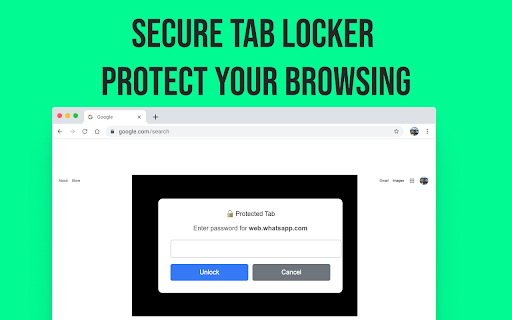
Protect your browsing with domain-specific passwords for enhanced privacy and security. Tab Lock is a powerful Chrome extension that lets you password-protect any website or browser tab, helping you keep your private browsing secure and distractions under control. Whether you're looking to lock social media, protect email accounts, or limit access to sensitive pages, Tab Lock gives you complete control with simple, fast protection. Perfect for parents, professionals, students, and anyone who shares their device. 🔐 Set passwords for specific websites (like Facebook, Gmail, YouTube, etc.) 🕒 Schedule lock hours for productivity (e.g., during work hours) 👀 Stealth mode – Hide the extension from the toolbar Easy setup with no login or cloud required Ideal For: Productivity lovers, parents, freelancers, students, remote workers, and anyone who values digital privacy and focus. 🔐 Install Tab Lock now and take control of your tabs and time! Keywords: tab lock extension

Browser Lock | Lock Your Browser
Protect your browser against unauthorized access. Easily lock your browser for added security. Secure Your Browser with Browser Lock: The Ultimate Protection Solution In today’s digital age, securing your online activities is paramount. Browser Lock offers an advanced solution to ensure your browser remains safe from unauthorized access, providing an extra layer of security with ease. Enhanced Security with Encryption Browser Lock uses state-of-the-art encryption technology to protect your browser. This means that all your data, from saved passwords to browsing history, is securely encrypted, making it inaccessible to unauthorized users. Whether you are at home, at work, or on the go, you can be confident that your online activities are private and protected. Easy to Use and Implement One of the key features of Browser Lock is its simplicity. With just a few clicks, you can lock your browser, preventing others from accessing your sensitive information. The user-friendly interface ensures that anyone, regardless of their technical expertise, can use Browser Lock to safeguard their browsing experience. Startup Lock: Automatically locks your browser as soon as you open it. This feature ensures that every time you start your browser, you are prompted to enter a password, preventing unauthorized access right from the beginning. Right-Click Lock: Instantly lock your browser using the right-click menu. This practical feature allows you to quickly and conveniently secure your browser with just a few clicks, enhancing your security with minimal effort. Easy Lock: Quickly and simply lock your browser using keyboard shortcuts. This feature offers a fast and straightforward way to lock your browser, providing immediate security with the press of a few keys. Idle Mode: Automatically locks your browser when you're away from your computer. This feature detects inactivity and locks your browser after a predefined period of no user interaction, ensuring your data remains secure even if you step away unexpectedly. Easy Password Change: Easily change your password at any time. This user-friendly feature allows you to update your password quickly and effortlessly, enabling you to enhance your security whenever needed without hassle. Dark Theme: Stylish dark theme that is easy on the eyes. This feature provides a visually pleasing dark mode, reducing eye strain during prolonged use and offering a more comfortable viewing experience, especially in low-light environments. Multi-Language Support: Use the browser in multiple languages. This feature makes the browser accessible to users who speak different languages, allowing them to navigate and utilize all functions in their preferred language for a more inclusive experience. Unbreakable or Invisible Password: Keep your data secure with robust encryption. This feature ensures that your password is either extremely difficult to break or completely invisible, providing maximum security for your sensitive information by leveraging advanced encryption techniques. Protecting your browser from unauthorized access has never been easier. With Browser Lock, you can enhance your security effortlessly and keep your online activities safe from prying eyes. Download Browser Lock today and experience the ultimate in browser security.

Locksy - Tab Locker & Password Protection
Password-protect your tabs with military-grade PBKDF2 encryption. Instant locking, offline security, 100% private. 🎯 WHY YOU NEED LOCKSY? ━━━━━━━━━━━━━━━━━━━━━━━━━━━━━━━━━━━━ Do you work in shared spaces? Need to step away from your computer but have sensitive information open? Worried about someone seeing your personal tabs when you share your screen? Locksy is your solution. Locksy keeps your sensitive tabs secure with strong password protection and instant biometric unlock (fingerprint / Face ID / Windows Hello). Whether it's banking information, confidential work documents, personal messages, or private research - only you can access your locked tabs. ❌ OS/Device Lock (Windows Lock, macOS Lock, etc.) DOESN'T PROTECT: • Screen sharing sessions - Others can see your tabs during meetings/presentations • Quick shoulder surfing - Anyone can glance at your screen in seconds • Brief moments away - Locking/unlocking your whole device is slow and disruptive • Shared family computers - Family members with login access see everything • Remote desktop connections - Authorized users can access all content • Individual privacy needs - You need to lock ENTIRE device for just ONE sensitive tab ✅ LOCKSY PROVIDES INSTANT, SELECTIVE PROTECTION: • Lock ONLY sensitive tabs, keep working on others • Instant protection (1 second vs 5-10 seconds for device lock) • Works DURING screen sharing - Hide specific tabs while presenting • No disruption - Keep music, downloads, background tasks running • Tab-level granular control - Lock banking but keep email accessible • Domain-wide protection - Lock all work tabs, keep personal tabs open • Quick access - Unlock one tab without unlocking everything • Auto-lock after inactivity - Set and forget automatic protection • Scheduled locking - Automatic protection during specific hours • Biometric unlock - Touch your fingerprint reader or use Face ID to unlock instantly 💡 REAL-WORLD SCENARIOS WHERE LOCKSY SHINES: • Video calls: Share screen without showing private tabs • Coffee shops: Step away for 30 seconds - lock tabs, not entire laptop • Office desk: Colleague asks to look something up - they can't see your locked tabs • Family PC: Everyone logged in - only YOUR tabs need password • Teaching/Demos: Present on one screen while keeping research tabs locked • Quick coffee breaks: 2-second protection vs full device sleep • Multiple users with access: They can use PC but not YOUR sensitive tabs • Work hours: Auto-lock all tabs during 9-5 when you're in office • Overnight protection: Schedule locking from 10 PM to 6 AM automatically ✨ KEY FEATURES ━━━━━━━━━━━━━━━━━━━━━━━━━━━━━━━━━━━━ 👆 BIOMETRIC UNLOCK • Touch-to-unlock with fingerprint, Face ID, or Windows Hello • Zero password typing required — just tap to unlock • Your biometric data never leaves your device • Works with: Windows Hello, Touch ID, Face ID, fingerprint readers • Falls back to password if biometric unavailable • Enable/disable anytime from settings 🖱️ RIGHT-CLICK CONTEXT MENUS • Lock tabs instantly without opening the popup • Right-click options: Lock this tab, Lock this domain, Lock all tabs • Toggle Stealth Mode directly from right-click menu • No need to click the extension icon — instant protection 📸 INTRUDER DETECTION (NEW v2.6.0) • Automatically captures webcam photos on suspicious unlock attempts • Detects repeated failed password entries (3+ attempts trigger capture) • All photos stored 100% locally — never uploaded or transmitted • New Intruder Log page with grid view of all captured photos • Per-photo delete button or clear entire log at once • Smart storage management — capped at 50 photos (oldest automatically removed) • Feature defaults to OFF • First time setup: You must manually enable camera permission in Chrome settings 🔓 QUICK-UNLOCK PANEL (NEW v2.6.0) • See all currently locked tabs in the popup at a glance • One-click unlock any tab without re-entering your password • No friction — the popup is already authenticated • Shows tab favicon and truncated title • Real-time updates as you lock/unlock tabs • Count badge shows how many tabs are locked 🛡️ STRONG SECURITY • Military-grade encryption (OWASP standard) • Brute-force protection with automatic lockout • 5-minute lockout after 10 failed attempts • Password strength indicator • Zero data collection or analytics • Everything stays on your device • Open-source (verify security yourself) 🌐 DOMAIN LOCK FEATURE • Lock entire domains (e.g., gmail.com, youtube.com) • All current and future tabs of that domain are protected • Wildcard support (*.google.com locks all Google services) • New tabs matching the domain auto-lock 🔓 UNLOCK ALL TABS • Single button unlocks all locked tabs at once • Works for all lock types: manual, scheduled, domain-locked 🕶️ INCOGNITO MODE SUPPORT • Works seamlessly in private browsing windows • Same master password for normal and incognito tabs 🔒 PRIVACY FIRST ━━━━━━━━━━━━━━━━━━━━━━━━━━━━━━━━━━━━ ✅ 100% Offline - No external servers or data transmission ✅ Zero Tracking - No analytics, cookies, or data collection ✅ Local Storage Only - Everything stays on your device ✅ Open Source - Transparent code on GitHub ✅ Biometric Safe - Your fingerprint/Face ID data never leaves your device ✅ No Passwords Shared - Your master password is never transmitted 🎯 PERFECT FOR ━━━━━━━━━━━━━━━━━━━━━━━━━━━━━━━━━━━━ 👥 Shared Computers - Protect tabs when others use your PC 🏢 Office Environments - Secure sensitive work tabs ☕ Public Spaces - Lock tabs at cafes, libraries, airports 👨👩👧 Family Computers - Keep personal tabs private 🏦 Banking & Finance - Lock entire banking domain 📧 Email & Social Media - Protect communication tabs 🎓 Students - Lock school portals during presentations ⏰ Scheduled Workers - Auto-lock during work hours 🌙 Night Security - Automatic overnight protection ☕ Break Times - Auto-lock after inactivity 🎯 Forgetful Users - Set it once, never worry about forgetting 📸 INTRUDER DETECTION — CATCH SUSPICIOUS ACTIVITY Automatically captures webcam photos when someone repeatedly enters the wrong password: • First time setup: You must manually enable camera permission in Chrome settings before Intruder Detection can capture photos • Once camera permission is enabled, Locksy will silently capture photos on suspicious attempts • Silently captures on the 3rd, 4th, 5th… failed attempts • All photos stored 100% locally — never uploaded or transmitted • New Intruder Log page with grid view of all captured photos • Per-photo delete button or delete entire log at once • Each photo tagged with attempt number and exact timestamp • Dark mode support for comfortable viewing • Feature defaults to OFF • Smart storage management — capped at 50 photos (oldest automatically removed) • View your intruder log from the popup with a real-time photo count badge 🔓 QUICK-UNLOCK PANEL — MANAGE LOCKED TABS INSTANTLY New collapsible panel in the popup shows all currently locked tabs: • One-click unlock any tab without re-entering your password • No friction — the popup is already authenticated, so unlock is instant • See favicon, tab title, and unlock button for each locked tab • Real-time updates as you lock and unlock tabs • Count badge auto-hides when no tabs are locked • Perfect for managing multiple sensitive sessions at once 1. Biometric-Default Preference • New "Use as Default Unlock" toggle in settings • When ON: locked pages open biometric-first — your OS prompt fires automatically • Password is a secondary fallback if biometric fails • When OFF: password remains primary, biometric is a secondary button 2. Visibility-Aware Auto-Trigger • WebAuthn prompts now fire ONLY when the locked tab is visible and focused • Eliminates the NotAllowedError loop that occurred during browser session restore • Shows "Switch to this tab to authenticate" while waiting for focus • Automatically triggers biometric when tab becomes active 3. Popup-Level Biometric Auth • Unlock the Locksy popup itself with your fingerprint or face • Platform-adaptive UI — correct icon/label for your device's biometric method • "Use Password Instead" / "Use Biometric Instead" toggle links • Retry button if biometric fails 🐛 BUG FIXES IN v2.6.0: • Fixed NotAllowedError loop that occurred on browser session restore with multiple locked tabs • Fixed stale state in quick-unlock panel after rapid lock/unlock cycles • Fixed photo storage overflow with automatic pruning 🖱️ RIGHT-CLICK CONTEXT MENUS — LOCK TABS FASTER No need to open the popup anymore! Right-click any page and instantly: 🔒 Lock this tab — instantly protect the current tab with your password 🌐 Lock this domain — add the entire website to your auto-lock list 📂 Lock all tabs — bulk-lock every tab in the browser window 👁️ Toggle Stealth Mode — activate/deactivate stealth from the menu 🕵️ STEALTH MODE — DISAPPEAR Hide every trace of Locksy so no one knows you're using it: 🎨 LIGHT / DARK THEME TOGGLE — YOUR PREFERENCE New theme switcher in the popup header — choose between Light ☀️ and Dark 🌙 modes: 🆕 VERSION 2.3.0 - BIOMETRIC UNLOCK • Touch-to-unlock with fingerprint, Face ID, or Windows Hello • No password typing required Locksy - Your Tabs, Your Password, Your Privacy. Made with ❤️ for Privacy & Security | © 2026 Locksy

WebSafety - Privacy Protector
Block web trackers automatically and protect your data with privacy protector for secure browsing. WebSafety – Advanced Privacy Protector ensures your online experience remains secure and private. Modern websites rely on tracking pixels and scripts to monitor user activity, but this extension stops those attempts before they can access your personal data. 🔒 Stop Trackers Before They Start: Automatically detect and block analytics systems, tracking cookies, and advertising pixels across websites. WebSafety keeps your activity private from third-party monitoring. 🛡 Protect Personal Data: Prevent companies from collecting your online behavior, purchase intent, or page interactions. WebSafety keeps your personal information secure, reducing unwanted profiling. ⚙️ Smart Privacy Management: Turn protection on or off for specific websites in just one click. WebSafety provides full flexibility so you can manage your privacy without sacrificing usability. 🚀 Enhanced Browsing Speed: Pages load faster when unnecessary scripts are removed. By blocking trackers, WebSafety streamlines browsing performance for smoother navigation. 🌍 Always Active: Once installed, it runs automatically in the background - a consistent shield for your digital identity. WebSafety - Smart Privacy Protector gives you control in a world of hidden data tracking. It is designed for users who value safety, simplicity, and performance in their everyday browsing routine. The extension sends anonymized data regarding the number of blocked trackers and the hostname to our secure server and do not share this data with third parties, as this is necessary for the core functions of the extension to work properly. This allows us to continuously improve the accuracy of our blocklists and provide users with visual context via the widget regarding the threat level on a specific website. This way, users can make an informed decision on their own about restoring protection to safeguard their privacy.

Browser Lock - Chrome Lock Browser | Browser-Lock.com
Lock your Chrome with a password to protect privacy. Auto-lock after inactivity and parental control for safe browsing. Keep Your Browsing Private, Secure, and Truly Yours – Effortlessly with Browser Lock Every time you walk away from your computer—at home or at work—you leave your most personal information just one click away from prying eyes. Your browsing sessions contain your emails, confidential work, private photos, and sensitive conversations. In shared spaces, busy households, or unpredictable office interruptions, relying solely on device locks or OS profiles doesn’t always shield your privacy. Browser Lock gives you seamless, always-on control—letting you safeguard your unique online world. **Why Privacy Matters: Day-to-Day Realities** How often do you step away from your laptop for just a minute, only to realize your open tabs are exposed? Whether it’s family sharing a computer, coworkers walking by, friends borrowing your device, or simply grabbing a drink—your web content can be seen by anyone. OS-level locking is clunky and sometimes impossible; Browser Lock fills the gap, letting you secure the browser instantly and automatically. **What Makes Browser Lock Different? Your Smart Security Partner** - Password-protect your Chrome browser—no complex setup required. - Auto-lock after inactivity: set your own timer for peace of mind. - Parental control mode: keep kids safe from unwanted content when you’re not around. - Locks without closing your work: resume right from where you left off after unlocking. - No cloud required, no sensitive data leaves your device—privacy by design. - Supports families, home offices, students, and professionals alike. **Everyday Scenarios: Real Benefits for Real People** - At home, you walk away to cook, and your emails/tabs remain private from other family members. - In the office, stepping out for a coffee, Browser Lock automatically secures client documents and private correspondence. - Public spaces—coworking or libraries—ensure strangers can’t snoop if you’re briefly distracted. - For parents, childproof your browser with one click—gain peace of mind when sharing devices. **Why Choose Browser Lock? The Clear Value** - Prevents information leaks, accidental clicks, and curious eyes - Saves time—no need to log out or reset sessions each time - Works quietly in the background, giving you seamless privacy - Distinct advantage over generic OS locking or user switching (quicker, more targeted, no session loss) - Extremely lightweight, no drain on system resources **Ready to Take Control? Install Browser Lock Now** Safeguard your browsing world—whether you care about confidentiality, parental oversight, or just peace of mind. Join thousands who trust Browser Lock for hassle-free, always-on web privacy. Install now and experience security without compromise!
