
peghhndlpmpmoejloomncaioafieipmh
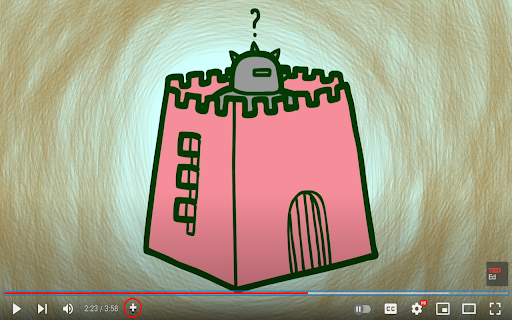


YTSave easily enables users to bookmark timestamps of YouTube videos with 1 click of a button on the YouTube player. YTSave makes it so that you never need to go searching for a part of a video or searching for a video ever again! 1. After installation, pin the YTSave icon to your Chrome Menu Bar by clicking on the puzzle piece and clicking the pin icon. 2. Go to any YouTube video and a new plus button should have appeared on your YouTube player bar. 3. Clicking the plus button at any timestamp will save your timestamp and video link to your browser. 4. To see the timestamp, click the YTSave logo next to the puzzle piece on your Chrome Menu Bar to see all of your saved timestamps in one place. 5. Clicking on the thumbnail or the title of the video in the extension user interface will bring you back to the timestamp you bookmarked.

YT Playlist Title Grabber
This browser extension allows you to easily fetch and copy the titles and links of YouTube videos in a playlist. Its features include: -Copy titles and links with a click of a button. -Show or hide the fetched list using a toggle switch. -Choose from different display formats: default, numbered, or markdown hyperlinks. With this extension, you can quickly share or take notes of your favorite YouTube content. The code and the promotional copy for this browser extension were created by ChatGPT.

YT Bookmarker
Add bookmarks and notes to Youtube videos YT Bookmarker - the Video Bookmarker for YouTube - is a handy Chrome extension designed to enhance your video watching experience. With the ability to create bookmarks and add custom notes to specific timestamps in YouTube videos, you can effortlessly save and access key moments for future reference. This tool is perfect for tutorial videos, lectures, presentations, or any content where you wish to highlight and remember specific parts of the video. 1. **Create bookmarks with notes**: Save important timestamps in YouTube videos along with your personalized notes, ensuring you can easily recall and navigate to specific moments. Use the following shortcut to add bookmarks directly from your keyboard: Shift + A 2. **View and manage saved bookmarks**: Access your saved bookmarks through the extension popup, where you can view, edit, or delete them as needed. 3. **Easy navigation**: Click on a bookmark's timestamp in the extension popup to instantly navigate to that point in the video. No more manually scrubbing through the video to find the exact moment you're looking for! 4. **Edit existing bookmarks**: Need to update a note or fix a typo? The extension allows you to edit your bookmarks effortlessly, keeping your notes accurate and up-to-date. 5. **Delete bookmarks**: You can remove individual bookmarks or delete all bookmarks for a video with just a few clicks. Using Video Bookmarker for YouTube is simple and intuitive. Just open a YouTube video, click the Video Bookmarker icon under the video, and start creating bookmarks. Click the Bookmarker icon in your Chrome toolbar and access your personal bookmars with your custom notes to easily jump to a timestamp, edit your notes, and delete what's no longer needed. Enhance your YouTube experience, improve productivity, and make video content more accessible with YT Bookmarker, your video bookmarker for YouTube. Install the extension now and revolutionize the way you watch and navigate videos!

BookyTube
BookyTube allows you to save a certain moment of a YouTube video and you can jump to this exact moment whenever you comeback to the video with a click

Youtube Timestamp Saver
It helps you save timestamps in Youtube videos Are you tired of losing track of those golden moments while watching YouTube videos? My YouTube Timestamp Bookmark Extension is here to make your video-watching experience smarter and more efficient. ★ The Problem: We've all been there – watching multiple videos, absorbing valuable insights, and suddenly realizing we've stumbled upon a gem of information. The only hitch? We can't recall where it was in the video. Cue the frustrating hunt through endless playback. ★ The Solution: Introducing my YouTube Timestamp Bookmark Extension – your shortcut to hassle-free video bookmarking. Say goodbye to endless scrolling and searching. With a simple click on the "Bookmark Icon" button within the YouTube player, you can instantly mark that crucial moment. ★ Key Features: - Sync with Google Account: Seamlessly integrate your bookmarks with your Google account, ensuring accessibility across devices and platforms. - Effortless Search: Easily locate specific bookmarks across all your bookmark videos with an intuitive search function. - Customization: Personalize your bookmarks by giving them custom names. No more generic timestamps – now you'll know exactly what each bookmark represents. or you can omit ★ What Sets Me Apart: My commitment to continuous improvement means that I'm open to your feedback and suggestions. Your support fuels my development, and I'm dedicated to enhancing your YouTube experience. ★ Stay Tuned: As interest in my extension grows, I have exciting plans for additional features. Your valuable feedback will help shape the future of this tool, so join me on this journey. Don't let those enlightening YouTube moments slip through the cracks. Try my YouTube Timestamp Bookmark Extension today and unlock a more organized, efficient way to revisit your favorite video insights. Disclaimer: I didn't own any icons used in this extension, I used lordicon for this.
