
pdmocfijkjiciognffkekgkppmpledpe
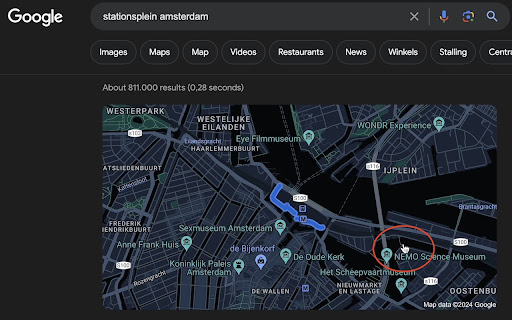
Bring back the old functionality where you click the card on a google search page and get redirected to google maps.

Google Search Maps Button
Adds back the Maps button to Google search pages and makes the search result map images clickable again for seamless navigation. The "Google Search Maps Button" Chrome extension brings the Google Maps button back to the Google Search navigation bar for users in Europe. If you've found the Google Maps button gone or missing from your search experience, this extension is designed to address exactly that. What it Does: This extension ensures you can access Google Maps with just one click from the Google Search page. It also makes map images clickable within search results, significantly improving your navigation experience. Why it's Needed: In response to the Digital Markets Act (DMA), which is aimed at fostering fair competition and innovation, the Google Maps shortcut was removed for European users. This tool effectively restores that lost convenience. Privacy and Security: Operating without saving any user data, the extension ensures your privacy and security are protected. For anyone who's noticed the Google Maps button gone from the Google Search navigation bar in Europe, this extension provides a straightforward and effective solution, seamlessly reintegrating this essential feature into your browsing routine. Troubleshooting steps if the extension is not working: 1. Check Plugin Status: Make sure that the plugin is enabled in your Chrome browser. 2. Verify Site Access: Open the details for this plugin under "My Extensions" and ensure that "Site Access" is enabled. NB! For Opera users: Go to the Manage Extension section and tick the „Allow access to search page results” option. Otherwise the plugin wont work. If you'd like to say thanks, you can do so via PayPal at henripp94@gmail.com. I'm truly grateful for any support, though it's absolutely not necessary or expected.

Return Google Maps Search
restores the google maps button to google search Restore the seamless integration of Google Maps with your Google Search experience using the 'Return Google Maps Search' extension. This lightweight extension brings back the familiar Google Maps button to your Google Search results, providing you with quick and direct access to location information. Never miss a beat when searching for places, businesses, or addresses. With the 'Google Maps Search Restorer,' effortlessly navigate from your search results directly to Google Maps, gaining instant access to detailed maps and directions. Reintroduces the Google Maps button to Google Search results. Simplify your online navigation and exploration by adding the Google Maps Search Restorer extension to your browser. Save time and enjoy the convenience of having Google Maps readily available whenever you perform a search.

Reddit Untranslate
Automatically redirects Reddit URLs by removing ?tl=xx from the query string + optional toggle for Google query modification redditUntranslate automatically cleans up Reddit URLs by removing the ?tl=xx query string parameter, effectively disabling the auto-translation feature. This ensures you view content in its original language without unwanted translations. Whether you frequently browse international subreddits or just want to streamline your Reddit experience, redditUntranslate keeps your browsing free from automatic language adjustments, allowing you to enjoy Reddit exactly as intended. Automatically removes the ?tl=xx parameter from Reddit URLs. Disables auto translation, showing content in its original language. Lightweight and runs quietly in the background, with no setup required. How It Works: Simply install redditUntranslate, and it will automatically modify Reddit URLs as you browse, ensuring that you see the original, untranslated content every time. V2.1 : Added an optional Google filtering toggle, it will ad a string that ignores translated Reddit pages when you do a Google search, it will however add an ugly string of text at the end of your query. V2.2 : Added a sub-toggle to the Google filtering option that restricts the appender to queries containing the word "reddit", so the ugly string of text only ends up on searches where it's actually useful. It will however only catch searches where you explicitly typed "reddit", so a query that's clearly about a Reddit thread but doesn't include the word won't be filtered. The popup is also a bit wider now for readability. Thanks to the contributors : @NotaInutilis, @lucasfernog and @tairi Tags: Reddit extension, language settings, Non-English Reddit users, Reddit language fix, Disable automatic translation

YouTube Anti Translate
A small extension to disable YouTube video titles/audio/descriptions autotranslation. YouTube title translation is helpful for beginners, but once you know the language well enough to understand original titles, it quickly becomes frustrating. Even worse, there's no proper way to disable this — unless you change your YouTube country, which messes up your recommendations and trends. This extension fixes the problem. Over 100,000 users trust it to restore YouTube the way it was meant to be. ✨ Restores original video titles instead of auto-translated ones 📝 Restores original video descriptions and chapters 💬 Restores original subtitles (untranslates captions) 🖼️ Restores original video thumbnails 🎨 Restores original channel branding, headers, and channel names 🔇 Disables automatic audio translations (dubbing) 📱 Supports YouTube Shorts — restores both audio and titles 📱 Also works on mobile (m.youtube.com) — untranslates both titles, descriptions, and audio (beta) 🔔 Fixes translations in notifications 🌐 Works everywhere — homepage, embedded videos, youtube-nocookie.com, and more ⚙️ Works automatically — no configuration or API keys needed 🎯 Advanced settings — whitelist specific channels to keep translations if needed 🧼 Lightweight and safe — clean code, no tracking, open source Chrome for Android doesn't support extensions, but you have two options: 1️⃣ Firefox for Android (Recommended): • Install Firefox • Visit FireFox page of this extension: https://addons.mozilla.org/firefox/addon/youtube-anti-translate-mv3/ • Install this extension • Open YouTube and enjoy! 2️⃣ Kiwi Browser: • Install Kiwi Browser • Open Kiwi and go to this page (Chrome Web Store) • Install this extension • Open YouTube and enjoy! 💖 This is a completely free, open‑source project maintained by volunteers. If the extension has helped you, please consider supporting the original creator at https://www.patreon.com/zpix1 or the maintainers at https://github.com/zpix1/yt-anti-translate. Firefox version: https://addons.mozilla.org/ru/firefox/addon/youtube-anti-translate-mv3/ GitHub page: https://github.com/zpix1/yt-anti-translate No more awkward or misleading title translations — get YouTube back the way it was meant to be. ____
