
pdgbmlhjjgaenhbmahiafcelnbbbopla
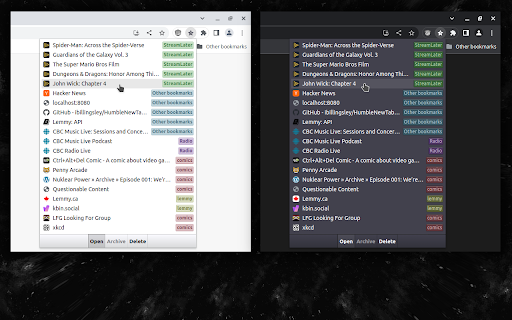
This is a very simple extension that lists the most recent bookmarks. Each bookmark is labelled with it's parent folder name. At the bottom are buttons to quickly move a bookmark to an "Archive" folder or to delete the bookmark. In the options page, you can toggle grouping bookmarks by date, or hide the bottom toolbar.

Maple Bookmarks
Let you navigate smoothly while hiding the bookmark bar. The bookmarks bar can occupy the browsing window and affect concentration, so I often hide it. However, this makes accessing bookmarks inconvenient. Therefore, I developed the Maple Bookmarks extension. By just using the shortcut Command + E, you can quickly access your bookmarks, which is practical and convenient.

Power Bookmarks
Power Bookmarks allows you to search your bookmarks easily. Its tree view and sunburst view allow you to analyze the complexity of… Power Bookmarks allows you to search your bookmarks easily. Its tree view and sunburst view allow you to analyze the complexity of your bookmark tree. You can continue to create a bookmark or organize your bookmark with whatever tools your browser provides, and clicking on the “Reload” button will automatically load the latest bookmarks.

Bookmark Manager and Viewer
An elegant bookmark manager with fuzzy search and more The "Bookmarks Manager and Viewer" extension provides a panel view to modify your bookmarks. The panel is equipped with fuzzy search (like Google search) to help you find the matching bookmarks. You have a set of tools to edit your bookmarks on the fly. It is even possible to drag a bookmark to a new position in the tree or create a new directory and place the bookmark inside it. Features: 1. Fuzzy Search: Use to find matching items even if you are not sure what the exact title or URL of the stored bookmark is. 2. Validation Button: Delete broken bookmarks or find duplicated bookmarks recursively. 3. Edit Properties: Modify the title or address of a bookmark 4. Toolbar Color: Detect if the current page is bookmarked or not 5. Sort Bookmarks 6. Supports Live Bookmarks 7. Opening Mode: Open in a browser tab or popup view 8. Keyboard Navigation and Operation

Tiny Bookmark Tab
Replace your new tab with a super fast tree-list of browser bookmarks. Use a search field to filter bookmarks. Persist open folders between uses. Also accessible from the extension menu bar.
