
pdangmggjepiihojngloobkfjahfbknm
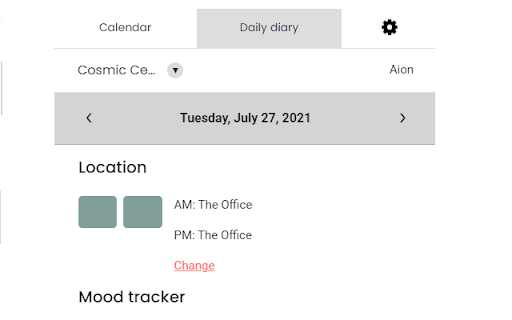
Aion Chrome extension Aion is an Emotional intelligence platform that lets you and your team share vital information with each other. Connecting with your team is now easier then ever. Aion teams, or cloud-based team management software was born out of an observation that as teams and organizations switched to semi-permanent form of distribute work there were very few tools that would help them organise their in person/distributed time with a view to optimising their collective intelligence and output. Aion is focused on optmising the way that teams allocate and spend their time in order improve their collective happiness, innovation and productivity. Aion Teams is a website, where organizations can register, create physical and virtual workspaces, define physical and office capacities, invite team members and access a shared calendar view. The calendar view allows team members to: - Mark their daily work location, by choosing between distributed in office, or day off. This will allow team members to become aware of each other's work location and help companies monitor their office capacity. - Share their daily mood, by choosing an emoji that best describes how they feel at the start of the day and another at the end of the day. This will help pave the way for open conversations that will bring everyone closer together and boost your team's morale. This new Chrome extension keeps users updated event when they are working on other tabs, allowing them to access their team's calendar, daily mood and location.

Paperflite Extension for Chrome
Access revenue-driving content from anywhere you work, instantly. The Paperflite Chrome Extension brings your content library, AI intelligence (SEEK), and meeting readiness (SmartPrep) directly into Gmail, HubSpot, Salesforce, Outreach, and any other tab you work on. Sales teams close deals faster through targeted content recommendations that support pipeline progression, reducing time spent searching for assets. Reps are prepared for every conversation with SmartPrep, which provides a comprehensive summary of prospect and deal details along with AI simulations for practice. SEEK gives you precise, context-aware content guidance and recommendations from your content hub. Just ask in natural language and get instant, informed responses. Try asking SEEK - "Find me the best case study to share with a prospect in medical instruments manufacturing." Features included in the chrome extension : → SEEK AI Content Intelligence: Ask natural-language questions and get instant, context-aware answers and content recommendations. → AI Recommendations for Next Steps: Ask SEEK what to share next or how to move the deal forward based on context. → Instant Content Access: Search, preview, and use your entire Paperflite Content Hub without leaving your workflow. → Personalize & Share Quickly: Generate tracked links, attach content directly to emails, and share in a single click. → Real-Time Engagement Tracking: Get alerts when prospects open or engage with shared content. → One-Click Meeting Intelligence with SmartPrep: Automatically surface account history, content activity, and key insights before any meeting.

Mahalo
Preserve cherished memories and organize your plans in a single, convenient digital haven. Mahalo: Your Daily Gratitude and Activity Journal Chrome Extension Mahalo transforms your browsing experience by integrating a gratitude journal and a daily activity tracker directly into your Chrome browser. It's designed to help you focus on what truly matters, enriching your daily life with positivity and organization. - **Date-Separated Pages**: Log your thoughts and answers to gratitude prompts for any selected day, adding personal remarks with ease. - **Weekly View**: Overview and edit your weekly notes, maintaining a clear perspective on your progress. - **Rich Text Editor**: Customize your entries with bullet points, various colors, and more for a personalized journaling experience. - **Extension Icon Access**: Quickly access your journal through the browser's top-right corner. Choose between opening the full notebook or a handy popup of the current day's notes - configurable in the settings. - **Smart Popup Feature**: Clicking the extension icon brings up the notes for the current or selected day, perfect for jotting down thoughts while watching a video. - **Page Notes Collection**: Seamlessly integrate information from web pages directly into your journal via the context menu. - **Sticky Calendar Navigation**: Easily navigate between dates with a calendar that highlights days with entries. - **Full-Page Editor Mode**: Dive into detailed note-taking with a distraction-free, full-page editor. - **Weather Updates**: Stay informed with current weather conditions, including temperature, sunrise/sunset times, and wind speed, displayed at the bottom of the page. - **Automatic Dark Mode**: Transition to a comfortable dark theme post-sunset to protect your eyes. - **3D Animation Effects**: Enjoy a visually appealing flipping page effect and ambient coffee smoke in dark mode. - **Inspirational Quotes**: Discover thought-provoking quotes about gratitude on the right side of the notebook. - **Offline Accessibility**: Access all your notes even without an internet connection. - **Flexible Configuration**: Customize your new tab page with Mahalo or revert to the default. Adjust the behavior of the G-icon to suit your preferences. - **Simple, Instant, and Free**: Enjoy an easy-to-use, free extension with ads. ### Permissions and Privacy: - **"New Tab Page"**: Display the extension when opening a new tab, adjustable in settings. - **"Geo Location"**: For accurate weather updates. Dark mode activation is based on this. - **"Storage"**: Stores your notes and settings locally, similar to cookies. - **"Context Menus"**: Enables text collection from web pages for your notes. Mahalo is committed to minimal permissions and user privacy, ensuring a secure and enriching journaling experience. Enhance your daily routine with gratitude and organization - try Mahalo today!

AverPoint
AverPoint chrome extension AverPoint helps students improve their reading, writing, and critical thinking. We turn media literacy into a dynamic, daily practice on real websites. Through daily practice, you can develop the skills, knowledge, and personal drive to apply media literacy in the real world. Our most popular product is the News Challenge. Every Sunday, we send you reading and critical thinking goals. Our extension measures your progress. If you meet your goals, you go up a level the next week. If you miss your goals, you go down a level. Over time, we help you improve your reading diet: the range of sources, topics, and geographies you read about. We also help you improve your critical thinking through two features. We add a credibility layer on top of text, allowing you to question, review, save, and add evidence to claims in real newspapers. We also show you a quiz at the end of the article that tests your comprehension, library science, and metacognition. Our 2nd most popular product is Classroom. This integrated reading, research, and writing platform enhances existing courses. You can use it with any text: newspapers, academic papers, literature, etc. Our extension measures your reading progress, and lets you interact with claims. After you save claims, you can organize them in our web app. You can then add this text as footnotes or block quotes in AverPoint Writer, our writing editor. We’ve also recently introduced a third product, Words. This vocabulary builder helps you naturally learn over 1,000 words that appear on standardized tests like the SATs. When you are reading for pleasure or for class, Words will highlight the words you should master. You can see flashcards, take quizzes, and keep track of your word lists over time. We designed our browser extension to help you develop your cognitive media literacy. This approach to media literacy goes beyond footnotes and sources, and helps students build autonomy over two things: 1) The media they consume and 2) the meaning they make from media messages. In a free republic, it's crucial each person has the skills, knowledge, and personal drive to maintain this autonomy.

Valotalive My Display
Valotalive My Display turns your laptop with Chrome into a live Info Screen. Valotalive is the leading digital signage service making your Workplace more productive, transparent and fun. Valotalive My Display turns any laptop with Chrome into a live Info Screen. You can connect Valotalive with your favourite tools that you use. The information and data will flow to you, making your life easier. ★ With Valotalive you can: * Connect to different data sources with Apps * Combine Apps and create a Flow of live information and data visualizations * Manage local and global network of digital signage Screens with live and visual information Flows ★ With Valotalive My Display you can: * Have your personal Info Screen with you * Enjoy Valotalive anywhere ➤ To manage your Valotalive My Display you need an account. Try it for free https://www.valota.live Valotalive has turn-key integrations to a constantly increasing number of data sources. You can see the latest status at https://www.valota.live/applications
