
pcboocjafhilbgocjcnlcoilacnmncam
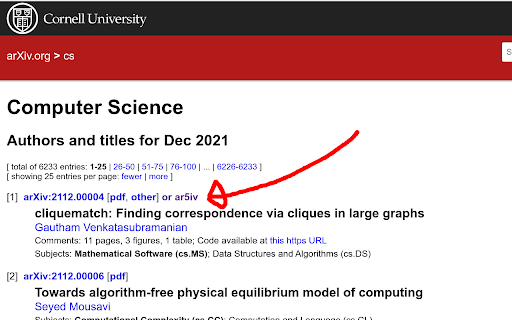
ArXiv with Ar5iv Append ar5iv links to arXiv. You can quickly access the ar5iv page from the arXiv page.

arxiv-utils
Easy access on ArXiv! Auto-rename tabs to paper title, Quick navigation via button/hotkey, Save PDFs by paper title, and more. For ArXiv PDF / abstract tabs: - Renames the title to paper's title automatically in the background. (Originally is meaningless paper id, or start with paper id) - Add an action button to open its corresponding abstract / PDF page. (Originally is hard to get back to abstract page from PDF page) - Add a direct download link on abstract page, click it to download the PDF with the title as filename. (Originally is paper id as filename) - Open the paper in extra services such as ar5iv and arXiv Vanity. - Better title even for bookmarks! - Firefox has strict restrictions on PDF.js. So it doesn't work well with OneTab, the PDF renaming is achieved by intercepting requests and show the PDF in a container. The bookmark works well though. - Works well with native tab search - `tabs`: On extension button click, open a new tab and move it to the right of the old active tab. - `activeTab`: Read active tab's title and modify it using the tab's url. - `storage`: Save extension configurations. - `contextMenus`: When right-click the extension button, show a help menu item. - `scripting`: Inject content scripts to existing tabs. - `*://arxiv.org/*`: Inject content scripts to existing tabs. - `*://export.arxiv.org/*`: Inject content scripts to existing tabs. - `*://browse.arxiv.org/*`: Inject content scripts to existing tabs. - `*://ar5iv.labs.arxiv.org/*`: Inject content scripts to existing tabs.

Redirectify
Redirects requests for PDFs of papers at some popular sites to their corresponding HTML index pages. This extension intercepts requests to PDFs of papers on arXiv and some other sites (mainly machine learning publications) and redirects the browser to the paper's parent HTML page. A request for the PDF from that HTML page will then work. These redirections mean you can see the metadata about papers before clicking on the PDF. The code uses a list of redirect rules. When I extend this list of sites the extension works with, you will be asked to confirm extending the permissions to new sites. For now, see the github page for more information.

Cool Papers Redirector
v0.2.1 Update: Change the tab position for opening redirect links to the immediate right (instead of the far end) 1. The right-click menu now supports accessing multiple paper IDs simultaneously; 2. The right-click menu is now compatible with PDF pages; 3. The right-click menu has added more paper sources including arXiv, OpenReview, ACL, IJCAI, and PMLR; 4. If a paper ID is not found in the search, the right-click menu now redirects to context menu search (i.e., search the selected text); 5. Quick redirect links have been added in appropriate locations on certain websites such as arXiv, OpenReview, and ACL. Enhance your academic research with the "Cool Papers Redirector" Chrome extension, the ultimate tool for scholars, researchers, and anyone immersed in the world of academic papers. Simplify your workflow by seamlessly identifying arXiv paper IDs from selected text, links, or your current page's URL, and get instant access to professional paper summaries and interpretations. - **Easy Identification:** Automatically detects potential arXiv paper IDs within the text you select or the page you are on. - **One-Click Access:** Right-click to reveal a dedicated context menu that redirects you to the corresponding paper on Cool Papers (https://papers.cool). - **Professional Summaries:** Leverage the power of Kimi Chat (https://kimi.moonshot.cn), an advanced AI model, to quickly obtain expert-level summaries and analyses of academic papers. - **Open Academic Resource:** Cool Papers is an open academic platform designed to filter the latest research papers efficiently, making scholarly communication more accessible. By installing this extension, you're not only streamlining your academic research process but also engaging with cutting-edge AI technology to deepen your understanding of complex research topics. Whether you're searching for insights, preparing literature reviews, or staying updated with your field's latest developments, "Cool Papers Redirector" is your companion for a more productive academic journey. [Install now] and transform the way you interact with academic literature!

CCFrank
Displays CCF recommended rank of conferences/journals in dblp, Google Scholar, Connected Papers and WoS. 此扩展程序会添加一个网页标记,以便用户可以从 dblp、Google 学术、Connected Papers、Semantic Scholar 和 Web of Science 轻松查询学术文章的类别(即其在《中国计算机学会推荐国际学术会议和期刊目录》2022年拟定版(2022年12月)中的类别)。CCFrank 可执行以下操作: - 在 dblp 的 publication、person、conferences 和 journals 搜索结果中标记论文的类别;适配 dblp 各镜像站点。 - 在 Google 学术的 articles 和 author 搜索结果中标记论文的类别;适配 Google 学术各镜像站点; - 在 Connected Papers 的搜索结果中标记论文的类别。 - 在 Web of Science 的搜索结果中标记论文的类别。 - 在 Semantic Scholar 的 search results、citations 和 references 中标记会议和期刊论文的类别。 您的 Star 是我更新的动力
