
goopbgbhhhionbpfdkkblnbeopfmlihm

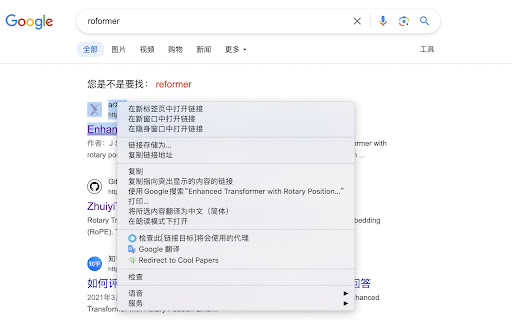

v0.2.1 Update: Change the tab position for opening redirect links to the immediate right (instead of the far end) 1. The right-click menu now supports accessing multiple paper IDs simultaneously; 2. The right-click menu is now compatible with PDF pages; 3. The right-click menu has added more paper sources including arXiv, OpenReview, ACL, IJCAI, and PMLR; 4. If a paper ID is not found in the search, the right-click menu now redirects to context menu search (i.e., search the selected text); 5. Quick redirect links have been added in appropriate locations on certain websites such as arXiv, OpenReview, and ACL. Enhance your academic research with the "Cool Papers Redirector" Chrome extension, the ultimate tool for scholars, researchers, and anyone immersed in the world of academic papers. Simplify your workflow by seamlessly identifying arXiv paper IDs from selected text, links, or your current page's URL, and get instant access to professional paper summaries and interpretations. - **Easy Identification:** Automatically detects potential arXiv paper IDs within the text you select or the page you are on. - **One-Click Access:** Right-click to reveal a dedicated context menu that redirects you to the corresponding paper on Cool Papers (https://papers.cool). - **Professional Summaries:** Leverage the power of Kimi Chat (https://kimi.moonshot.cn), an advanced AI model, to quickly obtain expert-level summaries and analyses of academic papers. - **Open Academic Resource:** Cool Papers is an open academic platform designed to filter the latest research papers efficiently, making scholarly communication more accessible. By installing this extension, you're not only streamlining your academic research process but also engaging with cutting-edge AI technology to deepen your understanding of complex research topics. Whether you're searching for insights, preparing literature reviews, or staying updated with your field's latest developments, "Cool Papers Redirector" is your companion for a more productive academic journey. [Install now] and transform the way you interact with academic literature!

Openreview Quicklook
Quicklook the summary of openreview submission It is unfriendly to get the submission information quickly, such as the ratings and the final accept/reject decision. This tool display such summary in a box, and you will never need to scroll all the page first before getting such information.

Paperlib Extension
Paperlib Chrome Extension This is the Chrome extension for Paperlib (https://paperlib.app), which is a simple open-source academic paper management tool.

Kimi Explorer
Kimi Explorer: Highlight for explanations, explain screen areas, summarize articles, and find inspire writing - All in one! 🔎 Got questions?Highlight and ask Kimi : - Easily highlight the text you have questions about to get context-specific answers without having to switch back and forth between pages while browsing. 🖼️ Selecting an area? Capture to share with Kimi: - Quickly capture page content and ask questions using the screenshot shortcut, enabling seamless problem resolution. 📚 Reading documents? Summarize with Kimi : - Click the floating bubble on the right side or use the shortcut key to quickly summon the dialogue box and summarize the entire document to reduce reading time. 📝 Writing articles? Get inspired by Kimi : - Switch freely between "Sider Panel" mode and "Overlay" mode in the plugin settings page, available at your side in any scenario you need. ⭐️ How to use Kimi? 1. Click "Add to Chrome" in the top right corner and pin Kimi to the toolbar for easy access. 2. Log in to your Kimi account. 3. Press Command⌘/Alt + K to summon Kimi. 4. Start working! 🌘 If you have any suggestions or feedback about the plugin, feel free to leave us a comment, or contact us via email at any time, kimi.extension@moonshot.cn

CCFrank
Displays CCF recommended rank of conferences/journals in dblp, Google Scholar, Connected Papers and WoS. 此扩展程序会添加一个网页标记,以便用户可以从 dblp、Google 学术、Connected Papers、Semantic Scholar 和 Web of Science 轻松查询学术文章的类别(即其在《中国计算机学会推荐国际学术会议和期刊目录》2022年拟定版(2022年12月)中的类别)。CCFrank 可执行以下操作: - 在 dblp 的 publication、person、conferences 和 journals 搜索结果中标记论文的类别;适配 dblp 各镜像站点。 - 在 Google 学术的 articles 和 author 搜索结果中标记论文的类别;适配 Google 学术各镜像站点; - 在 Connected Papers 的搜索结果中标记论文的类别。 - 在 Web of Science 的搜索结果中标记论文的类别。 - 在 Semantic Scholar 的 search results、citations 和 references 中标记会议和期刊论文的类别。 您的 Star 是我更新的动力
