
pbpjjjgahcibnpohhbgpempjbjgfhneh

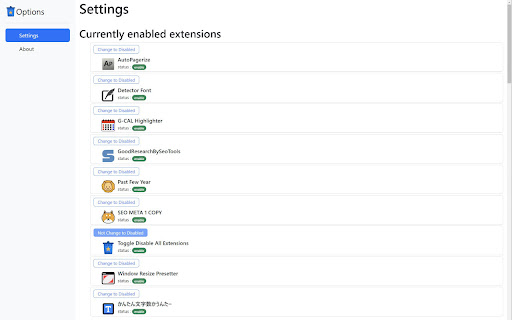
Clicking the icon temporarily disables all extensions. Clicking the icon again will re-enable all the disabled extensions. Extensions you wish to exclude can be set and excluded from the options screen. When disabled, the color of the toolbar icon changes, making it easy to check the status.

Enable Copy
Crack Disable Copy or Cancel Crack by click the icon. Unblock Context menu and Select is a tool that helps you bypass web site copy protection. Have you ever tried to select a text or access a context menu or copy a text, and nothing happened? Website owners can use technical tricks to disable selecting and copying content from their webpages. With Enable Copy extention, you control of your browser context menu again.

PmPractices Disable Extensions
Disable all your extensions with one click. Click again and you re-enable all your previously disabled extensions. Disable all your extensions in one click. Click again and re-enable all previously disabled extensions. If you want to temporarily disable chrome extensions. This extension does just that, with just one click. It remembers the extensions that you previously disabled and will re-enable them again with just one click. 'PmPractices Disable Extensions' is easy to use and free.

Disable All Extensions
Disable/Enable your chrome extensions with the click of a button. 🚀 Disable All Extensions – A simple extension manager that lets you turn off other extensions with a single click! Whitelist 🛡️ To prevent a certain extension from being affected when disabling, open the whitelist. You can right click the extension icon and go to the whitelist page to select an extension you want excluded Isolation Mode 🔍 Having trouble finding an extension causing problems for you? Introducing Isolation Mode, which allows you to test your chrome extensions. It will enable half your extensions, wait for your feedback and continuing enabling less extensions until the problematic extension is found. Usage 📌 Simply pin this extension to your Chrome toolbar for one-click access anytime you need it.

One Click Extensions Manager
View, enable, disable, remove your extensions with ease. "One Click Extensions Manager" is intentionally very simple, it's only meant to let you toggle extensions on and off. If you need a full-featured extension manager, this isn't it. - List installed extension in a popup or in the sidebar - Search/filter extensions - Keyboard shortcuts - Toggle extensions on and off - Toggle all extensions at once - Uninstall extensions - Visit the options and homepage of each extension - Undo/redo any changes (temporarily) - Keep extensions to the top of the list (ctrl-click) Please open an issue on GitHub if you encounter bugs. Note that extensions cannot "Pin to toolbar", you can only do so via the browser itself. Made with 🍚 in Italy and China
