
pbhckjhbhejbgehnfafjobcbjamgjfgm


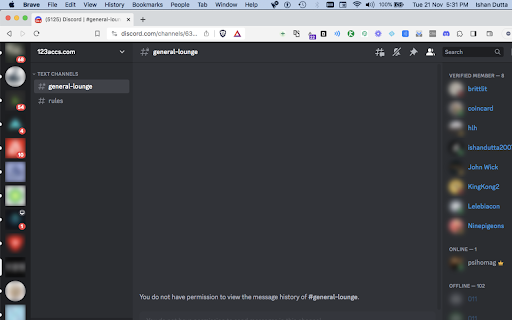
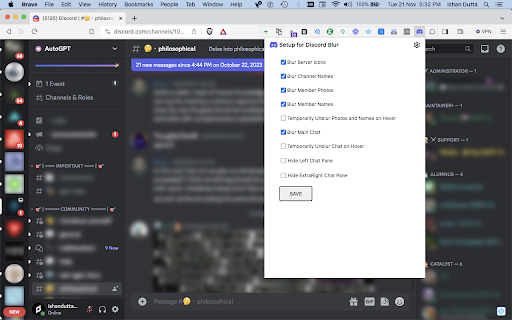
How to hide discord chats while sharing screen ? This extension works with discord.com provided you are logged in. Blur Discord™ channel names, member names, member photos, server icons, chats. Unlike other extensions this extension lets you control each of these at granular levels. LEGAL: Disclaimer: Discord™ Blur is not official Discord™ application. It is an unofficial extension that is developed and maintained independently and has no affiliation to Discord™.

Workstation for Discord
Access to Discord instant messaging for communications through text, media and files with friends and game communities. This is an extension that provides a workstation to access to the Discord social platform. Our application aims to offer users a way to connect with others on the popular communication platform that lets you share voice, video, and text chat with friends, game communities, and developers. This extension provides access to most of these Discord features. Users can connect to the platform without revealing any personal information from their PC, ensuring their privacy and security online.

Discord Content Toggle
Adds the ability to toggle the visibility of content in Discord chats. Have you ever wanted to hide distracting or inappropriate content in a Discord message? This should be a standard feature in Discord, but unfortunately it's not yet. This extension allows you to toggle the visibility of messages that contain gifs, images, videos, or embedded link content. Content that is able to be hidden will have an arrow icon above it. When clicked, the visibility of that content will be toggled.

Discord Blur
Blur and Hides your messages on Discord until you hover over them. Blur and Hides your messages on Discord until you hover over them. To increase privacy in public spaces the Discord Blur Extension For Discord Web blurs your messages as well as other content. And only reveals one when you hover over it with your mouse cursor. Additionally, you can quickly toggle all effects by using a keyboard shortcut (Alt+X) or by clicking the toggle button in the extension menu. It adapts to your needs by letting you decide which elements you want to blur. Your options: - Blurs all messages in the current chat. - Blurs all message previews on the left. - Blurs all images, videos, stickers, ... in separation from the text. - Blurs all small icons of images, videos, ... while viewing an image, video, ... - Makes the color in your input field lighter to make it hard to read. - Blurs all profile pictures. - Blurs all groups and users names. - Allows you to turn off the delay before revealing an item on hover. - Unblurs all elements when you hover over the Discord Web app

Awesome Discord Fonts
Generate cool, stylish and strikethrough fonts for Discord - Discord text formatting - Discord font generator Awesome Discord Fonts allows you to generate awesome fonts that you can use in your Discord chats. Using this discord text formatting extension you can you can post more than just bold and underlined text in your discord chat messages. Using the above forms you can convert text into all sorts of different fonts including Old English / medieval / gothic style text, cursive text, double-struck, strikethrough and many more. You can also use these fancy stylish text fonts on : Discord Fonts Facebook name, messages, comments, Bio, description Instagram Bio Whatsapp messages And other social media platforms Awesome Discord Fonts - ᐈ #1 Discord Font Generator - ς๏๏ɭ & 🅂🅃🅈🄻🄸🅂🄷 Fonts Best 𝐹𝒶𝓃𝒸𝓎 𝒯𝑒𝓍𝓉 For Discord - ⓢⓣⓨⓛⓘⓢⓗ Discord Font Generator Online - Discord 𝕮𝖔𝖔𝖑 Fonts.
